Choosing the right smart home automation hubs determines whether your connected devices work together seamlessly or remain isolated silos. The Homey Pro (2026) stands out as the best overall choice for its unparalleled protocol support and local processing power, making it ideal for users who want total control without cloud dependency. For budget-conscious buyers, the Aqara Smart Hub M3 offers exceptional value with strong Zigbee integration and affordable pricing, while the Lutron Caséta Smart Hub remains the gold standard for reliability in lighting control specifically. The main tradeoff in this category often lies between ease of setup and deep customization; simpler hubs like the Amazon Echo Hub get you started quickly but may lack the flexibility of advanced platforms like Hubitat Elevation. Continue reading for a detailed breakdown of each option to find the perfect match for your technical skill level and ecosystem preferences.

Get the latest gadgets delivered free with Prime
- Fast, free delivery on millions of items
- Prime Video, Amazon Music and more included
- Member-only deals all year
Complete the kit



Key Takeaways
- Local processing capability is now a primary differentiator, with hubs like amazon.com/dp/B0G52DX5M3?tag=cornfordandcross-20&ascsubtag=dc-1294004″ target=”_blank” rel=”nofollow sponsored noopener”>Homey Pro and Hubitat offering faster response times and better privacy than cloud-dependent models.
- Matter support is becoming standard but varies significantly in implementation; some hubs act as full controllers while others only support specific device types.
- Zigbee and Z-Wave remain essential for battery-operated sensors and locks, with dedicated radio chips in premium hubs providing more stable connections than Wi-Fi-only alternatives.
- The ecosystem lock-in risk is highest with single-brand hubs like Aqara and Lutron, whereas open platforms like SmartThings and Homey offer greater long-term flexibility.
- Entry-level hubs are increasingly capable of handling basic automations, blurring the line between beginner and advanced setups for users with fewer than 20 devices.
| Homey Pro (2026) Smart Home Hub |  | Best Overall for Mixed-Protocol Homes | Connectivity protocols: Wi-Fi, Zigbee, Z-Wave Plus, infrared, Bluetooth Low Energy, Matter, Thread | Compatible devices: More than 50,000 devices from more than 1,000 brands | Control methods: App and voice | VIEW LATEST PRICE | See Our Full Breakdown |
| Homey Pro mini Smart Home Hub with Zigbee, Ethernet, Matter, and Thread |  | Best for a Lean Local Setup | Model: HOMEY-PRO-MINI-US-01 | Protocols: Zigbee, Matter, Thread, Ethernet | Additional protocols: Z-Wave, Bluetooth, and infrared with a separately sold Homey Bridge | VIEW LATEST PRICE | See Our Full Breakdown |
| Homey Bridge Smart Home Hub with Z-Wave Plus, Zigbee, Wi-Fi, Bluetooth LE, and Infrared |  | Best for a Small Homey Trial | Connectivity: Z-Wave Plus, Zigbee, Wi-Fi, Bluetooth LE, infrared | Voice assistant compatibility: Amazon Alexa, Siri Shortcuts, Google Assistant | Dimensions: 5 x 5 x 3 inches | VIEW LATEST PRICE | See Our Full Breakdown |
| Hubitat Elevation C-8 Pro Smart Home Hub |  | Best for Advanced Local Automation | Model: C-8 Pro | Protocols: Matter 1.5, Z-Wave 800 Series, Zigbee 3.0, Bluetooth | Processing: Local automation | VIEW LATEST PRICE | See Our Full Breakdown |
| Aqara Smart Home Hub M3 |  | Best for Aqara and Infrared Control | Model: HM-G01E | Connectivity: Zigbee, Thread, Bluetooth, dual-band Wi-Fi (2.4/5 GHz), PoE, USB-C | Device capacity: Up to 127 Aqara Zigbee devices and 127 Thread devices | VIEW LATEST PRICE | See Our Full Breakdown |
| Aqara Smart Hub M100 |  | Best Compact Matter Bridge | Supported Protocols: Zigbee (Aqara only), Thread, Matter | Wi-Fi Standard: Wi-Fi 6 (802.11ax) 2.4 GHz | Device Capacity: 20 Zigbee devices, 20 Thread devices | VIEW LATEST PRICE | See Our Full Breakdown |
| Aqara Smart Hub M200 Matter Controller with Zigbee, Wi-Fi, IR, Thread, and PoE |  | Best Premium All-Rounder | Connectivity: Zigbee, Thread, dual-band Wi-Fi, Ethernet with PoE, USB-C | IR Blaster: 360° with remote-use detection and learning | Device Capacity: Up to 40 Zigbee and 40 Thread devices | VIEW LATEST PRICE | See Our Full Breakdown |
| Lutron Caséta Smart Hub | 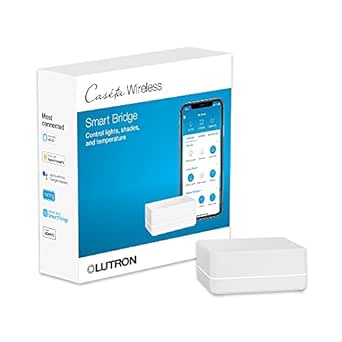 | Best for Lighting Reliability | Connectivity: Clear Connect technology; connects to router | Maximum Supported Devices: 75 Caséta devices | Compatibility: Alexa, Apple HomeKit, Google Assistant, Ring, Serena shades, Sonos | VIEW LATEST PRICE | See Our Full Breakdown |
| Aeotec Smart Home Hub with SmartThings, Z-Wave, Zigbee, and Matter |  | Best for Mixed Protocol Support | Connectivity: Ethernet, Wi-Fi, Z-Wave, Zigbee, Matter | Frequency: 908.42 MHz (North America) | Compatible Voice Assistants: Amazon Alexa, Google Assistant | VIEW LATEST PRICE | See Our Full Breakdown |
| YoLink Smart Home Hub (YS1603) |  | Best for Long-Range Low-Power Sensors | Protocol: YoLink LoRa | Maximum Range: 2,034 feet | Connectivity: Wi-Fi or Ethernet | VIEW LATEST PRICE | See Our Full Breakdown |
| SwitchBot Hub 2 Smart Home Hub with Thermometer, Hygrometer, IR Remote, and Light Sensor |  | Best for Infrared Control | Connectivity: Wi-Fi (2.4 GHz), Bluetooth | Compatible Assistants: Alexa, Google Home, Siri Shortcuts, IFTTT, SmartThings | Temperature Accuracy: ±0.36°F | VIEW LATEST PRICE | See Our Full Breakdown |
| SONOFF Bridge-M Smart Home Hub |  | Best for Local Control Enthusiasts | Connectivity: Wi-Fi, Ethernet, Zigbee | Protocols: IEEE 802.11a/b/g/n/ac/ax, IEEE 802.15.4 | Alarm: 90 dB | VIEW LATEST PRICE | See Our Full Breakdown |
| Amazon Echo Hub 8-Inch Smart Home Control Panel |  | Best Central Control Panel | Display: 8-inch touchscreen, 1280 × 800 resolution | Connectivity: Dual-band Wi-Fi, Bluetooth, Zigbee, Matter, Thread, Sidewalk | Power: 12.5 W adapter included; USB-C PD supported | VIEW LATEST PRICE | See Our Full Breakdown |
| Samsung SmartThings Hub 3rd Generation |  | Best for Z-Wave Compatibility | Model: GP-U999SJVLGDA | Connectivity: Zigbee, Z-Wave, cloud-to-cloud | Power Source: Battery powered | VIEW LATEST PRICE | See Our Full Breakdown |
| Homey Pro (Early 2023) Smart Home Hub |  | Best Premium Multi-Protocol Hub | Hub Technologies: Wi-Fi, Zigbee, Z-Wave Plus, Infrared, BLE, Matter, Thread | Device Compatibility: Works with >50,000 devices from >1,000 brands | Control Method: Local-first processing (on-premise) | VIEW LATEST PRICE | See Our Full Breakdown |
| smart home automation hub | Connectivity |
|---|---|
| Homey Pro | — |
| Homey Pro mini Smart Home Hub | — |
| Homey Bridge Smart Home Hub wi | Z-Wave Plus, Zigbee, Wi-Fi, Bluetooth LE, infrared |
| Hubitat Elevation C-8 Pro Smar | — |
| Aqara Smart Home Hub M3 | Zigbee, Thread, Bluetooth, dual-band Wi-Fi (2.4/5 GHz), PoE, USB-C |
| Aqara Smart Hub M100 | — |
| Aqara Smart Hub M200 Matter Co | Zigbee, Thread, dual-band Wi-Fi, Ethernet with PoE, USB-C |
| Lutron Caséta Smart Hub | Clear Connect technology; connects to router |
| Aeotec Smart Home Hub with Sma | Ethernet, Wi-Fi, Z-Wave, Zigbee, Matter |
| YoLink Smart Home Hub | Wi-Fi or Ethernet |
| SwitchBot Hub 2 Smart Home Hub | Wi-Fi (2.4 GHz), Bluetooth |
| SONOFF Bridge-M Smart Home Hub | Wi-Fi, Ethernet, Zigbee |
| Amazon Echo Hub 8-Inch Smart H | Dual-band Wi-Fi, Bluetooth, Zigbee, Matter, Thread, Sidewalk |
| Samsung SmartThings Hub 3rd Ge | Zigbee, Z-Wave, cloud-to-cloud |
| Homey Pro | — |
More Details on Our Top Picks
Homey Pro (2026) Smart Home Hub
Homey Pro (2026) is the broadest fit in this group for households combining devices from different brands and wireless standards. Its support for Zigbee, Z-Wave Plus, Matter, Thread, infrared, Bluetooth LE, and Wi-Fi can reduce the need to assemble separate bridges, while local processing keeps many automations from depending on cloud services. App and voice control, along with energy monitoring, make it useful beyond basic device switching. Compared with the Homey Pro mini, this model includes Z-Wave, infrared, and Bluetooth without requiring a separate Homey Bridge; the mini is a better match for a smaller protocol mix. The tradeoff is that broad stated compatibility does not guarantee every feature works with every device, so I’d check the Homey app compatibility details before building around it. The listed dimensions are also incomplete.
Pros:- Combines Wi-Fi, Zigbee, Z-Wave Plus, infrared, Bluetooth LE, Matter, and Thread
- Local processing can keep many automations running with less cloud dependence
- App and voice control plus energy-monitoring features
- Broad stated compatibility across more than 1,000 brands
Cons:- Compatibility and available features vary by device and brand
- Product dimensions are incomplete in the supplied specifications
Best for: Households with devices from several brands that want local automations, energy monitoring, and multiple radio protocols in one hub.
Not ideal for: Buyers with a small, single-brand setup who do not need the additional radios, or anyone who needs confirmed compatibility for a specific device before purchase.
- Connectivity protocols:Wi-Fi, Zigbee, Z-Wave Plus, infrared, Bluetooth Low Energy, Matter, Thread
- Compatible devices:More than 50,000 devices from more than 1,000 brands
- Control methods:App and voice
- Processing:Local processing supported
- Features:Automation and energy monitoring
- Color:Black/Grey
- Mounting type:Wall mount
- Dimensions:4.9 x 4.9 x (listed dimensions incomplete)
Our verdict“Choose the Homey Pro (2026) if you want one locally processing hub for a varied mix of protocols and devices.”
Homey Pro mini Smart Home Hub with Zigbee, Ethernet, Matter, and Thread
Homey Pro mini suits buyers who want local automations and current-generation connectivity without needing every radio built into the hub. It supports Zigbee, Matter, Thread, and Ethernet, works with more than 1,000 brands, and connects with Siri, Alexa, and Google Assistant without a subscription. Compared with the full-size Homey Pro (2026), its main compromise is clear: Z-Wave, Bluetooth, and infrared require a separately sold Homey Bridge. That makes the mini a sensible choice for a setup centered on its included protocols, but a less tidy foundation for homes with Z-Wave locks or infrared-controlled appliances. It also offers app-based sensor alerts and energy monitoring, so the smaller protocol list does not mean it is limited to simple on/off routines. I’d check which devices need the optional Bridge before choosing it.
Pros:- Supports local control and automations
- Works with more than 1,000 brands
- Integrates with Siri, Alexa, and Google Assistant
- No subscription required
Cons:- Z-Wave, Bluetooth, and infrared require a separately sold Homey Bridge
- Its included protocol selection is narrower than the Homey Pro (2026)
Best for: Homeowners building around Zigbee, Matter, and Thread devices who want local control, Ethernet, and voice-assistant support without a subscription.
Not ideal for: Buyers with Z-Wave, Bluetooth, or infrared devices who want those radios included in the hub rather than supplied through a separately sold Homey Bridge.
- Model:HOMEY-PRO-MINI-US-01
- Protocols:Zigbee, Matter, Thread, Ethernet
- Additional protocols:Z-Wave, Bluetooth, and infrared with a separately sold Homey Bridge
- Brand compatibility:More than 1,000 brands
- Voice assistants:Siri, Alexa, and Google Assistant
- Control and automation:Local control, automations, and sensor alerts
- Energy features:Energy monitoring
- Subscription:Not required
Our verdict“Pick the Homey Pro mini for a subscription-free local setup built around Zigbee, Matter, and Thread, provided you do not need its optional radios.”
Homey Bridge Smart Home Hub with Z-Wave Plus, Zigbee, Wi-Fi, Bluetooth LE, and Infrared
Homey Bridge brings several radio types and Homey app automations together in a compact hub, with voice control through Alexa, Siri Shortcuts, and Google Assistant. Its mix of Z-Wave Plus, Zigbee, Bluetooth LE, and infrared gives it broader device reach than the Homey Pro mini on its own. But the subscription terms change the fit: after the included three months of Homey Premium, connecting more than five devices and using Homey Insights require a subscription. That makes it less compelling as the core of a growing smart home than the Hubitat Elevation C-8 Pro, which does not require a recurring subscription. I’d favor the Bridge for a small setup or a limited trial of Homey automations, not for buyers planning to connect many devices without ongoing fees. Device compatibility should also be checked in the Homey App Store.
Pros:- Supports Z-Wave Plus, Zigbee, Wi-Fi, Bluetooth LE, and infrared
- Enables Homey app automations and voice control
- Works with Alexa, Siri Shortcuts, and Google Assistant
- Three months of Homey Premium are included
Cons:- A subscription is required to connect more than five devices
- Homey Insights also requires Homey Premium
- Compatibility needs checking in the Homey App Store
Best for: People with a small Homey-compatible setup who want to try app-based automations and voice control across several radio types.
Not ideal for: Households planning to connect more than five devices or use Homey Insights without paying for Homey Premium.
- Connectivity:Z-Wave Plus, Zigbee, Wi-Fi, Bluetooth LE, infrared
- Voice assistant compatibility:Amazon Alexa, Siri Shortcuts, Google Assistant
- Dimensions:5 x 5 x 3 inches
- Weight:1.19 pounds
- Included subscription:Three months of Homey Premium
- Subscription limits:Homey Premium required for more than five devices and Homey Insights
- Manufacturer:Athom B.V.
Our verdict“Choose Homey Bridge for a small Homey setup, but compare its subscription limit with the no-subscription Hubitat Elevation C-8 Pro before expanding.”
Hubitat Elevation C-8 Pro Smart Home Hub
Hubitat Elevation C-8 Pro is the choice here for buyers who want to shape detailed routines and keep automation processing local. Its support for Matter, Z-Wave 800 Series, Zigbee 3.0, and Bluetooth, plus integrations with Alexa, Google Home, Apple HomeKit, and Ring, gives it a broad foundation. Unlike the Homey Bridge, it has no recurring subscription requirement for its listed features, which matters in a growing setup. The tradeoff is a steeper learning curve: its advanced rule engine offers more control, but buyers who want quick, simple setup may prefer a more guided hub. AI-assisted routine building can help, though it does not remove the need to understand the devices and integrations involved. External antennas are a practical advantage for wireless reach, but compatible devices remain necessary for each integration.
Pros:- Automations run locally, including when the internet is down
- Supports Matter, Z-Wave 800 Series, Zigbee 3.0, and Bluetooth
- Works with Alexa, Google Home, Apple HomeKit, and Ring
- No recurring subscription required; includes two dedicated external antennas
Cons:- The advanced rule engine can take time to learn
- Integrations depend on having compatible devices
Best for: Automation-minded homeowners who want local routines, several major protocols, and integrations with popular assistants without a subscription.
Not ideal for: Beginners who want a very simple setup process or buyers whose devices do not support the hub’s protocols and integrations.
- Model:C-8 Pro
- Protocols:Matter 1.5, Z-Wave 800 Series, Zigbee 3.0, Bluetooth
- Processing:Local automation
- Voice assistant compatibility:Amazon Alexa, Google Home, Apple HomeKit
- Other integration:Ring cameras
- Device compatibility:More than 1,000 devices across more than 100 brands
- Antennas:Two dedicated external antennas
- Dimensions and weight:2.95 x 3.23 x 0.67 inches; 2.56 ounces
- Subscription:Not required
Our verdict“Pick the C-8 Pro if local, customizable routines matter more than a beginner-friendly setup.”
Aqara Smart Home Hub M3
Aqara Smart Home Hub M3 stands out when Aqara devices are central to the home and infrared control is part of the plan. It supports Zigbee and Thread, bridges supported devices to Matter, and runs local automations; the 360° IR blaster can control compatible appliances and report status. Power and placement are flexible, too, with dual-band Wi-Fi, PoE, and USB-C. Compared with the broader protocol mix of the Homey Pro (2026), the M3 is more focused on Aqara’s ecosystem and its stated capacity of up to 127 Aqara Zigbee and 127 Thread devices. That focus is a strength for an Aqara-heavy setup, but a limitation for shoppers seeking a general hub with Z-Wave support. A USB power adapter is not included, and some cloud notifications still need internet access.
Pros:- Supports Aqara Zigbee and Thread devices and bridges supported devices to Matter
- Local automations and 8 GB of encrypted local storage
- 360° IR blaster offers status feedback and learning
- Offers dual-band Wi-Fi, PoE, and USB-C connectivity
Cons:- USB power adapter is not included
- Some cloud notifications require an internet connection
- Thread devices need Thread repeaters
Best for: Aqara-centered households that want local automations, Matter bridging, Thread support, and infrared control for compatible appliances.
Not ideal for: Buyers who need Z-Wave support, expect every notification to work offline, or want a USB power adapter included.
- Model:HM-G01E
- Connectivity:Zigbee, Thread, Bluetooth, dual-band Wi-Fi (2.4/5 GHz), PoE, USB-C
- Device capacity:Up to 127 Aqara Zigbee devices and 127 Thread devices
- Infrared:360° IR blaster with status feedback and learning
- Local storage:8 GB end-to-end encrypted
- Compatibility:Matter, Apple HomeKit, Alexa, SmartThings, Home Assistant
- Power adapter:USB power adapter not included
- Warranty:12 months
Our verdict“Choose the M3 for an Aqara-focused home that benefits from local automations and IR control, rather than as a general Z-Wave hub.”
Aqara Smart Hub M100
This hub serves as a dedicated bridge for users already invested in the Aqara ecosystem who want to connect their Zigbee and Thread devices to modern platforms like Apple Home and Home Assistant. Unlike the larger Aqara Hub M200, the M100 is stripped of extra features like an IR blaster or PoE support, focusing instead on minimalism. It excels at local automation with millisecond response times, ensuring scenes trigger instantly even if your internet drops. However, it strictly supports Aqara-branded Zigbee devices, meaning you cannot mix in third-party sensors. If you need a small, unobtrusive device to extend your Aqara setup into the Matter standard without cluttering your shelf, this is a solid choice.
Pros:- Bridges Aqara Zigbee and Thread devices to Matter ecosystems seamlessly
- Local automation ensures fast response times without cloud dependency
- Compact form factor with flexible USB-A power options
- Wi-Fi 6 and WPA3 security provide robust connectivity
Cons:- Power adapter is not included in the box
- Strictly limited to Aqara-branded Zigbee devices, excluding third-party sensors
- Limited to 20 Zigbee and 20 Thread devices, which may fill up quickly
Best for: Aqara device owners who need a compact, low-profile bridge to connect Zigbee and Thread sensors to Apple Home or Home Assistant.
Not ideal for: Users who want to control third-party Zigbee devices or need infrared control for legacy appliances.
- Supported Protocols:Zigbee (Aqara only), Thread, Matter
- Wi-Fi Standard:Wi-Fi 6 (802.11ax) 2.4 GHz
- Device Capacity:20 Zigbee devices, 20 Thread devices
- Security Protocol:WPA3
- Power Input:5 V ⎓ 0.5 A via USB-A (adapter not included)
- Coverage Area:1,500–2,000 sq ft
Our verdict“Choose the M100 if you are an Aqara loyalist seeking a discreet, secure bridge to bring your existing devices into the Matter ecosystem.”
Aqara Smart Hub M200 Matter Controller with Zigbee, Wi-Fi, IR, Thread, and PoE
The Aqara Hub M200 is a powerhouse that combines Matter controller capabilities with a built-in 360° IR blaster, allowing it to control legacy appliances like air conditioners and TVs. Compared to the Aqara Smart Hub M100, the M200 doubles the device capacity to 40 Zigbee and 40 Thread devices and adds dual-band Wi-Fi and PoE support for cleaner installations. It handles complex automations locally, though some cloud-dependent features like push notifications still require internet access. While it offers superior connectivity and flexibility, the requirement for a separate power adapter and the limitation of exposing only one air conditioner to Matter are minor frustrations. This hub is best for those who want a single device to manage both modern smart sensors and older infrared-controlled electronics.
Pros:- Integrated 360° IR blaster with learning capabilities for legacy devices
- Supports PoE for simplified installation and reliable power
- Higher device capacity (40 Zigbee/40 Thread) than smaller hubs
- Functions as a Matter Controller, Thread Border Router, and Matter Bridge
Cons:- Power adapter is not included
- Zigbee support is limited to Aqara devices, excluding third-party sensors
- Only one air conditioner can be exposed to Matter platforms
Best for: Users with mixed smart home setups who need to control both modern Matter/Thread devices and legacy infrared appliances.
Not ideal for: Budget-conscious buyers who do not need infrared control or PoE networking capabilities.
- Connectivity:Zigbee, Thread, dual-band Wi-Fi, Ethernet with PoE, USB-C
- IR Blaster:360° with remote-use detection and learning
- Device Capacity:Up to 40 Zigbee and 40 Thread devices
- Dimensions:3.93 x 3.93 x 1.21 inches
- Weight:4.6 ounces
- Power Adapter:2A USB power adapter not included
Our verdict“The M200 is the ideal choice for power users who want a robust, future-proof hub that can also replace their universal remotes.”
Lutron Caséta Smart Hub
The Lutron Caséta Smart Hub is not a general-purpose automation hub but a dedicated controller for Lutron’s proprietary Clear Connect wireless technology. Unlike the Aeotec Smart Home Hub, which supports a wide variety of protocols like Z-Wave and Zigbee, Lutron focuses exclusively on its own ecosystem of dimmers, switches, and Serena shades. This specialization results in exceptional reliability for lighting control, with no interference issues common in Wi-Fi or Zigbee networks. It supports up to 75 devices and integrates smoothly with major voice assistants. However, it requires you to buy Lutron hardware separately, and it cannot control non-Lutron devices. If your primary goal is rock-solid lighting control and you are willing to stick to one brand, this hub delivers a premium, hassle-free experience.
Pros:- Proprietary Clear Connect technology offers superior reliability for lighting
- Supports up to 75 Caséta devices in a single hub
- Integrates seamlessly with Apple HomeKit, Alexa, and Google Assistant
- Simple plug-in design with no complex network configuration
Cons:- Compatible dimmers, switches, and shades are sold separately
- Cannot control third-party smart home devices outside the Lutron ecosystem
- Requires the Lutron app for initial setup and management
Best for: Homeowners prioritizing flawless lighting control who are willing to invest in the exclusive Lutron Caséta ecosystem.
Not ideal for: Users who want a single hub to manage diverse third-party smart home devices like locks, sensors, and plugs.
- Connectivity:Clear Connect technology; connects to router
- Maximum Supported Devices:75 Caséta devices
- Compatibility:Alexa, Apple HomeKit, Google Assistant, Ring, Serena shades, Sonos
- Power:120 volts
- Dimensions:1.44 × 2.94 × 4.69 inches
- Operating Temperature:32–104 °F
Our verdict“Select the Caséta Hub if you want the most reliable smart lighting system available and do not mind being locked into Lutron’s proprietary hardware.”
Aeotec Smart Home Hub with SmartThings, Z-Wave, Zigbee, and Matter
The Aeotec Smart Home Hub is one of the few remaining hubs that natively supports Z-Wave Plus, making it invaluable for users with existing Z-Wave sensors and locks. Unlike the YoLink Smart Home Hub, which uses a proprietary LoRa protocol, Aeotec offers broad compatibility with standard Zigbee and Z-Wave devices, plus emerging Matter support. It connects via Ethernet or Wi-Fi and runs some automations locally for faster response times. While it is designed specifically for North America, limiting its use elsewhere, it provides a stable foundation for a diverse smart home. The SmartThings ecosystem it relies on is robust, though it may feel less customizable than open-source alternatives like Home Assistant. This hub is ideal for those who want a ‘set it and forget it’ solution that bridges older Z-Wave tech with modern Matter devices.
Pros:- Native support for Z-Wave Plus, Zigbee, and Matter protocols
- Stable connection via Ethernet or Wi-Fi with SmartThings integration
- Local automation execution for critical scenes and rules
- Broad compatibility with Amazon Alexa and Google Home
Cons:- Designed exclusively for use in North America
- Relies heavily on the SmartThings cloud for certain features and setup
- Less flexible for advanced users compared to open-source hubs like Home Assistant
Best for: Users with existing Z-Wave devices who want a reliable, brand-supported hub that also supports Zigbee and Matter.
Not ideal for: Users outside North America due to regional frequency restrictions, or those seeking a fully open-source local automation platform.
- Connectivity:Ethernet, Wi-Fi, Z-Wave, Zigbee, Matter
- Frequency:908.42 MHz (North America)
- Compatible Voice Assistants:Amazon Alexa, Google Assistant
- Weight:1.1 pounds
- Warranty:1 year
- Model:V3 – Smart Home Hub (2020)
Our verdict“The Aeotec hub is the best choice for North American users who need native Z-Wave support alongside modern Matter compatibility.”
YoLink Smart Home Hub (YS1603)
The YoLink Hub stands out for its use of the LoRa protocol, offering a stated range of over 2,000 feet. This makes it significantly better suited for large properties, farms, or detached structures than Wi-Fi-based hubs like the Aqara Smart Hub M100 or Ethernet-connected hubs like the Aeotec. It integrates well with IFTTT and Home Assistant, allowing for flexible automation logic. However, it is not a general-purpose hub; it only works with YoLink’s proprietary devices, meaning you cannot use it to control smart lights or plugs from other brands. It also lacks battery backup, so power outages will disable your sensors. This hub is best for users who need to monitor distant assets like water leaks, temperature, or door sensors in areas where Wi-Fi signals fail.
Pros:- Extensive LoRa range of up to 2,034 feet for large-area coverage
- Low power consumption for YoLink sensors extends battery life
- Integrates with IFTTT and Home Assistant for flexible automations
- Supports both Wi-Fi and Ethernet connections for reliability
Cons:- No battery backup, leaving sensors offline during power outages
- Proprietary protocol means it only works with YoLink devices
- Not suitable for controlling high-bandwidth devices like cameras or locks
Best for: Owners of large properties, barns, or detached garages who need long-range connectivity for low-power sensors.
Not ideal for: Users who want to control smart switches, lights, or locks, as it only supports YoLink’s proprietary sensor ecosystem.
- Protocol:YoLink LoRa
- Maximum Range:2,034 feet
- Connectivity:Wi-Fi or Ethernet
- Dimensions:4.33 x 4.33 x 1.06 inches
- Weight:0.19 kg
- Battery Backup:Not included
Our verdict“Pick the YoLink Hub if you need reliable, long-range monitoring for sensors in large or remote areas where Wi-Fi is weak.”
SwitchBot Hub 2 Smart Home Hub with Thermometer, Hygrometer, IR Remote, and Light Sensor
This hub stands out for its ability to bridge legacy infrared appliances like TVs and AC units into your smart ecosystem, a feature the Samsung SmartThings Hub lacks entirely. It combines environmental monitoring with device control, allowing automations to trigger based on real-time temperature or humidity readings. While it supports Matter for HomeKit, this compatibility is strictly limited to SwitchBot’s own accessories, not third-party devices. Compared to the Sonoff Bridge-M, it offers a more polished consumer experience but lacks the raw protocol flexibility for complex DIY setups. It is an excellent entry point for users wanting to modernize older appliances without replacing them.
Pros:- Built-in thermometer, hygrometer, and light sensor enable environmental automations.
- IR blaster controls legacy appliances via app or voice commands.
- Compact design requires no batteries and fits discreetly on shelves.
Cons:- Matter support is restricted to SwitchBot devices only.
- Limited to 2.4 GHz Wi-Fi, which may struggle in congested networks.
Best for: Users with non-smart TVs, ACs, or fans who want voice control and environmental automation.
Not ideal for: Tech enthusiasts needing broad Matter controller capabilities for diverse third-party devices.
- Connectivity:Wi-Fi (2.4 GHz), Bluetooth
- Compatible Assistants:Alexa, Google Home, Siri Shortcuts, IFTTT, SmartThings
- Temperature Accuracy:±0.36°F
- Humidity Accuracy:±1.8% RH
- Maximum Range:10 meters
- Power Source:No batteries required
- Weight:36 g
Our verdict“Choose this if you need to bring dumb appliances into your smart home with minimal hassle.”
SONOFF Bridge-M Smart Home Hub
The Sonoff Bridge-M appeals to users who prioritize local network operation and privacy over cloud convenience. It acts as a Matter Bridge, connecting Zigbee and eWeLink devices to platforms like Alexa and Apple Home, but it cannot function as a full Matter controller. Unlike the Homey Pro, which offers a user-friendly graphical interface, this hub relies on a web console and MQTT for Home Assistant integration, demanding a higher technical skill level. It includes a built-in alarm and supports Ethernet, offering more stability than Wi-Fi-only options like the SwitchBot Hub 2. This is a tool for tinkerers, not casual users.
Pros:- Local web console allows configuration without cloud dependency.
- Bridges Zigbee, BTHome, and eWeLink devices to Matter platforms.
- Built-in 90 dB alarm with mobile notifications for security.
Cons:- Cannot act as a Matter controller or add Matter devices directly.
- Interface is technical and less intuitive than consumer-focused hubs.
Best for: Home Assistant users and tech-savvy individuals requiring local-only Zigbee/eWeLink integration.
Not ideal for: Beginners who prefer plug-and-play simplicity and graphical setup wizards.
- Connectivity:Wi-Fi, Ethernet, Zigbee
- Protocols:IEEE 802.11a/b/g/n/ac/ax, IEEE 802.15.4
- Alarm:90 dB
- Voltage:5 volts
- Warranty:2 years
- Item Weight:2.88 ounces
- Color:White
Our verdict“Ideal for advanced users building a local-first smart home with mixed protocol devices.”
Amazon Echo Hub 8-Inch Smart Home Control Panel
Unlike the command-line or app-only interfaces of the Sonoff Bridge-M or Homey Pro, the Echo Hub provides a dedicated 8-inch touchscreen dashboard for wall-mounted control. It supports a wide array of protocols, including Zigbee, Matter, Thread, and Sidewalk, making it a robust central command node. While it excels at viewing cameras and managing routines visually, it lacks the extensive local automation logic of the Homey Pro. It requires an internet connection for full functionality, unlike some local-first alternatives. This device is best viewed as a smart display with hub capabilities, rather than a pure automation engine.
Pros:- Large 8-inch touchscreen with customizable dashboard widgets.
- Supports Zigbee, Matter, Thread, and Amazon Sidewalk.
- Includes wall-mounting hardware and power adapter in the box.
Cons:- Tabletop stand and PoE adapter are sold separately.
- Requires an active internet connection for core features.
Best for: Families wanting a visual, wall-mounted interface for cameras, routines, and device control.
Not ideal for: Users seeking a portable device or those who prefer purely app-based control without hardware clutter.
- Display:8-inch touchscreen, 1280 × 800 resolution
- Connectivity:Dual-band Wi-Fi, Bluetooth, Zigbee, Matter, Thread, Sidewalk
- Power:12.5 W adapter included; USB-C PD supported
- Sensors:Passive infrared proximity, ambient light
- Installation:Wall mounted or optional tabletop stand
- Audio:Stereo speakers
- Sustainability:Made with 27% recycled materials
Our verdict“Perfect for households needing a central visual hub for smart home management.”
Samsung SmartThings Hub 3rd Generation
This hub remains a solid choice for users invested in the Z-Wave ecosystem, offering reliable connectivity that the SwitchBot Hub 2 cannot match due to its Bluetooth/Wi-Fi focus. However, it is significantly older technology; unlike the Echo Hub or Homey Pro, it lacks native support for Matter, Thread, or Zigbee 3.0. It relies heavily on cloud processing, meaning automations may fail during internet outages, a drawback compared to local-first options like the Sonoff Bridge-M. Its battery-powered design is convenient for placement but requires periodic maintenance. It is best suited for legacy Z-Wave users not ready to migrate to newer protocols.
Pros:- Strong support for Z-Wave devices and cloud-to-cloud integrations.
- Simple smartphone app for managing devices and routines.
- Compact size with flexible wall or shelf mounting.
Cons:- Requires battery replacements, adding to maintenance.
- No native support for Matter or Thread protocols.
Best for: Users with existing Z-Wave devices who need a simple, single-app management system.
Not ideal for: New buyers wanting Matter support, local processing, or multi-protocol flexibility.
- Model:GP-U999SJVLGDA
- Connectivity:Zigbee, Z-Wave, cloud-to-cloud
- Power Source:Battery powered
- Dimensions:5 x 5 x 1.2 inches
- Weight:8 ounces
- Warranty:1 year limited
- Compatible Assistants:Alexa, Google Home
Our verdict“A reliable option for maintaining older Z-Wave setups, but limited for modern smart homes.”
Homey Pro (Early 2023) Smart Home Hub
The Homey Pro dominates this list with seven supported protocols, including Zigbee, Z-Wave Plus, Infrared, BLE, Matter, Thread, and Wi-Fi. This breadth far exceeds the SwitchBot Hub 2‘s limited connectivity and the Sonoff Bridge-M‘s lack of controller capabilities. Its local-first processing ensures fast response times and privacy, contrasting with the cloud-dependent SmartThings Hub 3rd Gen. While it offers unparalleled flexibility and energy-saving automations, the learning curve is steep. Setting up complex flows is more involved than the streamlined experience of the Echo Hub. This is a premium tool for those who want to future-proof their home automation infrastructure.
Pros:- Supports seven wireless protocols for maximum device compatibility.
- Local-first processing enhances privacy and reduces cloud reliance.
- Built-in energy-saving flows for solar and dynamic tariff optimization.
Cons:- Steep learning curve for creating advanced automation flows.
- Premium price point compared to single-protocol hubs.
Best for: Advanced users wanting a single hub for all protocols with local processing and energy management.
Not ideal for: Casual users who find complex automation flows and technical setup overwhelming.
- Hub Technologies:Wi-Fi, Zigbee, Z-Wave Plus, Infrared, BLE, Matter, Thread
- Device Compatibility:Works with >50,000 devices from >1,000 brands
- Control Method:Local-first processing (on-premise)
- Energy Management:Automated scheduling based on solar/tariffs
- Release Year:Early 2023
- Protocols:7 Wireless Protocols
- Interface:Mobile app and Web interface
Our verdict“The definitive choice for power users seeking a comprehensive, local-first automation hub.”
How We Picked
I evaluated these smart home automation hubs based on protocol compatibility, local execution speed, and ecosystem openness. The ranking prioritizes hubs that support multiple communication standards such as Zigbee, Z-Wave, Thread, and Matter, as this ensures longevity and flexibility when adding new devices. I also weighed the importance of local processing, favoring hubs that can run automations without internet connectivity to reduce latency and enhance privacy. Build quality and the availability of a developer community were secondary factors, helping to distinguish between polished consumer products and robust platforms for enthusiasts. This approach highlights which hubs offer the best balance of current usability and future-proofing for 2027 and beyond.
Factors to Consider When Choosing Smart Home Automation Hubs
Selecting a hub involves more than just checking feature lists; it requires understanding how the device fits into your existing infrastructure and future plans.Understanding Protocol Support
Most smart devices communicate via Wi-Fi, Bluetooth, Zigbee, Z-Wave, or the newer Matter standard. Wi-Fi devices are easy to set up but can congest your router if you have many of them. Zigbee and Z-Wave use mesh networking, which creates a more stable connection for sensors and lights by allowing devices to talk to each other rather than just the hub. A hub that supports multiple protocols acts as a universal translator, allowing you to buy the best device for the job regardless of its wireless standard. If you already own many Zigbee sensors, prioritize a hub with a strong Zigbee radio. Ignoring protocol compatibility is the most common mistake, leading to dead ends when you want to add a specific lock or sensor later.
The Importance of Local Processing
Cloud-dependent hubs require an internet connection to process commands, which introduces latency and privacy concerns. Local processing means the hub executes automations directly on the device, resulting in near-instant responses and functionality even during internet outages. This is particularly important for security systems, lighting schedules, and safety sensors where a few seconds of delay can matter. Some hubs offer a hybrid model, where simple commands are handled locally but complex logic or voice assistant integration relies on the cloud. For critical home functions, always verify if the hub supports local execution for your specific use cases. This feature is often the dividing line between hobbyist-grade and professional-grade automation reliability.
Ecosystem Lock-In vs. Open Standards
Some hubs are designed to work best within a specific brand ecosystem, such as Aqara or Lutron. These closed ecosystems often provide a smoother, more polished user experience and tighter integration with their own accessories. However, they may limit your ability to use third-party devices or integrate deeply with other platforms like Apple HomeKit or Amazon Alexa. Open platforms like Homey or SmartThings allow you to mix and match devices from various manufacturers, offering greater flexibility but potentially requiring more configuration effort. Consider how attached you are to a specific voice assistant or smart home app before committing. If you anticipate switching brands or expanding widely, an open standard hub is a safer long-term investment.
Setup Complexity and User Interface
The learning curve varies dramatically between hubs. Products like the Amazon Echo Hub are designed for plug-and-play simplicity, using visual interfaces and voice commands to set up routines. In contrast, platforms like Hubitat Elevation offer powerful rule engines and custom code capabilities that can feel overwhelming to beginners but provide unmatched control for experts. Assess your technical comfort level honestly; a powerful hub that sits unused because the interface is too confusing is a waste of money. Look for hubs with active community forums and clear documentation. A steep learning curve is acceptable if the payoff is significant customization, but not if you just want your lights to turn on at sunset.
Future-Proofing with Matter and Thread
Matter is the new industry standard designed to make smart home devices work together across different ecosystems. Thread is the underlying IP-based networking protocol that often powers Matter devices. While many hubs now advertise Matter support, the implementation varies. Some hubs act as full Matter controllers and border routers, bridging legacy Zigbee or Z-Wave devices into the new standard. Others may only support Matter devices natively without bridging older protocols. Verify whether the hub can serve as a Matter bridge, which is critical if you plan to migrate from older technologies. This capability ensures your current investment remains relevant as the industry shifts toward unified standards.
Frequently Asked Questions
Do I need a smart home hub if I only use Wi-Fi devices?
Not necessarily. If all your devices connect via Wi-Fi and work with a single voice assistant like Alexa or Google Home, a dedicated hub may be redundant. However, Wi-Fi devices can strain your network and often rely on cloud servers, leading to slower response times. A hub can centralize control and offer better reliability, but for a small setup of five to ten Wi-Fi bulbs and plugs, a smart speaker or app might suffice. You should consider a hub once you start adding non-Wi-Fi devices like Zigbee sensors or Z-Wave locks, or if you want complex automations that don’t depend on internet connectivity.Is Matter support a must-have feature in 2027?
It is highly recommended but not strictly mandatory depending on your current device inventory. Matter ensures that new devices will work with your chosen hub regardless of the brand, reducing fragmentation. If you are starting fresh, a hub with full Matter controller and border router capabilities is the safest bet for future compatibility. However, if you already have a large investment in Zigbee or Z-Wave devices, a hub that acts as a Matter bridge is more valuable than one that only supports native Matter devices. Check if the hub can expose your existing legacy devices to the Matter ecosystem to get the best of both worlds.Can I run two different smart home hubs in the same house?
Yes, but it requires careful planning to avoid conflicts. You might use a Lutron hub for lighting and a Homey Pro for sensors and security. The challenge lies in integration; you will need to manually link automations between the two systems or use a third-party platform like Home Assistant to bridge them. Running multiple hubs can increase complexity and maintenance, so it is usually better to choose a single hub that supports the protocols you need. Only consider multiple hubs if one specific brand offers unique features or reliability that cannot be replicated by an all-in-one solution.What happens to my automations if the internet goes down?
This depends entirely on whether the hub supports local processing. Cloud-based hubs will stop executing automations and lose remote access during an internet outage, though devices may still respond to physical switches. Hubs with local processing capabilities, such as Hubitat or Homey, continue to run schedules and sensor-triggered actions locally. Voice assistants and remote access will still fail without internet, but core functionality like lights turning on at dusk or alarms triggering on motion will remain active. For critical security and lighting, always prioritize hubs with robust local execution features.Are proprietary hubs like Aqara or Lutron worse than open ones?
No, they are simply different tools with different strengths. Proprietary hubs often offer superior reliability and ease of use for their specific device ecosystems. Lutron, for example, is unmatched in lighting control stability and dimming performance. Aqara offers excellent value and a wide range of affordable sensors. The downside is limited flexibility with third-party devices. Open hubs offer more freedom but may require more troubleshooting. If you are committed to a specific brand’s devices, a proprietary hub is often the best choice for performance. If you want to mix brands freely, an open hub is preferable despite the steeper learning curve.Conclusion
Choosing the right smart home automation hub depends on your technical comfort and ecosystem preferences. For those seeking the best overall balance of power and flexibility, the Homey Pro (2026) is the clear winner, offering extensive protocol support and local processing. If you prioritize budget and ease of use, the Aqara Smart Hub M3 provides excellent value with a user-friendly interface. For lighting-centric homes where reliability is paramount, the Lutron Caséta Smart Hub remains the industry benchmark. Beginners who want a simple, voice-controlled start should look at the Amazon Echo Hub, while enthusiasts who demand total customization and local control will find the Hubitat Elevation C-8 Pro to be the most rewarding option. Evaluate your existing devices and future plans to make the final decision.
Halloween Picks

MGparty 14.5 ft Halloween Inflatable Walk-In Pumpkin House with LED Lights

12.5-Foot Lighted Halloween Inflatable Archway

Govee Outdoor Halloween Projector Light
As an affiliate, we earn on qualifying purchases.