Switching between a work computer and a personal machine can turn a tidy desk into a cable shuffle. The Sabrent Thunderbolt 4 KVM Switch is built to share Thunderbolt and USB devices between two computers, with high-resolution display support and charging-capable USB ports.

Get the latest gadgets delivered free with Prime
- Fast, free delivery on millions of items
- Prime Video, Amazon Music and more included
- Member-only deals all year
With Black Friday and Cyber Monday on the calendar, the question is whether it solves a problem you have now or can wait for a better fit. The key is to check your devices and display needs before letting the holiday deal window set the pace.
Our top pick at a glance
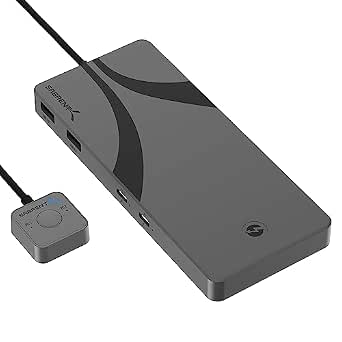
Sabrent Thunderbolt 4 KVM Switch
- ✔ Computers: Windows and macOS
- ✔ Input power: 24V/5A adapter
- ✔ Switching: Between two computers
A desk upgrade with a clear job
This switch is aimed at people who use two computers at one desk and want to share compatible peripherals. It supports Windows and macOS computers, along with Thunderbolt and USB devices, and is designed to make switching between the two computers easy.
Its aluminum body gives it a sturdy, clean-looking presence, while the mix of USB ports can help keep accessories and charging connections in one place. It does require its own power adapter, so plan for another item on the desk or under it.
Check the display details before buying
The listed display support is up to 8K at 60Hz or 4K at 60Hz, alongside 40Gbps transfer speed. Those figures make it worth considering for a high-resolution setup, but the product facts also mention 4K at 144Hz in the product name. If a high refresh rate is essential, confirm that mode against the manufacturer’s current specifications and your exact setup before purchasing.
Compatibility deserves the same care: the switch is designed primarily for Thunderbolt 4 devices, and non-compliant devices may have limited compatibility. Check the computers and peripherals you plan to share rather than assuming every USB or Thunderbolt connection will work as expected.
Black Friday or Cyber Monday: buy now or wait?
Buy during the holiday sales window if you already use two compatible computers, know which display mode you need, and would put the shared ports to work right away. In that situation, the convenience of reducing desk friction may matter more than waiting for an uncertain future offer.
Wait if your setup is changing, you are unsure about Thunderbolt 4 compatibility, or you need confirmation about 4K at 144Hz. Since no warranty is included in the supplied product facts, also weigh how important warranty coverage is to you before treating a seasonal promotion as a reason to commit.
Who should put it on the shortlist?
This is a focused desk tool rather than a universal upgrade. It makes the most sense for someone who regularly moves between two Windows or macOS computers and wants to share Thunderbolt and USB devices while keeping a high-resolution display in the setup.
It is less compelling for a single-computer desk, a setup built around non-compliant devices, or anyone who wants a switch with an included warranty or no external power supply. Make the call based on your actual workflow, not the holiday event label.
More Details on Our Top Picks
Sabrent Thunderbolt 4 KVM Switch
The Sabrent Thunderbolt 4 KVM Switch combines two-computer switching with high-resolution display support and a useful selection of USB ports. Its appeal depends on compatible devices and a real need to share a desk setup.
Pros:
- Switches between two computers
- Up to 8K at 60Hz display support
- Four USB-A and two USB-C ports
- Sturdy aluminum construction
Cons:
- Non-compliant devices may have limited compatibility
- No warranty included
- Requires an external power adapter
Best for: People sharing compatible Thunderbolt and USB peripherals between two Windows or macOS computers.
Not ideal for: Single-computer users, setups with uncertain Thunderbolt compatibility, or buyers who require warranty coverage.
Bottom line: Put it on your Black Friday or Cyber Monday shortlist if two-computer switching would immediately simplify a compatible desk setup.
Affiliate disclosure: As an Amazon Associate we earn from qualifying purchases. Prices and availability are accurate as of the time of publishing.