To dramatically improve your art reproduction, switch to a prime lens in the 50mm to 100mm range. This lens minimizes distortion and sharpens details, giving you a clearer image of the artwork. Position your lighting at 45-degree angles to enhance depth and prevent harsh shadows. Confirm your camera’s white balance matches the lighting for accurate colors. With these adjustments, you’ll see a noticeable boost in quality that truly reflects the artwork. There’s more to perfecting your setup!

Get the latest gadgets delivered free with Prime
- Fast, free delivery on millions of items
- Prime Video, Amazon Music and more included
- Member-only deals all year
Key Takeaways
- Use a prime lens between 50mm and 100mm to minimize distortion and ensure accurate art reproduction.
- Set your aperture to f/8 to f/11 for optimal sharpness across the artwork.
- Position lights at 45-degree angles to enhance depth and avoid harsh shadows obscuring details.
- Employ a sturdy tripod to eliminate camera shake, especially in low-light conditions.
- Shoot in RAW format to allow for better color correction and maintain color accuracy during editing.
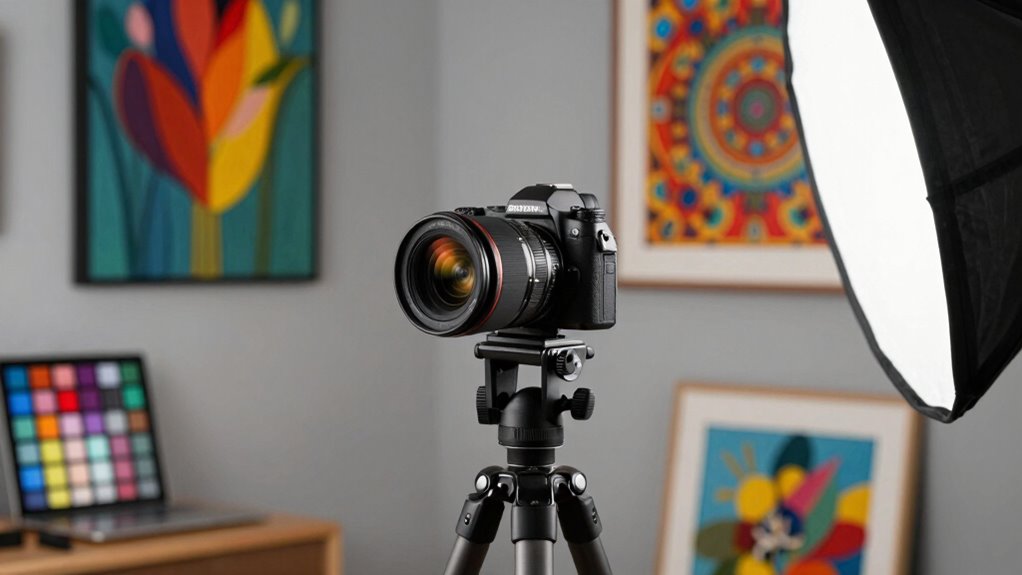
When you’re ready to capture the essence of artwork through photography, setting up your camera correctly is essential. One important shift you can make is focusing on your lighting techniques. Proper lighting can greatly enhance the details and colors of the artwork. Natural light is often the best choice, but if that’s not an option, consider using soft diffused artificial lights. Make sure to avoid harsh shadows that can obscure fine details. Position your lights at 45-degree angles from the artwork to create depth and dimension, ensuring the image reflects the true spirit of the piece.
Next, lens selection plays a pivotal role in achieving high-quality art reproduction. A prime lens with a focal length of 50mm to 100mm is ideal because it minimizes distortion, which is vital for capturing the artwork accurately. Avoid wide-angle lenses; they can warp the edges of the piece and lead to an inaccurate representation. Keep your aperture around f/8 to f/11 for sharpness across the entire image. Using a calibrated monitor during editing can also help ensure your adjustments are true to the original artwork.
Color accuracy is another key factor in reproducing art. You want your camera’s white balance set to match the lighting conditions. If you’re shooting under artificial light, use a custom white balance setting to prevent color casts that can misrepresent the artwork. Additionally, capturing in RAW format allows for better color correction during image editing, giving you more flexibility to enhance the final output. Ensuring your camera settings are optimized for accuracy can further improve the fidelity of your images. Proper lighting techniques are essential to avoid color shifts and maintain the integrity of the artwork’s hues.
Setup stability is non-negotiable. Use a sturdy tripod to eliminate camera shake, which can compromise sharpness. This is especially important in low-light conditions where longer exposure times are necessary. Make sure your camera is level and aligned with the artwork to avoid any angle distortion. Background choices can also impact the final image. A plain, neutral background helps the artwork stand out without distractions. Avoid cluttered settings that can draw the viewer’s eye away from the main subject. Ensuring your entire setup emphasizes color fidelity and accurate detail is crucial for high-quality reproduction.
Finally, once you’ve captured your images, spend time on image editing. Use software tools to adjust brightness, contrast, and colors, ensuring they reflect the original artwork as accurately as possible. A small investment in time spent on editing can elevate your photographs considerably, making them not just images, but true reproductions of the art you’ve worked so hard to capture. By implementing these strategies, you’ll see a noticeable improvement in your art reproduction photography.
50mm prime lens for art photography
As an affiliate, we earn on qualifying purchases.
As an affiliate, we earn on qualifying purchases.
Frequently Asked Questions
What Type of Lighting Is Best for Art Reproduction?
For art reproduction, LED lighting is often your best bet. It offers a consistent color temperature, which helps maintain color accuracy. You should also consider using softboxes to diffuse the light, minimizing harsh shadows and reflections. A studio setup with controlled natural light can enhance your results, but make certain to manage shadows effectively. Combining these techniques will guarantee your artwork is captured beautifully, showcasing its true colors and details.
How Do I Choose the Right Camera Lens?
Choosing the right camera lens isn’t as intimidating as it seems. First, check lens compatibility with your camera body. Then, consider focal length; a 50mm lens offers natural perspective for most art, while a macro lens captures intricate details. Imagine zooming in on a painting’s texture, bringing every brushstroke to life. Don’t let technicalities intimidate you; with the right lens, you’ll elevate your art reproduction effortlessly and showcase your work beautifully.
Can I Use My Smartphone for Art Reproduction?
Yes, you can definitely use your smartphone for art reproduction! Many smartphones have impressive cameras that can capture details well. Pair your shots with smartphone apps for image editing to enhance colors and clarity. Make sure to use good lighting and stable positioning to avoid blurriness. Experiment with different angles to find the best perspective. With the right techniques, your smartphone can produce stunning reproductions of your artwork!
What File Format Should I Save My Images In?
When it comes to saving your images, think of file formats like a painter’s palette—each one offers a different hue. You’ll want to use formats like TIFF for high quality, as it maintains file resolution without heavy image compression. JPEGs are handy for smaller files but can lose detail. So, choose wisely based on your needs; preserving your art’s essence is key to capturing its full vibrancy and clarity.
How Can I Improve Color Accuracy in My Photos?
To improve color accuracy in your photos, start with color calibration of your monitor using calibration tools. This guarantees what you see on screen matches reality. Next, use reliable editing software, like Adobe Lightroom or Photoshop, to fine-tune color balance and saturation. Always work in a color space like Adobe RGB for better range. Finally, regularly compare your prints to your screen to maintain consistent color reproduction.
tripod for studio art reproduction
As an affiliate, we earn on qualifying purchases.
As an affiliate, we earn on qualifying purchases.
Conclusion
In the dance of art and technology, your camera setup is the silent partner that elevates your creations. By embracing this simple shift, you reveal a vivid domain where colors sing and details shimmer like stars in the night sky. This transformation not only captures the essence of your work but also breathes life into every brushstroke. So, step boldly into this new sphere; let your art be seen as it was meant to be—vibrant and alive.
As an affiliate, we earn on qualifying purchases.
camera white balance calibration tool
As an affiliate, we earn on qualifying purchases.
As an affiliate, we earn on qualifying purchases.
Halloween Picks
halloween
As an affiliate, we earn on qualifying purchases.