
For most buyers, I would start with the AULA F75 Pro: its compact 75% layout, wireless options, and knob make it a flexible choice for both work and play. The Logitech MX Mechanical is a stronger fit for quiet office typing, while the AULA WIN68 HE targets gaming with Hall effect switches in a smaller footprint. The main tradeoffs are layout size, wired versus wireless use, switch feel, and how much gaming-specific control you need. A compact board saves desk space but may omit keys some workflows rely on; wireless convenience can also mean extra charging and setup choices. Read on for how all 12 mechanical keyboards compare and which one best matches your priorities.

Get the latest gadgets delivered free with Prime
- Fast, free delivery on millions of items
- Prime Video, Amazon Music and more included
- Member-only deals all year
Complete the kit



Key Takeaways
- The AULA F75 Pro is the broadest all-rounder: its 75% layout preserves useful navigation keys while the wireless connection options and knob suit mixed work and gaming setups.
- Wireless flexibility is a major dividing line: the AULA F99, Redragon K768 PRO, and Royal Kludge S98 offer different takes on untethered use, while the Logitech G413 SE and Redragon K580 are wired choices.
- Compact does not always mean gaming-focused: the AULA WIN68 HE pairs its 68-key layout with Hall effect technology, whereas the F75 models prioritize a more conventional mechanical keyboard experience.
- Full-size boards earn their space through dedicated controls: the Logitech G413 SE offers a standard full-size layout, while the Redragon K580 adds macro keys and a media wheel for users who want more direct control.
- Special features involve real tradeoffs: displays, knobs, hot-swappable switches, and hybrid switch designs can add flexibility, but they do not replace a layout and typing feel that suit daily use.
| Logitech G413 SE Full-Size Mechanical Gaming Keyboard |  | Best for a Durable Full-Size Wired Setup | Layout: Full-size QWERTY, 108 keys | Switch type: Tactile mechanical | Keycaps: PBT | VIEW LATEST PRICE | See Our Full Breakdown |
| Womier SK80 75% Hot-Swappable Mechanical Gaming Keyboard with Color Display |  | Best for Display-Led Customization | Layout: 75% QWERTY, 82 keys | Switch type: Pre-lubed linear | Mount: Gasket | VIEW LATEST PRICE | See Our Full Breakdown |
| AULA F99 Tri-Mode Wireless Mechanical Keyboard | 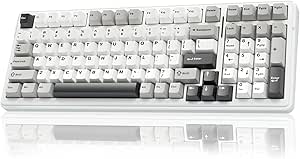 | Best for Multi-Device Wireless Use | Layout: 96%, 99 keys; listed AZERTY | Connectivity: Bluetooth 5.0, 2.4 GHz, and USB-C | Multi-device support: Up to 5 devices | VIEW LATEST PRICE | See Our Full Breakdown |
| Redragon K671 Wired Mechanical Gaming Keyboard with Hot-Swappable Red Switches |  | Best for Hot-Swap Gaming on a Full-Size Layout | Layout: QWERTY, 104 keys | Switch type: Linear red, Cherry MX Red model | Hot-swappable: Yes | VIEW LATEST PRICE | See Our Full Breakdown |
| Logitech MX Mechanical Wireless Illuminated Keyboard, Tactile Quiet, Graphite |  | Best for Quiet Multi-Device Productivity | Layout: Full-size QWERTY, 104 keys | Switch type: Low-profile Tactile Quiet | Connectivity: Bluetooth Low Energy or Logi Bolt receiver | VIEW LATEST PRICE | See Our Full Breakdown |
| AULA WIN68 HE 68-Key Compact Hall Effect Gaming Keyboard |  | Best for Adjustable Gaming Actuation | Key count: 68 | Layout: QWERTY, compact | Switch type: Linear Hall Effect magnetic | VIEW LATEST PRICE | See Our Full Breakdown |
| Redragon K768 PRO Wireless 100-Key Gasket Gaming Keyboard |  | Best for Wireless Customization | Number of keys: 100 | Connectivity: USB-C, Bluetooth, 2.4 GHz | Battery capacity: 8,000 mAh | VIEW LATEST PRICE | See Our Full Breakdown |
| AULA F75 Pro 75% Wireless Mechanical Keyboard with Knob |  | Best Compact Wireless Pick | Layout and key count: 75%, 81 keys, QWERTZ | Connectivity: Bluetooth 5.0, 2.4 GHz wireless, USB-C | Device connections: Up to 5 | VIEW LATEST PRICE | See Our Full Breakdown |
| RK Royal Kludge S98 Wireless Mechanical Keyboard with Smart Display and Knob |  | Best for a Feature-Rich Near-Full Layout | Number of keys: 98 | Layout: QWERTY | Connectivity: Bluetooth 5.0, 2.4 GHz RF, USB-C | VIEW LATEST PRICE | See Our Full Breakdown |
| SteelSeries Apex 5 Hybrid Mechanical Gaming Keyboard |  | Best for Clicky Tactile Feedback | Number of keys: 104 | Keyboard layout: AZERTY | Switch type: Hybrid blue, tactile and clicky | VIEW LATEST PRICE | See Our Full Breakdown |
| AULA F75 75% Wireless Mechanical Keyboard, White and Brown |  | Best for Flexible Wireless Setups | Layout: 75%, 81-key QWERTY | Connectivity: Bluetooth 5.0, 2.4 GHz wireless, USB-C wired | Switch type: Linear | VIEW LATEST PRICE | See Our Full Breakdown |
| Redragon K580 Wired RGB Mechanical Gaming Keyboard with Macro Keys and Media Wheel |  | Best for Onboard Macros | Model: Redragon K580 VATA | Layout: 104-key QWERTY | Connectivity: Wired USB-C | VIEW LATEST PRICE | See Our Full Breakdown |
| mechanical keyboard | Connectivity | Backlighting | Switch type | Layout |
|---|---|---|---|---|
| Logitech G413 SE Full-Size Mec | Wired USB 2.0 | Single-color white LED | Tactile mechanical | Full-size QWERTY, 108 keys |
| Womier SK80 75% Hot-Swappable | Wired USB-C | RGB, 19 effects and 9 colors | Pre-lubed linear | 75% QWERTY, 82 keys |
| AULA F99 Tri-Mode Wireless Mec | Bluetooth 5.0, 2.4 GHz, and USB-C | RGB, 16 lighting effects | — | 96%, 99 keys; listed AZERTY |
| Redragon K671 Wired Mechanical | Wired | 11 adjustable modes; color cannot be changed | Linear red, Cherry MX Red model | QWERTY, 104 keys |
| Logitech MX Mechanical Wireles | Bluetooth Low Energy or Logi Bolt receiver | Single-color smart illumination | Low-profile Tactile Quiet | Full-size QWERTY, 104 keys |
| AULA WIN68 HE 68-Key Compact H | Wired USB-C | RGB, 16.8 million colors | Linear Hall Effect magnetic | QWERTY, compact |
| Redragon K768 PRO Wireless 100 | USB-C, Bluetooth, 2.4 GHz | RGB | Custom linear | — |
| AULA F75 Pro 75% Wireless Mech | Bluetooth 5.0, 2.4 GHz wireless, USB-C | RGB, 16.8 million colors | Linear LEOBOG Reaper | — |
| RK Royal Kludge S98 Wireless M | Bluetooth 5.0, 2.4 GHz RF, USB-C | RGB | Linear RK switches | QWERTY |
| SteelSeries Apex 5 Hybrid Mech | USB | — | Hybrid blue, tactile and clicky | — |
| AULA F75 75% Wireless Mechanic | Bluetooth 5.0, 2.4 GHz wireless, USB-C wired | RGB, 16.8 million colors | Linear | 75%, 81-key QWERTY |
| Redragon K580 Wired RGB Mechan | Wired USB-C | RGB | — | 104-key QWERTY |
More Details on Our Top Picks
Logitech G413 SE Full-Size Mechanical Gaming Keyboard
The Logitech G413 SE suits buyers who want a conventional full-size layout and a sturdy build without wireless features or switch-swapping plans. Its tactile switches provide a noticeable bump, while PBT keycaps are built to resist wear better than the ABS keycaps on the Redragon K671. The aluminum-magnesium top case also gives this model a solid foundation, and white backlighting keeps legends visible without a choice of colors. Compared with the more customizable Womier SK80, the G413 SE is deliberately simpler: it has no hot-swap support or RGB effects, but its 108-key layout includes a number pad and familiar function-key media controls. The tradeoff is a wired-only connection and fewer ways to personalize the typing experience, making it a practical pick rather than a modding platform.
Pros:- PBT keycaps are designed to resist heat and wear.
- Tactile switches provide feedback while typing.
- Aluminum-magnesium top case offers a rigid-feeling base.
- Full-size layout includes 12 function-key media controls.
Cons:- Wired USB connection limits placement flexibility.
- White lighting offers no color or RGB customization.
- Switches are not listed as hot-swappable.
Best for: Gamers and office users who want a sturdy, full-size keyboard with tactile switches, a number pad, and wear-resistant keycaps.
Not ideal for: Buyers who need wireless use, per-key or multicolor lighting, or the ability to replace switches without soldering.
- Layout:Full-size QWERTY, 108 keys
- Switch type:Tactile mechanical
- Keycaps:PBT
- Connectivity:Wired USB 2.0
- Backlighting:Single-color white LED
- Rollover:6-key rollover anti-ghosting
- Top case:Aluminum-magnesium alloy
- Dimensions:17.13 × 1.97 × 1.43 in
Our verdict“Choose the G413 SE if you want a durable, full-size wired keyboard and prefer straightforward tactile typing over wireless convenience or customization.”
Womier SK80 75% Hot-Swappable Mechanical Gaming Keyboard with Color Display
The Womier SK80 is the most visually configurable wired option here: its customizable color display adds media and keyboard information, while RGB lighting offers multiple effects. Its 75% layout keeps the function row and arrow keys but takes up less desk space than the full-size Logitech G413 SE. A gasket mount, internal filling, and pre-lubed linear switches are intended to give typing a softer feel than the G413 SE’s more straightforward construction. The hot-swappable PCB is the bigger practical advantage: buyers can try compatible 3-pin or 5-pin switches without replacing the whole keyboard. That flexibility comes with some compromises. It remains tethered by USB-C, has no water resistance, and its compact layout omits the dedicated number pad found on the Logitech. I’d choose it for customization, not for a cable-free desk.
Pros:- Hot-swappable PCB supports compatible 3-pin and 5-pin switches.
- Customizable display presents media and keyboard settings.
- Gasket mount and internal filling are designed for a softer typing feel.
- Detachable USB-C cable and configurable RGB lighting.
Cons:- Wired-only connection does not suit a cable-free desk.
- No water resistance is listed.
- 75% layout lacks the dedicated number pad on the Logitech G413 SE.
Best for: Desk-focused gamers and keyboard hobbyists who want a compact layout, a display, RGB effects, and room to change switches.
Not ideal for: People who need wireless connectivity, a number pad, or a keyboard that can withstand spills.
- Layout:75% QWERTY, 82 keys
- Switch type:Pre-lubed linear
- Mount:Gasket
- Hot-swappable:Yes; compatible with 3-pin and 5-pin switches
- Connectivity:Wired USB-C
- Backlighting:RGB, 19 effects and 9 colors
- Display:Customizable color multimedia display
- Water resistance:Not water resistant
Our verdict“Pick the SK80 if display features and switch customization matter more to you than wireless use or a full-size layout.”
AULA F99 Tri-Mode Wireless Mechanical Keyboard
Among these five, the AULA F99 is the clearest fit for someone moving between devices: it supports Bluetooth, 2.4 GHz, and USB-C connections and can pair with up to five devices. Its 96% layout keeps 99 keys in a smaller footprint than the full-size Logitech G413 SE, though users who rely on a traditional arrangement should check the listed AZERTY layout before buying. Hot-swappable linear switches, double-shot PBT keycaps, and a gasket structure with sound-dampening layers offer more room for tuning and a softer, quieter typing character than the G413 SE’s fixed, tactile setup. It also has a substantial 8000 mAh battery and RGB lighting. The tradeoffs are the layout-specific learning curve and limited spill protection: water repellent does not mean waterproof. This is the most versatile connection choice here, not the safest layout choice for every buyer.
Pros:- Bluetooth, 2.4 GHz, and USB-C provide flexible connection options.
- Can connect to up to five devices.
- Hot-swappable switches support compatible 3-pin and 5-pin models.
- Gasket structure, sound-dampening layers, and double-shot PBT keycaps.
Cons:- Listed AZERTY layout may not suit QWERTY users.
- Water-repellent description does not indicate full waterproofing.
- Linear switches may not provide the tactile bump of the Logitech G413 SE.
Best for: People who switch between a laptop, tablet, phone, and PC and want wireless options plus hot-swappable linear switches.
Not ideal for: Buyers who require a standard QWERTY layout or need a keyboard rated as waterproof.
- Layout:96%, 99 keys; listed AZERTY
- Connectivity:Bluetooth 5.0, 2.4 GHz, and USB-C
- Multi-device support:Up to 5 devices
- Switches:Pre-lubed linear, hot-swappable 3-pin/5-pin
- Keycaps:Double-shot PBT
- Backlighting:RGB, 16 lighting effects
- Battery capacity:8000 mAh
- Water resistance:Water repellent
Our verdict“Choose the F99 if multi-device wireless flexibility and switch swapping matter more than a familiar QWERTY layout.”
Redragon K671 Wired Mechanical Gaming Keyboard with Hot-Swappable Red Switches
The Redragon K671 pairs a familiar 104-key layout with linear red switches and hot-swap support, making it a more approachable modification platform than the fixed-switch Logitech G413 SE. Full-key anti-ghosting and macro editing suit gaming setups where simultaneous inputs and custom commands matter; the included spare switches and replacement keycaps also give owners parts for basic repairs or swaps. Its 11 backlight modes add visual variety, but the color itself cannot be changed, so it is less adaptable than the RGB Womier SK80. Double-injection ABS keycaps are another tradeoff: they do not offer the PBT material used by the G413 SE. The K671 stays wired and has no listed wireless mode, but for buyers who want a number pad and the option to experiment with compatible switches, it provides a more flexible full-size alternative.
Pros:- Hot-swappable linear red switches allow switch replacement.
- Full-key anti-ghosting supports simultaneous key presses.
- Macro editing and 12 multimedia shortcuts add control options.
- Includes four spare switches and two replacement keycaps.
Cons:- Backlight color cannot be changed despite multiple modes.
- Wired-only connectivity limits placement flexibility.
- Double-injection ABS keycaps differ from the PBT keycaps on the Logitech G413 SE.
Best for: PC gamers who want a full-size wired keyboard with linear switches, full-key anti-ghosting, macro support, and switch-swapping capability.
Not ideal for: Buyers seeking wireless connectivity, multicolor RGB lighting, or PBT keycaps.
- Layout:QWERTY, 104 keys
- Switch type:Linear red, Cherry MX Red model
- Hot-swappable:Yes
- Connectivity:Wired
- Anti-ghosting:Full-key
- Backlighting:11 adjustable modes; color cannot be changed
- Keycaps:Double-injection ABS
- Warranty:24 months
Our verdict“Choose the K671 if you want a full-size gaming layout with hot-swap and macro features, and can live with fixed-color lighting.”
Logitech MX Mechanical Wireless Illuminated Keyboard, Tactile Quiet, Graphite
The Logitech MX Mechanical is the strongest fit here for a shared workspace or a multi-device desk, rather than a gaming setup built around RGB or switch modifications. Its Tactile Quiet low-profile switches offer feedback in a more restrained typing profile than the full-height Logitech G413 SE, while wireless pairing supports up to three devices across a broad range of operating systems. Smart illumination adjusts to lighting conditions and hand proximity, trading the G413 SE’s simple white backlight for more adaptive use without adding multiple colors. The aluminum and metal enclosure gives it a substantial feel, and USB-C charging is convenient; battery life is listed up to 15 days with backlighting, or up to 10 months with it off. It costs flexibility in other areas: the switches are not listed as hot-swappable, and some customization requires Logi Options+ software. For macOS startup with FileVault, Bluetooth can also complicate password entry; the Logi Bolt receiver is suggested.
Pros:- Tactile Quiet low-profile switches are designed to reduce typing noise.
- Pairs with up to three devices across many operating systems.
- Smart backlighting responds to ambient light and hand proximity.
- Rechargeable battery offers up to 15 days with backlighting or up to 10 months with it off.
Cons:- Some customization features require Logi Options+ software.
- Bluetooth may complicate password entry at macOS startup when FileVault is enabled.
- Single-color lighting and no listed hot-swap support limit customization compared with the Womier SK80.
Best for: Professionals who type across several operating systems and devices and prefer a low-profile, quieter tactile keyboard with smart backlighting.
Not ideal for: Keyboard modders seeking hot-swappable switches, RGB-focused gamers, or Mac users who rely on Bluetooth at FileVault startup.
- Layout:Full-size QWERTY, 104 keys
- Switch type:Low-profile Tactile Quiet
- Connectivity:Bluetooth Low Energy or Logi Bolt receiver
- Multi-device pairing:Up to 3 devices
- Battery life:Up to 15 days with backlighting; up to 10 months with backlighting off
- Charging:USB-C
- Backlighting:Single-color smart illumination
- Weight:828 g
- Compatible operating systems:Windows, macOS, Linux, Chrome OS, iOS, iPadOS, Android
Our verdict“Choose the MX Mechanical for quieter, low-profile wireless typing across devices, but look elsewhere if you want switch swapping or gaming-focused lighting.”
AULA WIN68 HE 68-Key Compact Hall Effect Gaming Keyboard
The AULA WIN68 HE is the specialist pick here: its Hall Effect switches let gamers set actuation from 0.02 mm to 3.44 mm, which gives more control over how quickly keys register than the fixed linear switches in the AULA F75 Pro. Its 68-key layout keeps arrow keys while taking up less desk space than the larger Redragon K768 PRO. The 8,000 Hz polling rate and stated 0.3 ms latency suit players prioritizing fast input, though those figures matter less for everyday typing than the adjustable actuation does. You also get RGB, programmable keys, and a detachable USB-C cable. The tradeoffs are a wired-only connection and a configuration driver that works with Windows only; buyers who want wireless flexibility or broad software support should look elsewhere.
Pros:- Hall Effect switches offer adjustable actuation from 0.02 mm to 3.44 mm.
- Compact 68-key layout retains arrow keys.
- 8,000 Hz polling rate and stated 0.3 ms latency target responsive gaming.
- Detachable USB-C cable, RGB lighting, and programmable keys.
Cons:- Wired USB-C is the only connection option.
- Configuration driver is compatible with Windows only.
- Plastic enclosure lacks the premium material feel of an aluminum-framed option such as the SteelSeries Apex 5.
Best for: PC gamers who want to tune key actuation and prefer a compact board that retains dedicated arrow keys.
Not ideal for: Wireless users or people who need to configure keyboard settings from macOS, since the board is wired and its driver is Windows-compatible only.
- Key count:68
- Layout:QWERTY, compact
- Switch type:Linear Hall Effect magnetic
- Actuation range:0.02 mm–3.44 mm
- Polling rate:8,000 Hz
- Connectivity:Wired USB-C
- Backlighting:RGB, 16.8 million colors
- Enclosure material:Plastic
Our verdict“Choose the WIN68 HE if adjustable magnetic-switch actuation matters more than wireless use or cross-platform configuration.”
Redragon K768 PRO Wireless 100-Key Gasket Gaming Keyboard
The Redragon K768 PRO suits buyers who want one mechanical keyboard to move between a desktop, laptop, and tablet: it supports USB-C, Bluetooth, and 2.4 GHz, and its 100-key layout offers more keys than the compact AULA F75 Pro. The large 8,000 mAh battery is a useful match for frequent wireless use, while the gasket design and custom linear switches are aimed at a cushioned typing feel rather than the rapid actuation tuning offered by the Hall Effect AULA WIN68 HE. Its hot-swappable 3-pin and 5-pin sockets make switch changes accessible without soldering, and PBT keycaps add a durable typing surface. The downside is its larger footprint, and lighting or macro customization depends on software. It is a strong fit for flexible desk setups, but less appealing if compactness is the priority.
Pros:- USB-C, Bluetooth, and 2.4 GHz provide three connection options.
- 8,000 mAh battery supports extended wireless use.
- Hot-swappable sockets accept most 3-pin and 5-pin switches.
- Gasket design, PBT keycaps, RGB lighting, and a control knob add customization and convenience.
Cons:- The 100-key layout takes up more space than the 68-key AULA WIN68 HE.
- Custom lighting and macros require software.
- The listed custom linear switches may not suit buyers seeking tactile or clicky feedback.
Best for: People who switch among a PC, laptop, and tablet and want a wireless mechanical keyboard with room to customize switches.
Not ideal for: Desk-space-conscious users who prefer a compact layout, or buyers who want to set macros and lighting without software.
- Number of keys:100
- Connectivity:USB-C, Bluetooth, 2.4 GHz
- Battery capacity:8,000 mAh
- Switch type:Custom linear
- Switch compatibility:3-pin and 5-pin
- Keycap material:PBT
- Backlighting:RGB
- Color:Lilac Land
Our verdict“Pick the K768 PRO if you want a wireless, hot-swappable keyboard with a fuller layout and can spare the desk space.”
AULA F75 Pro 75% Wireless Mechanical Keyboard with Knob
The AULA F75 Pro balances a smaller footprint with everyday function: its 75% layout retains arrow keys, while Bluetooth, 2.4 GHz, and USB-C let it serve as a wireless or wired board. Support for up to five device connections makes it more flexible for multi-device setups than the wired AULA WIN68 HE. It also accepts 3-pin and 5-pin hot-swappable switches, giving owners a way to change the feel without soldering. The multifunction knob, programmable keys, RGB, and side-printed PBT keycaps round out a feature-rich compact package. One caveat is the specified QWERTZ layout, which may frustrate buyers accustomed to QWERTY. Battery capacity is listed at 4,000 mAh, but runtime is not, so I would not choose it on an assumption about how long it lasts between charges.
Pros:- 75% layout keeps arrow keys in a compact footprint.
- Bluetooth, 2.4 GHz, and USB-C support multiple connection styles.
- Connects with up to five devices.
- Hot-swappable 3-pin and 5-pin sockets, plus a multifunction knob and RGB.
Cons:- QWERTZ layout may not suit users who expect QWERTY.
- Battery runtime is not specified.
- The 4,000 mAh battery capacity is lower than the Redragon K768 PRO’s listed 8,000 mAh.
Best for: Users with limited desk space who want arrow keys, wireless device switching, and the option to change switches later.
Not ideal for: QWERTY typists who do not want to adapt to a QWERTZ layout, or wireless buyers who need a stated battery runtime before choosing.
- Layout and key count:75%, 81 keys, QWERTZ
- Connectivity:Bluetooth 5.0, 2.4 GHz wireless, USB-C
- Device connections:Up to 5
- Switch type:Linear LEOBOG Reaper
- Hot-swappable switches:Supports 3-pin and 5-pin
- Battery capacity:4,000 mAh
- Keycaps:Side-printed PBT
- Backlighting:RGB, 16.8 million colors
Our verdict“Choose the F75 Pro for a space-saving wireless layout with arrows and switch customization, provided QWERTZ suits your typing habits.”
RK Royal Kludge S98 Wireless Mechanical Keyboard with Smart Display and Knob
The RK Royal Kludge S98 is for buyers who want many keys without moving to a conventional 104-key board: its 98-key layout pairs with Bluetooth, 2.4 GHz, and USB-C, plus a customizable display and multifunction knob. Compared with the more compact AULA F75 Pro, it offers a fuller layout and a screen for personalized information, but needs more desk space. Hot-swappable 3-pin and 5-pin sockets make it easier to tailor the linear RK switches, while double-shot PBT keycaps and layered sound-dampening materials support durability and a fuller, quieter typing sound. The listed data does not specify battery life, which makes wireless upkeep harder to judge. Its 98-key arrangement may also take adjustment if you are used to a standard full-size board.
Pros:- Bluetooth, 2.4 GHz, and USB-C support wireless and wired use.
- Customizable display and multifunction knob add controls beyond standard keys.
- Hot-swappable 3-pin and 5-pin switches allow changes without soldering.
- Double-shot PBT keycaps and layered sound-dampening materials.
Cons:- The 98-key layout may take adjustment for users accustomed to a standard full-size layout.
- Battery life is not specified.
- Larger than the 75% AULA F75 Pro for desks where footprint matters.
Best for: Desk users who want a near-full keyboard with wireless options, a customizable display, and switch-swapping flexibility.
Not ideal for: People who need a confirmed wireless runtime or prefer a compact board like the AULA F75 Pro.
- Number of keys:98
- Layout:QWERTY
- Connectivity:Bluetooth 5.0, 2.4 GHz RF, USB-C
- Switch type:Linear RK switches
- Switch compatibility:3-pin and 5-pin hot-swappable
- Keycaps:Double-shot PBT
- Backlighting:RGB
- Weight:3 pounds
Our verdict“Choose the S98 if you want a feature-rich, near-full wireless layout with a screen and knob, and can accept uncertainty about battery life.”
SteelSeries Apex 5 Hybrid Mechanical Gaming Keyboard
The SteelSeries Apex 5 takes a different route from the wireless, hot-swappable boards in this group: it is a wired 104-key keyboard with tactile, clicky hybrid blue switches, per-key RGB, and an OLED display for game information or messages. That makes it a better match for buyers who want audible feedback and a conventional full-size layout than the quieter, customizable-switch RK Royal Kludge S98. An aluminum alloy frame, magnetic wrist rest, and IP32 water resistance add practical gaming-desk features. The tradeoff is that the clicky switches can be distracting in shared rooms, and the listed AZERTY layout is not a fit for everyone. It also lacks the wireless connections offered by the S98 and AULA F75 Pro, so this is best treated as a dedicated desk setup rather than a flexible multi-device board.
Pros:- Tactile, clicky hybrid blue switches provide clear audible feedback.
- Full-size 104-key layout with per-key RGB and an OLED display.
- Aluminum alloy frame and magnetic wrist rest.
- IP32 water resistance and a stated 20-million-keypress lifespan.
Cons:- Clicky switches may be loud in shared spaces.
- AZERTY layout may not suit QWERTY users.
- USB is the only listed connection, unlike the wireless RK Royal Kludge S98.
Best for: Gamers who prefer audible tactile feedback, use an AZERTY layout, and want a full-size wired keyboard with a wrist rest.
Not ideal for: Shared-office users who need quiet typing, wireless users, or buyers who require a QWERTY layout.
- Number of keys:104
- Keyboard layout:AZERTY
- Switch type:Hybrid blue, tactile and clicky
- Keypress lifespan:20 million keypresses
- Connectivity:USB
- Display:OLED smart display
- Frame material:Aluminum alloy
- Water resistance:IP32
Our verdict“Pick the Apex 5 if you want a full-size, wired keyboard with clicky feedback and an OLED display, and its AZERTY layout fits your needs.”
AULA F75 75% Wireless Mechanical Keyboard, White and Brown
The AULA F75 suits buyers who want a compact mechanical keyboard without giving up multiple ways to connect. Its Bluetooth, 2.4 GHz, and USB-C modes make it easier to switch between a laptop, tablet, or desktop than the wired-only Redragon K580 VATA. The 75% layout keeps the arrow keys while reclaiming desk space compared with that full-size board. Hot-swappable sockets also let you change compatible switches without soldering, adding a customization path the F75 shares with several compact options in this roundup.
The tradeoff is a plastic enclosure, which may feel less substantial than keyboards with metal components, and the listed specs don’t state battery life. Its knob and RGB lighting offer useful controls, but buyers who need dedicated macro keys may prefer the K580. I’d choose the F75 for flexible device pairing and compact everyday use, not for a premium case or a full-size key layout.
Pros:- Bluetooth, 2.4 GHz wireless, and USB-C wired connectivity
- Compact 75% layout retains arrow keys
- Hot-swappable support for compatible 3-pin and 5-pin switches
- Multifunction knob and programmable keys add control options
Cons:- Plastic enclosure may feel less substantial than keyboards with metal components
- Battery life is not specified in the supplied product details
- Compact layout omits the full-size number pad
Best for: People who move between a PC, laptop, and mobile device and want a compact layout with wireless and wired connection choices.
Not ideal for: Buyers who want a metal-feeling enclosure, a full-size number pad, or published battery-life information.
- Layout:75%, 81-key QWERTY
- Connectivity:Bluetooth 5.0, 2.4 GHz wireless, USB-C wired
- Switch type:Linear
- Hot-swappable:Supports 3-pin and 5-pin switches
- Battery:Rechargeable, 4000 mAh
- Backlighting:RGB, 16.8 million colors
- Additional controls:Programmable keys and multifunction knob
- Enclosure material:Plastic
Our verdict“Choose the AULA F75 if you want a compact keyboard that can connect wirelessly to several devices or run over USB-C.”
Redragon K580 Wired RGB Mechanical Gaming Keyboard with Macro Keys and Media Wheel
The Redragon K580 VATA is the lineup’s practical pick for players who want dedicated controls close at hand. Its five programmable macro keys work onboard without software, while the media controls and volume roller keep common adjustments off the main typing area. Compared with the wireless AULA F75, the K580 takes up more desk space but adds a number pad and a full-size 104-key layout. Full anti-ghosting is useful when several keys are pressed together, and its hot-swappable Outemu Blue switches provide a way to change compatible switches later.
That switch choice is a clear tradeoff: clicky Blue switches are audible, which can bother people nearby or interrupt quiet work. The wired connection also gives up the device flexibility of the F75. Some advanced lighting effects and macro profiles require companion software, despite the onboard macro option. I’d pick the K580 for a fixed gaming or desktop setup where macros and dedicated media controls matter more than quiet typing or wireless use.
Pros:- Five onboard programmable macro keys work without software
- Full 104-key layout includes a number pad
- Full anti-ghosting supports simultaneous key presses
- Dedicated media controls and volume roller
Cons:- Clicky Outemu Blue switches are audible during typing
- Wired-only connectivity limits placement and device switching
- Advanced RGB effects and macro profiles require companion software
Best for: Desktop gamers who want a full-size layout, accessible onboard macro keys, and dedicated media controls.
Not ideal for: People sharing a quiet workspace, users who need wireless connectivity, or anyone short on desk space.
- Model:Redragon K580 VATA
- Layout:104-key QWERTY
- Connectivity:Wired USB-C
- Switches:Hot-swappable Outemu Blue, clicky
- Backlighting:RGB
- Macro keys:Five onboard programmable keys
- Media controls:Dedicated controls and volume roller
- Anti-ghosting:Full
- Dimensions and weight:15.75 × 5.91 × 0.98 in; 1200 g
Our verdict“Choose the K580 if you want a full-size wired gaming keyboard with onboard macros and don’t mind loud clicky switches.”

How We Picked
I compared these keyboards around the choices that affect daily ownership: layout, wired and wireless connectivity, switch approach, control features, and suitability for work, gaming, or both. I gave more weight to a practical balance of functions than to a single standout extra. A board’s layout matters because missing navigation or number keys can interrupt familiar workflows, while switch and connection choices affect how it feels to type and how easily it fits a setup.
The ranking favors keyboards with a clear role and useful versatility, then places more specialized options where their strengths matter most. That puts the AULA F75 Pro ahead as a flexible starting point, while dedicated office, compact gaming, and macro-heavy boards rank better for buyers with specific priorities. I also treated added complexity as a tradeoff: displays, wireless modes, and hot-swap support can be useful, but they should not outweigh a poor fit in size or intended use.
Factors to Consider When Choosing Mechanical Keyboards
Before choosing a board, I would settle the decisions that are harder to fix after purchase: what keys you need, where the keyboard will live, and which compromises you can accept. Feature lists can make two boards look alike even when their daily use differs sharply.
Choose a Layout That Matches Your Work
Full-size keyboards keep the number pad and familiar key spacing, which helps with spreadsheets, data entry, and established muscle memory. A 75% layout saves space while retaining many navigation keys, making it a useful compromise for mixed work and gaming. Smaller layouts can leave more room for mouse movement, but buyers may need to use function layers for keys that were once dedicated. Before buying, check the exact layout diagram rather than relying on labels such as compact or tenkeyless. A common mistake is choosing the smallest board for desk space and only later discovering that a missing key slows down everyday tasks. If you regularly enter numbers or use navigation keys, prioritize those needs over a few inches of extra room.
Match the Switch Feel to Your Daily Tasks
Switch type influences sound, resistance, and the point at which a keystroke registers, so it affects more than gaming speed. A tactile feel can help some typists recognize key presses, while quieter or lighter-feeling options may suit shared spaces and long sessions. Hall effect boards use a different sensing approach from standard mechanical switches and can appeal to competitive players seeking adjustable input behavior. Do not assume a switch described as gaming-oriented will feel comfortable for office typing. If possible, try similar switches in person or buy from a seller with a clear return policy, since sound and feel are difficult to judge from product names. Also account for your environment: a sound that feels satisfying at home may distract others in a shared room.
Decide Whether Wireless Convenience Is Worth the Upkeep
Wireless keyboards reduce desk cable clutter and make it easier to move between devices or locations, but they add charging and connection management. Tri-mode models can offer more ways to connect, though more modes may mean extra settings to learn. A wired board avoids battery planning and can be a straightforward fit for a permanent gaming setup. Buyers sometimes focus on the number of supported connection types without checking whether those modes match their actual devices. Think through where you will use the keyboard, how often it will move, and whether a cable is truly a problem. For a desk that rarely changes, paying for wireless flexibility may bring less practical value than a better layout or typing feel.
Treat Hot-Swap Support as Flexibility, Not a Guarantee
Hot-swappable sockets let owners replace compatible switches without soldering, which can make repairs and future feel changes easier. That flexibility can extend a keyboard’s usefulness, but it does not mean every switch will fit or that changing switches is effortless. Confirm socket compatibility before buying replacement parts, and check whether keycaps and stabilizers can also be changed if customization matters to you. A frequent mistake is choosing a board for modding potential before deciding whether the default sound and feel are acceptable. If you are new to mechanical keyboards, a comfortable stock setup may be more valuable than a long list of modification options. Experienced hobbyists may place greater value on serviceability and experimentation.
Pay for Features You Will Actually Use
Knobs, displays, macro keys, and media controls can make frequent actions quicker, but they also add controls that take desk space and may require software setup. A display is most useful when it presents information or controls you will check often; it is less compelling as a decorative extra. Macro keys benefit repeatable workflows and game commands, while a media wheel can help people who adjust volume throughout the day. Before paying more for these additions, identify a task each one would simplify. If no regular task comes to mind, a simpler keyboard may be easier to learn and maintain. Put the budget toward the feature that changes your routine, not the one that looks most elaborate on a specification list.
Check Compatibility and Ergonomics Before Committing
Key placement, keyboard height, and the angle at which your wrists rest can shape comfort over long sessions. A compact model may shift the mouse closer to your body, but it can also require more function-layer use. Confirm operating-system compatibility and any software requirements for lighting, macros, or custom controls before relying on them. Buyers also benefit from checking the keycap legends and layout language, particularly when ordering a less familiar configuration. A keyboard that fits a desk but forces awkward reaches is not a good space-saving choice. If you type for hours, give comfort and familiar key access more weight than lighting effects.
Frequently Asked Questions
Is a 75% keyboard a good choice if I use a number pad for work?
A 75% layout keeps many navigation keys but usually omits the dedicated number pad. If you enter figures regularly, a full-size model such as the Logitech G413 SE or an external number pad may suit you better. The AULA F75 Pro and other 75% boards make more sense when desk space and mouse room matter more than one-piece access to every key. Think about how often you enter numbers rather than how often you might need the number pad. Occasional spreadsheet work may not justify a full-size board, but daily data entry often does.
Should I choose a Hall effect keyboard instead of a standard mechanical model for gaming?
Choose Hall effect if its gaming-specific input behavior is a priority and you are comfortable with a more specialized board. The AULA WIN68 HE is the lineup’s compact option in this category, while standard mechanical models such as the AULA F75 Pro are more general-purpose choices. Hall effect technology alone does not guarantee better results; layout, comfort, and familiarity still shape play. Check the supported software and adjustment features before buying, since those capabilities are part of the appeal. For mixed office and gaming use, a conventional mechanical board may be the simpler fit.
Is wireless reliable enough for a gaming keyboard?
Wireless can work well when the keyboard’s connection options suit your setup and you are willing to manage charging. If you prefer not to think about battery life or connection settings, a wired model such as the Logitech G413 SE or Redragon K580 is a more direct choice. Wireless models in this roundup vary, so compare their connection modes rather than treating them as interchangeable. For competitive play, check the manufacturer’s connection and performance details for the exact model you are considering. For casual gaming and desk flexibility, the convenience may matter more than keeping a cable attached.
Does hot-swap support matter if I have never changed a keyboard switch?
It can still be useful, but it is not a requirement for a satisfying first keyboard. Hot-swap support gives you a way to replace compatible switches later without soldering, which can help with repairs or changes in feel. If you prefer a ready-to-use setup, focus first on whether the included switches suit your typing and noise needs. Before buying replacement switches, verify compatibility with the keyboard’s sockets. A hot-swap feature is most valuable when you expect to experiment or keep the board for a long time.
Which keyboard features should I prioritize for a shared office?
Start with typing noise, a familiar layout, and whether a wired or wireless setup better fits your desk. The Logitech MX Mechanical is the lineup’s office-oriented pick, while gaming models with prominent lighting or extra controls may offer functions you do not need at work. Switch descriptions can hint at sound and feel, but they do not tell the whole story, so seek a sound sample or try a similar board when possible. A compact layout can free desk space, though missing keys may slow common tasks. Check workplace norms around lighting and noise before choosing a feature-heavy model.
Conclusion
For most mixed-use setups, I recommend the AULA F75 Pro as the best overall because its 75% layout and wireless flexibility balance everyday tasks with gaming. The Redragon K671 is the best value-style pick for buyers who want a straightforward wired board with hot-swappable switches, while the Logitech MX Mechanical is best for office typing and a quieter work-focused setup. For beginners, I would favor a familiar layout and simple connection over extra displays or layers; the Logitech G413 SE is a practical wired starting point if you want full-size keys. The AULA WIN68 HE is the specific pick for compact Hall effect gaming, and the Redragon K580 suits buyers who need macro keys and dedicated media controls. Choose by the layout and daily tasks you will actually use, not by the longest feature list.