For interactive art, I’d choose a 360-degree camera based on how its footage will be captured, edited, and presented—not resolution alone. My best overall pick is the Ricoh Theta X, whose 11K stills, 5.7K video, and touchscreen make it a flexible starting point for immersive projects. The Ricoh Theta Z1 stands out for image quality, while the GoPro MAX better suits installations that need a rugged camera for active environments. The main tradeoffs are image detail versus durability, and streamlined capture versus control over editing and playback. Read on for the full breakdown, including how the older and lower-cost Theta models compare.

Get the latest gadgets delivered free with Prime
- Fast, free delivery on millions of items
- Prime Video, Amazon Music and more included
- Member-only deals all year
Complete the kit



Key Takeaways
- The Theta X is the most balanced fit for varied art workflows: its high-resolution stills, 5.7K video, and touchscreen support both capture and on-site adjustments.
- The Theta Z1 prioritizes image quality over convenience: it is the premium choice among these models, while the Theta X offers a more approachable hands-on interface.
- Ruggedness changes the recommendation: the GoPro MAX and AKASO 360 Action Camera Creator Combo are better suited to movement or demanding locations than the more studio-oriented Theta options.
- Bundles can help with setup, not image quality: the Theta X bundle adds a Video Art Suite, while the Kodak adventure pack and Z1 bundle should be judged by included accessories and workflow fit.
- Older Theta models involve sharper compromises: the Theta S and Theta SC can suit basic experiments, but buyers should compare their capabilities with newer options before planning detailed or video-heavy installations.
| Kodak PIXPRO ORBIT360 4K 360° VR Camera Adventure Pack |  | Best Starter Kit for Multi-Format Experiments | Sensors: Dual 20 MP CMOS | Video modes: 360° spherical, 197° ultra-wide, 235° dome | Lens: Fixed focus, 1.63 mm, f/2.8 | VIEW ON AMAZON | See Our Full Breakdown |
| Ricoh Theta Z1 51GB 360° Camera |  | Best for Gallery-Quality Stills and Spatial Audio | Image sensors: Two 1-inch back-illuminated CMOS sensors | Still image resolution: 23 MP, approximately 6720 × 3360 | Video resolution: 3840 × 1920 at 30 fps | VIEW ON AMAZON | See Our Full Breakdown |
| Ricoh Theta X 360-Degree Camera Bundle with Lens Cap and Video Art Suite |  | Best Bundle for High-Resolution Interactive Content | Maximum still image resolution: 60 MP, 11,008 × 5,504 | Video resolution: 5.7K-equivalent, 5,760 × 2,880 at 30 fps | Image sensor: 48 MP CMOS, 1-inch | VIEW ON AMAZON | See Our Full Breakdown |
| Ricoh Theta X 360° Camera with 11K Photos and 5.7K Video |  | Best for Location-Tagged Installations | Still image resolution: Up to 60 MP | Still image modes: 11K and 5.5K | Video resolution: 5.7K, 5760 × 2880 at 30 fps | VIEW ON AMAZON | See Our Full Breakdown |
| GoPro MAX Waterproof 360 and Action Camera |  | Best for Rugged, Moving Installations | 360 video resolution: 5.6K at 30 fps | Single Lens video: 1080p or 1440p | Slow-motion video: 3K at 60 fps | VIEW ON AMAZON | See Our Full Breakdown |
| Samsung Gear 360 (2017) 4K Spherical Camera, SM-R210 |  | Best for Galaxy-Based Interactive Art | Video resolution: 4K | Still image resolution: 15 MP | Lenses: Dual 180-degree lenses | VIEW ON AMAZON | See Our Full Breakdown |
| AKASO 360 Action Camera Creator Combo |  | Best for Moving, High-Detail Installations | Video resolution: 5.7K | Photo resolution: 72 MP 360-degree photos | Sensors: Dual 1/2-inch 48 MP CMOS sensors | VIEW ON AMAZON | See Our Full Breakdown |
| Ricoh THETA Z1 360° Camera Bundle with 51GB Storage | 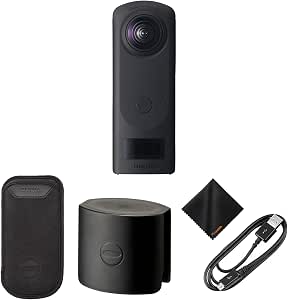 | Best Premium Pick for Gallery Documentation | Sensors: Dual 1-inch CMOS | Photo resolution: Up to 23 MP | Video resolution: 4K (3840 × 1920) | VIEW ON AMAZON | See Our Full Breakdown |
| Ricoh Theta S 360° Digital Camera, Black |  | Best for Short, Simple Spherical Walkthroughs | Video resolution and frame rate: Full HD at 30 fps | Maximum video recording time: 25 minutes | Viewing angle: 360 degrees | VIEW ON AMAZON | See Our Full Breakdown |
| Ricoh Theta SC 360° Video and Still Camera, Blue |  | Best Lightweight Starter Camera | Image sensor: 1/2.3-inch CCD | Photo output: Approximately 14 megapixels | Lens aperture: F2.0 | VIEW ON AMAZON | See Our Full Breakdown |
| degree camera for interactive art | Weight | Video resolution | Display |
|---|---|---|---|
| Kodak PIXPRO ORBIT360 4K 360° | 4.64 oz | — | 1-inch screen |
| Ricoh Theta Z1 51GB 360° Camer | — | 3840 × 1920 at 30 fps | — |
| Ricoh Theta X 360-Degree Camer | 16 oz | 5.7K-equivalent, 5,760 × 2,880 at 30 fps | 2.25-inch LCD touchscreen |
| Ricoh Theta X 360° Camera with | — | 5.7K, 5760 × 2880 at 30 fps | 2.25-inch touchscreen |
| GoPro MAX Waterproof 360 and A | 13.12 oz | — | — |
| Samsung Gear 360 | 4.6 ounces | 4K | — |
| AKASO 360 Action Camera Creato | 0.54 kg | 5.7K | 2.29 inches |
| Ricoh THETA Z1 360° Camera Bun | — | 4K (3840 × 1920) | OLED |
| Ricoh Theta S 360° Digital Cam | 4.8 ounces | — | — |
| Ricoh Theta SC 360° Video and | 3.52 ounces | — | — |
More Details on Our Top Picks
Kodak PIXPRO ORBIT360 4K 360° VR Camera Adventure Pack
The PIXPRO ORBIT360 is a flexible entry point for artists who want to try spherical scenes, ultra-wide views, and dome-style framing without assembling a separate accessory kit. Its three capture modes give an installation or interactive artwork more than one visual format to explore, while the included stand, remote controls, covers, and carrying case help with basic setup. Compared with the Ricoh Theta X, it offers lower specified still-image detail and lacks a touchscreen, so it is less suited to fine-grained on-camera setup or highly detailed 360-degree stills. Its fixed-focus lenses also limit control over focus. I’d choose it for experimentation and bundled essentials, but skip it for outdoor work in wet conditions: it is not water resistant.
Pros:- Offers spherical, ultra-wide, and dome capture modes for varied visual treatments.
- Includes a stand, remote controls, carrying case, and lens covers to support basic installation and field setup.
- Dual 20 MP CMOS sensors capture 360-degree video and photos.
- Wi-Fi and Bluetooth provide wireless connectivity options.
Cons:- Fixed-focus lenses offer limited control over focus.
- Not water resistant, restricting use in wet environments.
- The 1-inch screen is less useful for detailed framing and settings control than the Theta X touchscreen.
Best for: First-time 360-degree art makers who want multiple capture modes and a ready-to-use set of mounting and protection accessories.
Not ideal for: Artists who need weather protection, adjustable focus, or a touchscreen workflow for previewing and controlling a shoot.
- Sensors:Dual 20 MP CMOS
- Video modes:360° spherical, 197° ultra-wide, 235° dome
- Lens:Fixed focus, 1.63 mm, f/2.8
- Connectivity:Wi-Fi 802.11 b/g/n and Bluetooth 4.1
- Display:1-inch screen
- Weight:4.64 oz
- Memory card support:MicroSD
- Water resistance:Not water resistant
Our verdict“Choose the PIXPRO ORBIT360 if you want a versatile starter kit for indoor 360-degree art experiments, but pick the Ricoh Theta X for higher-resolution stills and touchscreen control.”
Ricoh Theta Z1 51GB 360° Camera
For interactive art built around careful 360-degree stills and immersive sound, the Theta Z1 is the most image-focused choice here. Its two 1-inch back-illuminated sensors, HDR processing, and multiple exposure modes give artists more tools for scenes with varied lighting, while four-channel spatial audio can add a convincing sense of place. Compared with the Ricoh Theta X, the Z1 has less specified still resolution and no listed touchscreen or expandable storage, but its 51 GB of built-in memory avoids relying on a separate card. Stabilization helps with moving capture, though this is not as high-resolution a video option as the Theta X’s 5.7K recording. I’d favor it for sound-rich, photo-led work; its USB-C connection and fixed internal storage make it a less adaptable choice for some long or fast-changing projects.
Pros:- Two 1-inch back-illuminated sensors support detailed 23 MP 360-degree stills.
- HDR processing and multiple exposure modes help handle scenes with mixed lighting.
- Four-channel spatial audio can add directional sound to interactive scenes.
- 51 GB of internal memory provides substantial onboard photo storage.
Cons:- Video resolution is 3840 × 1920 at 30 fps, below the Theta X’s 5.7K-equivalent video.
- Internal storage is not listed as expandable, unlike the Theta X’s microSDXC support.
- The listed specifications do not include a built-in touchscreen for camera-side control.
Best for: Artists creating photo-led 360-degree installations or audio-rich virtual experiences who value larger sensors, HDR tools, and built-in storage.
Not ideal for: Creators who need 5.7K video, expandable microSD storage, or a touchscreen for camera-side preview and operation.
- Image sensors:Two 1-inch back-illuminated CMOS sensors
- Still image resolution:23 MP, approximately 6720 × 3360
- Video resolution:3840 × 1920 at 30 fps
- Internal memory:51 GB
- Image stabilization:3-axis rotation correction
- Microphone:Built-in 4-channel microphone with 360° spatial audio
- Connection:USB 3.0 Type-C
- Body material:Magnesium alloy
Our verdict“Pick the Theta Z1 for lighting flexibility, high-quality 360-degree stills, and spatial audio; choose the Theta X if higher-resolution video and expandable storage matter more.”
Ricoh Theta X 360-Degree Camera Bundle with Lens Cap and Video Art Suite
The Theta X bundle is a strong fit when an interactive art project needs both detailed panoramic stills and high-resolution motion footage. It captures up to 60 MP still images and 5.7K-equivalent video, giving creators more source detail to work with than the Kodak PIXPRO ORBIT360. Its 2.25-inch touchscreen makes framing and settings changes less dependent on a phone, and replaceable battery and microSDXC expansion support longer sessions. The included lens cap and Video Art Suite download card add practical protection and a software element, though they do not change the camera’s hardware limits. Compared with the Theta X sold on its own, this bundle’s defining extras are those included items; it remains a 16-ounce, non-water-resistant camera, so I’d keep it for controlled spaces rather than exposed installations.
Pros:- Captures stills up to 60 MP and 5.7K-equivalent video at 30 fps.
- 2.25-inch touchscreen supports preview and camera-side settings control.
- Replaceable battery and microSDXC expansion help extend shooting sessions.
- Bundle includes a lens cap and Video Art Suite download card.
Cons:- At 16 oz, it is heavier than the 4.64 oz Kodak PIXPRO ORBIT360.
- Not water resistant, making it unsuitable for wet outdoor installations.
- Expanding storage requires a separate microSDXC card.
Best for: Digital artists who need high-resolution 360-degree stills and 5.7K video, plus on-camera controls and room to expand storage.
Not ideal for: Creators seeking a lightweight, weather-ready camera or buyers who do not need the included lens cap and Video Art Suite download card.
- Maximum still image resolution:60 MP, 11,008 × 5,504
- Video resolution:5.7K-equivalent, 5,760 × 2,880 at 30 fps
- Image sensor:48 MP CMOS, 1-inch
- Internal storage:46 GB
- Expandable storage:microSDXC
- Display:2.25-inch LCD touchscreen
- Battery:Replaceable lithium-ion
- Weight:16 oz
- Included accessories:Ricoh Lens Cap TL-3 and Video Art Suite download card
Our verdict“Choose this Theta X bundle for high-detail interactive content and useful included extras, but favor the lighter Kodak if portability is the priority.”
Ricoh Theta X 360° Camera with 11K Photos and 5.7K Video
This Theta X is the clearest choice for artists who need to connect 360-degree captures with real-world locations. Its built-in GPS can embed location information in photos, useful when documenting site-specific work or organizing captures across an installation. Like the Theta X bundle, it offers up to 60 MP stills, 5.7K video, a touchscreen, interchangeable battery, and microSDXC expansion; compared with the Z1, it puts more emphasis on higher-resolution video and direct camera controls. The 11K still mode is intended for bright-light photography, which narrows its usefulness for dim galleries. A spare battery is sold separately, and the product data does not list water resistance. I’d pick this version over the bundle when GPS matters more than the bundle’s lens cap and Video Art Suite card.
Pros:- Captures still images up to 60 MP and 5.7K video at 30 fps.
- Built-in GPS can add location information to photos.
- Touchscreen supports preview, settings, and playback without a smartphone.
- Interchangeable battery and microSDXC expansion support longer sessions.
Cons:- 11K still-image mode is intended for bright-light photography.
- A spare rechargeable battery is sold separately.
- Water resistance is not specified in the supplied product data.
Best for: Artists documenting site-specific interactive works who want high-resolution 360-degree capture and location data embedded in photos.
Not ideal for: Creators working mainly in dim galleries, or buyers who need a spare battery included or water protection.
- Still image resolution:Up to 60 MP
- Still image modes:11K and 5.5K
- Video resolution:5.7K, 5760 × 2880 at 30 fps
- Display:2.25-inch touchscreen
- GPS:Built-in GPS (QZSS) with A-GPS compatibility
- Storage:Expandable via microSDXC card
- Battery:Interchangeable
Our verdict“Choose this Theta X for location-tagged, high-resolution 360-degree documentation, while the bundled Theta X suits buyers who prefer its included lens cap and Video Art Suite card.”
GoPro MAX Waterproof 360 and Action Camera
The GoPro MAX is the practical pick when interactive art capture involves movement, weather, or a camera mounted in an exposed location. Its waterproof rugged body, HyperSmooth stabilization, and Horizon Lock suit action and roaming footage better than the non-water-resistant Ricoh Theta X models. Capturing 5.6K spherical video also leaves room to reframe shots later in the GoPro Quik app, which can help shape a viewer’s path through a scene. The tradeoff is that reframing and editing depend on that app, and Single Lens video tops out at 1080p or 1440p. Compared with the Theta X, this is less compelling for maximum still-image detail or 5.7K video, but it is a stronger fit for durable, motion-heavy work. It weighs 13.12 ounces, so it is not the lightest setup.
Pros:- Waterproof, rugged design suits exposed environments where the Theta X models are not water resistant.
- HyperSmooth stabilization and Horizon Lock help keep moving footage steady.
- 5.6K spherical video allows later reframing in the GoPro Quik app.
- Single Lens mode supports standard video, photos, and time lapses.
Cons:- Single Lens video is limited to 1080p or 1440p.
- Many reframing and editing features require the GoPro Quik app.
- At 13.12 ounces, it is heavier than the Kodak PIXPRO ORBIT360.
Best for: Artists filming moving, outdoor, or weather-exposed interactive work who value stabilization, waterproofing, and post-capture reframing.
Not ideal for: Creators prioritizing 60 MP stills, 5.7K video, or an editing workflow that does not depend on the GoPro Quik app.
- 360 video resolution:5.6K at 30 fps
- Single Lens video:1080p or 1440p
- Slow-motion video:3K at 60 fps
- 360 photo resolution:16.6 MP
- Screen size:2 inches
- Water resistance:Waterproof
- Weight:13.12 oz
- Memory:MicroSD
Our verdict“Choose the GoPro MAX for rugged, stabilized 360-degree video and flexible reframing, but favor a Theta X for higher-resolution stills and 5.7K capture.”
Samsung Gear 360 (2017) 4K Spherical Camera, SM-R210
I’d choose the Gear 360 (2017) for compact 360-degree capture when a Galaxy phone is already central to the art-making workflow. Its 4K video and 15 MP photos give viewers a straightforward spherical record of an installation, while the 4.6-ounce body is easy to position around a gallery or carry between locations. Compared with the Ricoh Theta S, it offers 4K video rather than Full HD, making it the stronger choice for footage meant to be explored on a large display. The tradeoff is ecosystem dependence: previewing, editing, and sharing through the Samsung app requires a compatible Galaxy device. Its IP53 water resistance adds some protection, but this is not a camera I’d pick for wet or rugged environments. For interactive art, it is a practical lightweight capture tool, not the most flexible platform in this group.
Pros:- Records 360-degree video in 4K and captures 15 MP stills.
- Compact 4.6-ounce body is easy to place around an installation.
- IP53 water resistance offers some protection from dust and splashes.
- Includes a pouch, USB cable, and grip belt.
Cons:- Samsung app preview, editing, and sharing features require a compatible Galaxy device.
- IP53 protection is not suited to heavy rain or wet environments.
- Micro SD storage requires a separate card.
Best for: Galaxy phone owners documenting indoor installations who want lightweight 360-degree 4K capture and a simple mobile workflow.
Not ideal for: Artists using non-Galaxy phones or planning exposed outdoor installations, since key app features need a compatible Galaxy device and IP53 is limited protection.
- Video resolution:4K
- Still image resolution:15 MP
- Lenses:Dual 180-degree lenses
- Viewing angle:360 degrees
- Water resistance:IP53
- Connectivity:USB Type-C; 802.11b/g/n
- Weight:4.6 ounces
- Storage format:Micro SD
Our verdict“Choose the Gear 360 if you use a compatible Galaxy phone and want portable 4K spherical documentation without relying on a larger camera.”
AKASO 360 Action Camera Creator Combo
For interactive art that viewers should explore from changing viewpoints, I’d put the AKASO 360 Creator Combo ahead of simpler fixed-position cameras. Its 5.7K video, 72 MP photos, horizon lock, and AI subject tracking give creators more room to reframe moving performances or document a walk-through installation. The included invisible selfie stick can keep the camera out of the apparent scene, a useful effect when the artist wants an unobstructed spherical view. Compared with the Samsung Gear 360, this is the more motion-oriented, feature-rich choice, but its 0.54 kg weight makes it less effortless to carry. The combo includes three batteries, yet no microSD card, so storage needs planning before a shoot. Water resistance is listed without a rating, which makes me cautious about using it near water or in unpredictable weather.
Pros:- Captures 5.7K 360-degree video and 72 MP spherical photos.
- Horizon lock and digital stabilization help keep moving footage level.
- AI subject tracking supports recordings where the action moves through the scene.
- Creator Combo includes three rechargeable batteries and a 1.2 m invisible selfie stick.
Cons:- MicroSD card is not included, so recording storage must be supplied separately.
- Water resistance has no stated rating.
- At 0.54 kg, it is heavier than compact choices such as the Samsung Gear 360.
Best for: Artists filming moving performances, participatory installations, or walk-throughs who want high-resolution reframing tools and spare batteries.
Not ideal for: Creators who need a clearly specified waterproof rating, a microSD card included, or a very lightweight camera for long handheld sessions.
- Video resolution:5.7K
- Photo resolution:72 MP 360-degree photos
- Sensors:Dual 1/2-inch 48 MP CMOS sensors
- Stabilization:Digital image stabilization; 360-degree Horizon Lock
- Display:2.29 inches
- Connectivity:Wi-Fi
- Weight:0.54 kg
- Included batteries:Three rechargeable batteries
- Included accessory:1.2 m invisible selfie stick
Our verdict“Pick the AKASO Creator Combo for moving art and flexible reframing when high-resolution capture matters more than low weight or a clearly rated water seal.”
Ricoh THETA Z1 360° Camera Bundle with 51GB Storage
The Ricoh THETA Z1 bundle is my premium choice here for artists who value sensor size, spatial sound, and dependable onboard storage more than weather protection. Its dual 1-inch CMOS sensors and 4K capture suit carefully composed installation records, while four-channel microphones can preserve a sense of how a space sounds as well as how it looks. The included 51GB internal storage avoids the separate card purchase required by the AKASO 360 Creator Combo, and the lens cap doubles as a tabletop stand for static displays. That convenience comes with limits: the Z1 is not water resistant, and its fixed focus is less adaptable for subjects closer than its 15.7-inch minimum focus distance. Compared with the compact Samsung Gear 360, this bundle favors image-making features and a more substantial camera setup over easy, casual portability.
Pros:- Dual 1-inch CMOS sensors support high-quality 360-degree photo and video capture.
- Captures 4K video and photos up to 23 MP.
- Four-channel microphones record spatial audio to accompany immersive visuals.
- 51GB internal storage and a lens cap that doubles as a tabletop stand are included.
Cons:- Not water resistant, limiting use around wet or exposed installations.
- Fixed focus and a 15.7-inch minimum focus distance limit close-up work.
- A more specialized premium setup than lightweight options such as the Samsung Gear 360.
Best for: Gallery artists and installation documentarians who want 4K spherical capture, spatial audio, and built-in storage for planned indoor shoots.
Not ideal for: Artists filming outdoors in wet conditions or capturing details closer than 15.7 inches, due to the lack of water resistance and fixed focus.
- Sensors:Dual 1-inch CMOS
- Photo resolution:Up to 23 MP
- Video resolution:4K (3840 × 1920)
- Internal storage:51GB
- Audio:4-channel microphones; spatial audio capture
- Display:OLED
- Minimum focus distance:15.7 inches (40 cm)
- Body material:Magnesium alloy
- Bundle accessories:Soft case, USB cable, TL-2 lens cap/tabletop stand, microfiber cleaning cloth
Our verdict“Choose this THETA Z1 bundle for indoor art documentation where sensor quality, spatial audio, and onboard storage outweigh weather protection and close-focus flexibility.”
Ricoh Theta S 360° Digital Camera, Black
I’d assign the Ricoh Theta S to short, straightforward 360-degree records rather than demanding art production. It captures spherical photos and Full HD video at 30 fps, with Wi-Fi live view and transfers that can help an artist check framing and move files to a phone. That makes it more approachable for quick room walkthroughs than the higher-resolution AKASO 360 Creator Combo, which adds stabilization and tracking features but asks more of the operator. The Theta S’s clearest constraint is its 25-minute maximum video recording time; that can interrupt a long performance or installation session. Its 8GB internal storage also leaves less room for extended capture than the 51GB in the Ricoh THETA Z1 bundle. I’d choose it for concise, indoor documentation, not for long takes or polished high-detail projection.
Pros:- Captures 360-degree spherical photos and Full HD video at 30 fps.
- Wi-Fi supports live view and transfer to a mobile device.
- 8GB of internal flash memory is built in.
- Light 4.8-ounce body is easy to carry for quick documentation.
Cons:- Video recording is limited to 25 minutes per recording.
- Full HD video offers less detail than the 4K Samsung Gear 360 and 5.7K AKASO.
- Not water resistant, and 8GB internal storage is limited for longer projects.
Best for: Artists making short indoor walkthroughs or spherical stills who want Wi-Fi live view and simple phone transfers.
Not ideal for: Creators recording long performances, planning detailed large-screen playback, or working in wet environments, given the 25-minute limit, Full HD video, and lack of water resistance.
- Video resolution and frame rate:Full HD at 30 fps
- Maximum video recording time:25 minutes
- Viewing angle:360 degrees
- Connectivity:Wi-Fi, HDMI, USB
- Internal storage:8GB
- Weight:4.8 ounces
- Dimensions:5.1 × 1.73 × 0.9 inches
- Water resistance:Not water resistant
Our verdict“Choose the Theta S for compact, short-form indoor spherical documentation, but skip it if your art project needs long takes or higher-resolution video.”
Ricoh Theta SC 360° Video and Still Camera, Blue
The Ricoh Theta SC is the easiest fit in this group for beginners making spherical stills and brief clips for interactive art. At 3.52 ounces, it is lighter than the Theta S and far less involved than the AKASO Creator Combo, while iOS and Android compatibility gives it a broader phone workflow than the Galaxy-dependent Samsung Gear 360. Its approximately 14-megapixel photos and F2.0 lens are useful for documenting a room or creating shareable 360-degree images, but the video ceiling is restrictive: Full HD recording lasts up to five minutes. That makes it a poor match for performances or long gallery walkthroughs. Live viewing and app-based editing also depend on a compatible smartphone, so this is best treated as a simple capture companion rather than a self-contained production camera.
Pros:- Lightweight 3.52-ounce body is easy to handhold or position.
- Captures approximately 14 MP spherical photos with dual fisheye lenses.
- F2.0 lens supports low-light shooting.
- Works with iOS and Android devices for live view, editing, and sharing.
Cons:- Full HD 360-degree video recording is limited to five minutes.
- Live view and app-based editing require a compatible smartphone.
- Offers less video detail and recording time than the Samsung Gear 360 and Ricoh Theta S.
Best for: First-time 360-degree camera users creating spherical stills and very short indoor clips with an iOS or Android phone.
Not ideal for: Artists recording performances or extended walkthroughs, since Full HD video is limited to five minutes and app-based live view and editing require a compatible smartphone.
- Image sensor:1/2.3-inch CCD
- Photo output:Approximately 14 megapixels
- Lens aperture:F2.0
- Video recording:Full HD 360-degree video, up to 5 minutes
- Connection:USB
- Weight:3.52 ounces
- Compatibility:iOS and Android
- Included items:Camera, soft case, USB cable
Our verdict“Choose the Theta SC as a lightweight, phone-connected starter for 360-degree stills and brief clips, not for long-form interactive art video.”

How We Picked
I ranked these cameras for interactive art rather than general travel use. I focused on capture detail for projection and close viewing, video capability for moving or looped scenes, ease of making adjustments on site, and how well each model fits studio, gallery, or mobile work. I also weighed durability, included accessories, and the likely effort needed to move footage into an editing and playback workflow.
The Theta X ranks first for balance: its listed image and video capabilities pair with a touchscreen that can simplify hands-on setup. The Z1 follows for buyers placing image quality first, while action-focused picks rank higher for rough or mobile installations than for controlled studio capture. Older Theta cameras and models with narrower use cases rank lower because their tradeoffs matter more as project needs grow. A bundle earns no automatic advantage; its extras matter only when they solve a real workflow need.
Factors to Consider When Choosing 360 Degree Camera For Interactive Art
Interactive art adds questions that ordinary camera comparisons often miss: how viewers will move through the image, where the camera can be mounted, and how the finished work will run. I’d settle the installation and playback plan before choosing a model, since a camera’s capture format is only one part of the final experience.
Match Capture Detail to Viewing Distance
Start with how close viewers will get to the image and how large it will appear. A work projected across a wall or inspected on a large display can expose softness that goes unnoticed on a phone. Higher-resolution stills can help when the artwork is static or slowly explored, while video capability matters more for motion, performance, and looping scenes. Do not assume a camera’s largest resolution setting will fit every editing or playback system. Check the full chain—capture, stitching, export, and display—before paying for detail your final presentation cannot show.
Plan for the Audience’s Way Into the Work
A 360-degree image can be presented as a navigable panorama, a fixed viewpoint, or an environment that responds to movement. Those formats place different demands on the source material and the software that presents it. Before buying, confirm that the intended platform accepts the camera’s files and supports the interaction you want, such as touch, head movement, or a gallery controller. A camera cannot create meaningful interactivity by itself; the presentation system shapes what visitors can do. A common mistake is to choose a camera first and discover later that the planned exhibit needs a different export or playback format.
Choose for the Installation Environment
Studio capture, a busy gallery, and an outdoor participatory installation call for different levels of protection and mounting flexibility. If visitors may bump the equipment or the camera must move through a scene, a rugged action-oriented design can be more useful than a model aimed at controlled capture. For a fixed installation, stability, discreet mounting, and access to controls may matter more than action-camera toughness. Check what protection is built into the camera and what requires a separate case or mount. Buying a rugged body for a stationary artwork can mean accepting compromises you do not need, while using a delicate camera in a public setting can create avoidable risk.
Account for Editing, Storage, and Transfer
360-degree footage can demand more storage and editing work than a standard frame, especially when projects combine high-resolution video with multiple takes. Confirm how files move from camera to computer or mobile device and whether your editing setup can handle the footage without awkward conversions. Built-in storage, removable media, and bundle software each affect the workflow, but none guarantees a smooth exhibit pipeline. Keep room for test exports and backups; losing the original spherical capture can limit later reframing or revision. If the camera will be used in a workshop or public program, fewer transfer steps may matter more than a feature that only helps in a specialist editing session.
Decide Which Controls You Need on Site
Touchscreens and direct camera controls can help when framing, checking settings, or adjusting a setup without relying on a phone. Remote control can be more useful when the camera is mounted high, hidden in the artwork, or placed where visitors should not approach it. Think through who will operate the camera and how often settings will change during an installation. A compact or simpler model may be easier to deploy, but limited controls can slow down repeated adjustments. For a permanent piece, dependable setup and remote access may matter more than a long list of controls that are rarely used.
Spend on the Bottleneck, Not the Bundle
Choose upgrades that address the weakest part of your project: image detail, durability, editing tools, or mounting. A software bundle is useful only if it supports the creation steps you actually plan to use, and included accessories are helpful only if they fit the installation. Compare bundle contents with the camera body rather than treating a larger package as a better art tool. A premium camera can be a poor match if the display, computer, or playback method cannot make use of its output. For early experiments, a capable older camera may be enough; for a commissioned work with large-scale presentation, investing in capture quality and a tested workflow can prevent costly reshoots.
Frequently Asked Questions
Is the Ricoh Theta X or Theta Z1 a better first camera for an interactive art project?
I’d choose the Theta X for a first project that needs a flexible balance of detailed stills, video, and hands-on controls. The Theta Z1 makes more sense when image quality is the main priority and the project can support a more premium, deliberate workflow. Before deciding, test how each camera’s files behave in the software and presentation system you plan to use. If your work relies on moving scenes or a public installation, also weigh the action-oriented GoPro MAX or AKASO option against both Theta models. The best first camera is the one that lets you complete a representative test from capture to audience interaction.
Will a 360-degree camera make my gallery piece interactive on its own?
No. A 360-degree camera captures the surrounding scene, but the interactive experience comes from how the artwork is edited and presented. Visitors might explore a panorama on a touchscreen, view a scene in a headset, or encounter a fixed projection; each approach needs compatible playback tools. Check that your platform can read the camera’s output and provide the controls you want visitors to use. Plan a short prototype before producing the final artwork. That test can reveal whether the audience experience depends more on camera capture or on software and exhibit hardware.
Should I prioritize high-resolution stills or 360-degree video?
Choose based on what viewers will experience. High-resolution stills are a strong fit for spaces where people inspect details at their own pace or where the artwork changes little over time. Video is more useful when movement, performance, or a continuous scene forms part of the work. If the piece combines both, make a small test of each format and view it at the intended display size before committing. Also check that your editing computer and playback setup can handle the video files; otherwise, the extra motion may create more workflow burden than artistic value.
Are the older Ricoh Theta S and Theta SC still worth considering?
They may suit basic experiments, teaching exercises, or projects where the camera’s output will be viewed on a modest display and the workflow matters more than advanced capture capabilities. I would be more cautious about choosing either for a large projection, detailed scenes, or work centered on video. Compare their actual output and file handling with newer Theta options before building an installation around them. A short capture-and-export test can show whether the image holds up at your intended viewing distance. If you expect the project to grow, starting with a newer model may reduce limits later.
When does a rugged 360-degree action camera make more sense than a Ricoh Theta?
A rugged action camera is a stronger fit when the camera must move through a scene, face rough conditions, or support an active installation. The GoPro MAX and AKASO 360 Action Camera Creator Combo stand out for that kind of use compared with the more studio-oriented Theta choices. For controlled capture where image quality and a straightforward camera interface lead the decision, the Theta models may be a better match. Check mounting options and the protection needed for your particular site, rather than assuming an action-camera label covers every installation risk. The right choice depends on whether the main challenge is capture quality or surviving the environment.
Conclusion
For most interactive-art makers, I’d start with the Ricoh Theta X as best overall: it balances detailed stills, 5.7K video, and on-camera controls. Choose the Theta Z1 as best premium when image quality leads and your workflow can support that priority. The GoPro MAX is my pick for rugged or mobile projects, while the AKASO Creator Combo is another action-oriented option to compare for active setups. For a first experiment or a restrained budget, look at the older Theta S or SC only after checking that their output fits your intended display; they are the simpler starting points, not the strongest choices for demanding projects. The Kodak adventure pack and Theta X or Z1 bundles make the most sense when their included accessories or software fit your planned workflow. Match the camera to your installation, then test the complete path from capture to audience interaction before producing the final work.