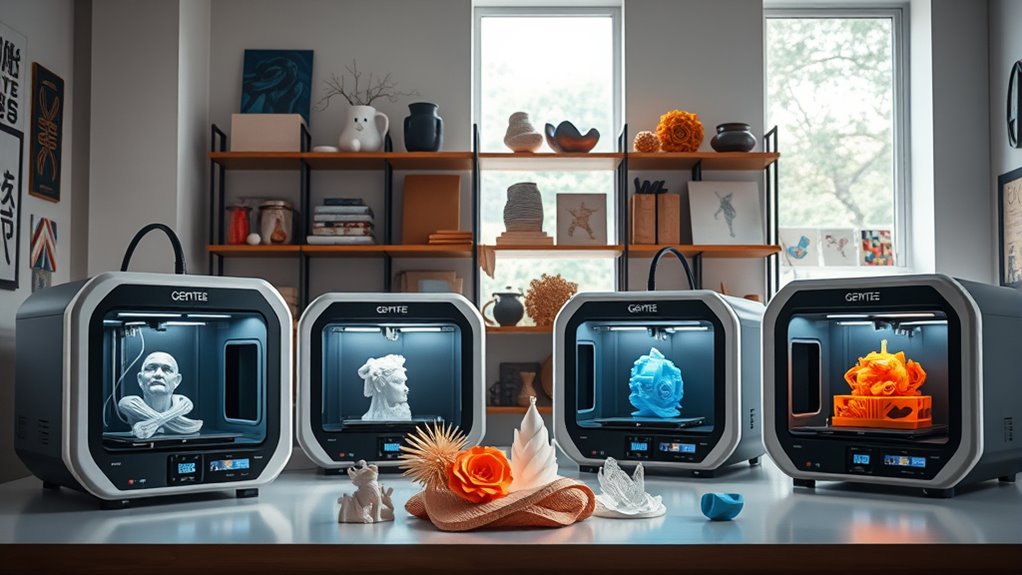
For art studios seeking a premium 3D printer, the goal is to balance exceptional print quality, versatility, and reliability. The FlashForge Adventurer 5M Pro stands out as the best overall choice, combining ease of use with advanced features. The Raise3D Pro2 Plus offers a larger build volume and industrial-grade performance for more complex projects, while the Bambu Lab P1S excels in multi-color printing and automation. Buyers face tradeoffs between price, complexity, and feature set, making it essential to choose a model aligned with specific studio needs. Continue reading for a detailed breakdown of these top options and what makes each one unique.

Get the latest gadgets delivered free with Prime
- Fast, free delivery on millions of items
- Prime Video, Amazon Music and more included
- Member-only deals all year
Complete the kit


Key Takeaways
- The best premium 3D printers for art studios balance advanced features with user-friendly interfaces.
- Multi-material and multi-color capabilities are key for creative flexibility but often come with higher costs.
- Build volume varies widely; larger prints demand more space and higher investment.
- Automation features like auto bed leveling and multi-material handling significantly reduce setup time.
- Price is a major consideration; more expensive models tend to offer greater precision and durability, but simpler options can suffice for smaller projects.
| FlashForge AD5X Multi-Color 3D Printer, CoreXY, 600mm/s High-Speed, Auto Leveling, 300°C Extruder, 220x220x220mm | 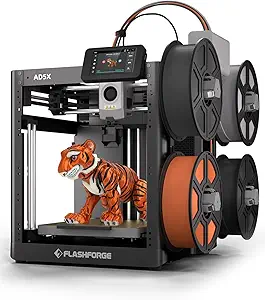 | Best Overall for Rapid Multi-Color Art Projects | Print Speed: 600mm/s | Build Volume: 220x220x220mm | Max Extruder Temperature: 300°C | VIEW ON AMAZON | See Our Full Breakdown |
| Creality K2 Plus Combo 3D Printer with Multi-Color Printing and CFS |  | Best for Complex Multi-Color and Large-Format Art | Printing Colors: Up to 16 with 4 CFS units | Max Speed: 600mm/s | Acceleration: 30000mm/s² | VIEW ON AMAZON | See Our Full Breakdown |
| Bambu Lab P1S Combo 3D Printer with Multi-Color Printing and Auto Bed Leveling |  | Best for Beginners and Flexible Art Creation | Product Dimensions: 15.31 x 18.03 x 15.31 inches | Item Weight: 47.5 pounds | Maximum Printing Speed: 500mm/s | VIEW ON AMAZON | See Our Full Breakdown |
| FLASHFORGE Adventurer 5M Pro 3D Printer with Auto Printing System |  | Best for High-Speed, Versatile Art in Small Spaces | Product Dimensions: 16 x 14 x 18 inches | Item Weight: 22 pounds | Maximum Nozzle Temperature: 280°C | VIEW ON AMAZON | See Our Full Breakdown |
| Raise3D Pro2 Plus 3D Printer, Dual Extruder, Fully Enclosed |  | Best for Large, Production-Ready Art and Complex Prototypes | Dual extruder: Yes | Build volume: 12 x 12 x 23.8 inches | Layer height: Minimum 0.01mm | VIEW ON AMAZON | See Our Full Breakdown |
| Bambu Lab P2S Combo, P2S 3D Printer & AMS 2 Pro, Multi-Color 3D Printing |  | Best Overall for Speed and Ease of Use | Print Speed: 600 mm/s | Setup Time: 15 minutes | Filament Drying Temperature: 65 °C | VIEW ON AMAZON | See Our Full Breakdown |
| Creality K2 Plus Combo 3D Printer – Multi-Color, Large Build Volume, High-Speed Auto-Leveling, Dual AI Cameras, Next-Gen Direct Drive Extruder |  | Best for Large-Scale, Multi-Color Projects | Build Volume: 13.78 x 13.78 x 13.78 inches | Dimensions: 16.1 x 15.4 x 18.7 inches | Weight: 70.4 pounds | VIEW ON AMAZON | See Our Full Breakdown |
| FLASHFORGE Creator 5 Pro 3D Printer, 4-Toolhead, Multi-Material & Color Printing, Heated Chamber, CoreXY, 600mm/s |  | Best for Multi-Material Industrial Use | Active Chamber Temperature: 65°C | Build Volume: 256mm³ | Number of Extruders: 4 | VIEW ON AMAZON | See Our Full Breakdown |
| FlashForge Creator 5 Pro Industrial 3D Printer with 4-Extruder System and HEPA13 Filtration |  | Best for Safe, Multi-Color Industrial Printing | Active Chamber Temperature: 65°C | Build Volume: 256mm³ | Number of Extruders: 4 | VIEW ON AMAZON | See Our Full Breakdown |
| premium 3d printer for art studio | Build Volume | Print Speed |
|---|---|---|
| FlashForge AD5X Multi-Color 3D | 220x220x220mm | 600mm/s |
| Creality K2 Plus Combo 3D Prin | — | — |
| Bambu Lab P1S Combo 3D Printer | — | — |
| FLASHFORGE Adventurer 5M Pro 3 | 220 x 220 x 220 mm | 600mm/s |
| Raise3D Pro2 Plus 3D Printer | 12 x 12 x 23.8 inches | — |
| Bambu Lab P2S Combo | — | 600 mm/s |
| Creality K2 Plus Combo 3D Prin | 13.78 x 13.78 x 13.78 inches | — |
| FLASHFORGE Creator 5 Pro 3D Pr | 256mm³ | 600 mm/s |
| FlashForge Creator 5 Pro Indus | 256mm³ | 600 mm/s |
More Details on Our Top Picks
FlashForge AD5X Multi-Color 3D Printer, CoreXY, 600mm/s High-Speed, Auto Leveling, 300°C Extruder, 220x220x220mm
The FlashForge AD5X stands out for its blazing print speeds up to 600mm/s and multi-color capabilities supporting up to 4 colors simultaneously. Compared with the Bambu Lab P1S Combo, it offers faster output, ideal for studios prioritizing speed, though at the cost of a steeper learning curve during setup. Its auto bed leveling simplifies preparation, making it accessible despite complex multi-color functions. However, the high-speed operation can sometimes compromise accuracy if not carefully calibrated. This model is best suited for artists needing rapid prototyping and vibrant multi-color work, especially when time is a premium but precision is secondary to speed.
Pros:- Supports multi-color printing with up to 4 colors simultaneously
- Exceptional print speeds up to 600mm/s for rapid production
- Automatic bed leveling for quick, hassle-free setup
- Supports multiple nozzle sizes for detailed and large prints
Cons:- Complex setup that may require technical expertise
- High-speed printing can reduce print accuracy if not carefully calibrated
Best for: Artists and studios focusing on fast-paced multi-color prototyping and detailed color work
Not ideal for: Beginners or those requiring ultra-high precision, as speed may impact accuracy without proper calibration
- Print Speed:600mm/s
- Build Volume:220x220x220mm
- Max Extruder Temperature:300°C
- Nozzle Sizes:0.25mm to 0.8mm
- Auto Leveling:Yes
- Connectivity:Mobile app control
Our verdict“This printer excels for artists needing quick multi-color output but demands careful calibration for best results.”
Creality K2 Plus Combo 3D Printer with Multi-Color Printing and CFS
The Creality K2 Plus Combo offers remarkable multi-color capabilities, supporting up to 16 colors with four CFS units, making it ideal for intricate multi-hued sculptures or large-format designs. Its high-speed, precision motion system, and actively heated chamber support diverse materials like ABS and PETG, surpassing the Bambu Lab P1S in material versatility and size. The automatic leveling and real-time error monitoring help maintain high quality, though the setup is more complex and may require dedicated technical skills. This pick is best for studios producing multi-color, multi-material, larger projects where color variety and precision matter most, despite the higher investment and larger footprint.
Pros:- Supports up to 16 colors with 4 CFS units
- High-speed, high-precision motion system for complex prints
- Automatic leveling and real-time error detection for consistent quality
- Supports a wide range of filament types including ABS, PETG, and PPA-CF
Cons:- Setup complexity requiring advanced technical skills
- Large size and higher price point may limit smaller studios
Best for: Professional artists and studios needing large, multi-color, multi-material prints with high precision
Not ideal for: Small or beginner studios lacking technical expertise or space for the large footprint
- Printing Colors:Up to 16 with 4 CFS units
- Max Speed:600mm/s
- Acceleration:30000mm/s²
- Materials Supported:PLA, ABS, PETG, PPA-CF
- Chamber:Actively heated
- Frame:Matrix, die-cast
Our verdict“Ideal for large, multi-color projects demanding high precision and material versatility, with a tradeoff in complexity and size.”
Bambu Lab P1S Combo 3D Printer with Multi-Color Printing and Auto Bed Leveling
The Bambu Lab P1S Combo combines ease of use with multi-material and multi-color flexibility, supporting up to 16 colors. Its automatic bed leveling and enclosed design make it accessible for both newcomers and experienced artists looking for reliable, consistent results. Compared to the FlashForge AD5X, it offers a more user-friendly experience, though it currently requires connection to the Bambu Lab AMS for multi-color capabilities, which adds ongoing cost. Its enclosed design improves print quality with sensitive filaments, but the overall weight and size may be a concern for tight spaces. This model is well-suited for studios that want a balance of creative flexibility and straightforward operation, especially for less complex multi-color projects.
Pros:- Supports multi-color and multi-material printing up to 16 colors
- Automatic bed leveling for quick setup
- Enclosed design improves print stability and safety
- Fast print speeds reduce project time
Cons:- Requires connection to Bambu Lab AMS for multi-color functionality
- Heavy and large, requiring ample space
Best for: Artists and small studios seeking versatile, easy-to-use multi-color printing with minimal setup
Not ideal for: Power users needing large build volumes or advanced multi-material features without external dependencies
- Product Dimensions:15.31 x 18.03 x 15.31 inches
- Item Weight:47.5 pounds
- Maximum Printing Speed:500mm/s
- Supported Filaments:PLA, PETG, TPU, PVA, PET, ABS, ASA
- Auto Bed Leveling:Yes
- Enclosed Design:Yes
Our verdict“Perfect for creative studios valuing ease of use and multi-color flexibility in a compact, enclosed system.”
FLASHFORGE Adventurer 5M Pro 3D Printer with Auto Printing System
The FlashForge Adventurer 5M Pro offers fast, reliable printing with speeds up to 600mm/s and a straightforward, auto bed leveling system. Its built-in camera and mobile control make it easy to monitor projects remotely, supporting a variety of common filaments like PLA, PETG, and ABS. Compared with the Raise3D Pro2 Plus, it sacrifices some build volume and advanced features for a more compact, user-friendly design ideal for home or classroom settings. The limited build volume may restrict large or highly detailed art pieces, but its quiet operation and quick setup make it perfect for artists who prioritize speed and convenience over size. This is a practical choice for small studios or educational environments.
Pros:- High-speed printing up to 600mm/s for rapid results
- Auto bed leveling simplifies setup
- Built-in camera and mobile app control for remote monitoring
- Quiet operation ideal for shared spaces
Cons:- Limited build volume for larger artwork
- Only one customer review, indicating limited feedback
Best for: Artists and educators needing quick, high-quality prints in limited space
Not ideal for: Large-scale projects or advanced multi-material art requiring extensive build volume
- Product Dimensions:16 x 14 x 18 inches
- Item Weight:22 pounds
- Maximum Nozzle Temperature:280°C
- Heated Bed Temperature:110°C
- Print Speed:600mm/s
- Build Volume:220 x 220 x 220 mm
Our verdict“A compact, fast printer suited for small-scale, multi-material art and educational use where speed and ease matter most.”
Raise3D Pro2 Plus 3D Printer, Dual Extruder, Fully Enclosed
The Raise3D Pro2 Plus is built for demanding production environments with its large 12 x 12 x 23.8-inch build volume and dual extruders, enabling complex multi-material or multi-color artworks. Its feature set, including a HEPA filter, camera, filament sensor, and wireless connectivity, surpasses many in this roundup, making it suitable for studios producing detailed, multi-material sculptures or prototypes. Compared to the smaller FlashForge AD5X, it offers significantly more space and advanced features, but at a substantial weight and higher price. Its setup and operation are more complex, best suited for experienced users with technical skills. This printer excels where size, versatility, and production quality are paramount.
Pros:- Massive build volume ideal for large projects
- Supports diverse filaments up to 300°C
- Features like filament sensor, camera, and HEPA filter enhance usability and safety
- Resumes printing after power outages for reliability
Cons:- Extremely heavy and bulky, challenging to move or set up
- High cost and complex operation require technical expertise
Best for: Large studios or professional artists creating complex, multi-material, large-scale art pieces
Not ideal for: Small or casual artists who lack space or need a more straightforward, lower-cost solution
- Dual extruder:Yes
- Build volume:12 x 12 x 23.8 inches
- Layer height:Minimum 0.01mm
- Maximum temperature:300°C
- Touch Screen:7 inches
- Features:Filament sensor, camera, HEPA filter, wireless
Our verdict“This printer is tailored for large-scale, multi-material art production where size and versatility outweigh complexity and cost.”
Bambu Lab P2S Combo, P2S 3D Printer & AMS 2 Pro, Multi-Color 3D Printing
The Bambu Lab P2S Combo stands out as the most well-rounded option for art studios that prioritize speed and simplicity. Its high-speed capability of up to 600 mm/s combined with automatic calibration makes it ideal for rapid prototyping and creative experimentation. Unlike the Creality K2 Plus Combo, which offers larger volume but at a heavier weight and more complex setup, the P2S excels in quick, precise prints with minimal fuss. The integrated AMS 2 Pro enables seamless multi-color and multi-material printing, though it requires understanding its workflow. Tradeoffs include the absence of multi-color support on the base P2S without the combo and a potential learning curve for new users exploring advanced features.
Pros:- High-speed printing up to 600 mm/s for rapid prototyping
- Automatic calibration reduces setup time and errors
- Seamless multi-color/multi-material capabilities with AMS 2 Pro
- User-friendly workflow with extensive design tool access
Cons:- Multi-color printing is limited without the Combo extension
- Complex features may require a learning curve for new users
Best for: Artists and designers who want fast, reliable multi-material outputs with minimal setup complexity
Not ideal for: Beginners seeking straightforward entry-level printers or those needing large build volumes without advanced multi-color features
- Print Speed:600 mm/s
- Setup Time:15 minutes
- Filament Drying Temperature:65 °C
- Chamber Temperature:50 °C
- Filament Compatibility:Multi-color/multi-material (AMS 2 Pro)
Our verdict“This pick is perfect for artists who need quick, precise multi-material printing with minimal hassle.”
Creality K2 Plus Combo 3D Printer – Multi-Color, Large Build Volume, High-Speed Auto-Leveling, Dual AI Cameras, Next-Gen Direct Drive Extruder
The Creality K2 Plus Combo makes a compelling case for studios with ambitious, large-scale projects. Its impressive 13.78 x 13.78 x 13.78 inches build volume surpasses many competitors, making it suitable for printing sizable artworks or prototypes. Compared to the FlashForge Creator 5 Pro, which offers multi-material capabilities but less volume, the K2 Plus’s four CFS units enable vibrant multi-color prints with up to 16 colors. Its high-speed performance of 600 mm/s and dual AI cameras for real-time monitoring enhance productivity. The tradeoff, however, is its substantial weight and size, which demand significant workspace, and a more complex setup that could challenge less experienced users.
Pros:- Large build volume enables big-scale creations
- Multi-color printing with 16-color capability using CFS units
- High-speed printing up to 600 mm/s with advanced motors
- Dual AI cameras for continuous monitoring and adjustments
Cons:- Heavy and bulky, requiring ample space
- Complex setup and higher price point for advanced features
Best for: Large art studios or professionals producing multi-color large-format sculptures and prototypes
Not ideal for: Small workshops or hobbyists with limited space and simpler printing needs
- Build Volume:13.78 x 13.78 x 13.78 inches
- Dimensions:16.1 x 15.4 x 18.7 inches
- Weight:70.4 pounds
- Max Nozzle Temperature:350°C
- Filament Compatibility:High-temp filaments like ASA and PPA
Our verdict“This printer delivers the size and multi-color versatility needed for professional, large-format projects, but demands a spacious workspace and technical familiarity.”
FLASHFORGE Creator 5 Pro 3D Printer, 4-Toolhead, Multi-Material & Color Printing, Heated Chamber, CoreXY, 600mm/s
The FLASHFORGE Creator 5 Pro emphasizes multi-material and multi-color production, making it suitable for professional studios needing complex, multi-faceted outputs. Its four independent toolheads allow quick material changes and versatile color combinations, outperforming simpler single-extruder printers like the FlashForge Creator 5. The heated chamber up to 65°C supports advanced filaments like PEEK, while its high-speed of 600 mm/s ensures rapid turnaround. Although its setup can be intricate, especially for those new to multi-tool systems, the added safety features like HEPA and activated carbon filtration provide a safer environment for daily use. The main drawback is its size and weight, which might be unsuitable for smaller workspaces.
Pros:- Four independent toolheads enable complex multi-material and multi-color printing
- Heated chamber up to 65°C prevents warping with advanced filaments
- High-speed operation up to 600 mm/s for fast production
- Effective HEPA13 filtration for safe indoor use
Cons:- Setup complexity requires technical expertise
- Relatively high cost and large footprint
Best for: Industrial artists and professionals who require multi-material, multi-color, high-speed production capabilities
Not ideal for: Hobbyists or small studios with limited space and simpler print requirements
- Active Chamber Temperature:65°C
- Build Volume:256mm³
- Number of Extruders:4
- Print Speed:600 mm/s
- Filtration:HEPA13
Our verdict“Ideal for professional environments demanding multi-material, multi-color, high-speed printing with safety features, provided space and expertise are available.”
FlashForge Creator 5 Pro Industrial 3D Printer with 4-Extruder System and HEPA13 Filtration
The FlashForge Creator 5 Pro offers a balanced combination of multi-material capacity and safety features, making it a strong choice for studios focused on complex multi-color projects in controlled environments. Its four independent extruders support a variety of filament types and colors, with automatic calibration simplifying setup. The active heated chamber up to 65°C ensures high-quality results with advanced filaments, and the HEPA13 filtration provides a cleaner workspace—an advantage over less equipped models like the FlashForge Adventurer 5M Pro. Its main limitation is the larger footprint and the need for some technical skill during setup, which might challenge less experienced operators.
Pros:- Four independent extruders support diverse multi-material and multi-color printing
- Active heated chamber up to 65°C enhances filament compatibility
- Effective HEPA13 filtration maintains a safe, odor-free environment
- Automatic calibration reduces setup errors
Cons:- Requires technical expertise for optimal setup
- Relatively high cost and large size limit portability
Best for: Professional studios and educational environments prioritizing safety, multi-material capabilities, and consistent print quality
Not ideal for: Small or casual hobbyists who need a compact, straightforward printer
- Active Chamber Temperature:65°C
- Build Volume:256mm³
- Number of Extruders:4
- Print Speed:600 mm/s
- Filtration:HEPA13
Our verdict“This model suits professional and educational settings seeking multi-color, multi-material, safe printing but demands space and technical skill.”

How We Picked
I evaluated each 3D printer based on performance, ease of use, build quality, material versatility, and feature set. Priority was given to models that combine professional-grade results with user-centric features suitable for art studios. Cost-to-value ratio was also considered, ensuring that the top picks deliver meaningful benefits relative to their price. The ranking reflects a balanced view of capability, reliability, and adaptability to creative workflows, helping buyers find options that match their specific studio needs.Factors to Consider When Choosing Premium 3d Printer For Art Studios
Choosing a premium 3D printer for art studios requires careful consideration of several key factors. Beyond initial features, buyers should assess how the printer integrates into their workflow, handles different materials, and maintains consistent quality over time. Understanding these broader considerations can help prevent costly mistakes and ensure a satisfying investment.Print Quality and Resolution
For artists, the ability to produce fine details and smooth surfaces is paramount. Higher resolution and precise layer control lead to more professional-looking results, especially for sculptures, prototypes, or intricate designs. However, increased detail often comes with longer print times and higher costs, so striking a balance is essential based on project complexity.
Material Compatibility and Multi-Color Capabilities
The range of compatible materials can dramatically expand your creative options, from flexible filaments to specialty composites. Multi-color or multi-material printing enables more vibrant and detailed final pieces but may require more advanced extruders and maintenance. Consider whether your studio needs multi-material options regularly or occasionally, to avoid overspending on features you won’t use often.
Build Volume and Space Requirements
Larger build volumes support more ambitious projects but demand more dedicated space and increase the cost of the printer. Smaller, more manageable sizes are ideal for detailed work and limited studios, but they might restrict your creative scope. Evaluate your typical project size before choosing a model to prevent workflow bottlenecks.
Ease of Use and Automation Features
Features like auto bed leveling, touchscreen interfaces, and multi-material handling can save significant setup time and reduce errors. These are especially valuable in busy art studios where time and precision matter. However, additional automation often raises the initial purchase price and can add complexity for those unfamiliar with advanced systems.
Price and Long-Term Value
Investing in a premium 3D printer involves weighing upfront costs against long-term benefits like durability, support, and maintenance costs. Cheaper models may require frequent upgrades or repairs, whereas higher-end options tend to offer better reliability and lower maintenance over time. Align your budget with your expected usage and the value you seek from the investment.
Frequently Asked Questions
Can I use a premium 3D printer for both small-scale art projects and larger installations?
Yes, but it depends on the build volume and material capabilities of the printer. Larger models like the Raise3D Pro2 Plus are better suited for sizable installations, while smaller units can handle detailed miniatures or prototypes. Consider your typical project size and whether you need a flexible machine that can scale with your creative ambitions.
Are multi-material 3D printers worth the extra investment for art studios?
Multi-material printers offer greater creative freedom, allowing for complex, multi-colored, or multi-material designs. For studios frequently producing detailed or multi-component pieces, these features justify the higher cost. However, if your work is mostly single-material, simpler models may provide better value without the added complexity.
How important is automation like auto bed leveling in a 3D printer for art studios?
Automation features such as auto bed leveling can significantly speed up setup times and improve first-layer adhesion, which is crucial for detailed art pieces. While these features increase the initial investment, they reduce manual adjustments and errors, making the printing process more reliable, especially in busy studio environments.
Is a fully enclosed printer necessary for working with certain materials?
Enclosed printers are beneficial when working with temperature-sensitive or fumes-emitting materials, as they maintain consistent conditions and improve safety. For delicate or advanced materials, enclosure can enhance quality, but it also adds cost and size. If your projects don’t require specific environmental control, a non-enclosed model could suffice.
How much should I expect to spend on a truly premium 3D printer for art studios?
Premium models typically start around $3,000 and can go beyond $10,000 depending on features like multi-material capability, large build volume, and automation. Consider your project scope and whether advanced features will improve your workflow or output quality. Investing more often results in better reliability and lower long-term maintenance costs, especially for professional-grade work.
Conclusion
For studios prioritizing overall reliability and ease of use, the FlashForge Adventurer 5M Pro offers a compelling balance of features and affordability. Those needing larger build volumes or industrial-grade robustness may find the Raise3D Pro2 Plus to be a better fit. Beginners or smaller studios can start with simpler, less expensive models, while experienced artists seeking maximum creative flexibility should consider multi-material and multi-color options like the Bambu Lab P1S. Matching your specific needs and budget will ensure you select a machine that elevates your art practice now and into the future.