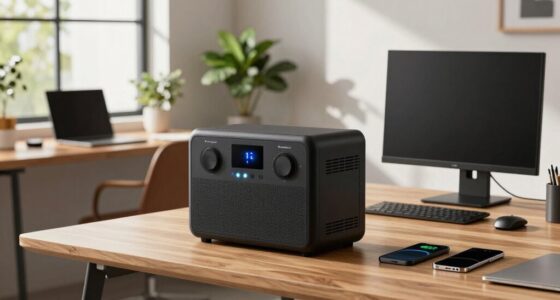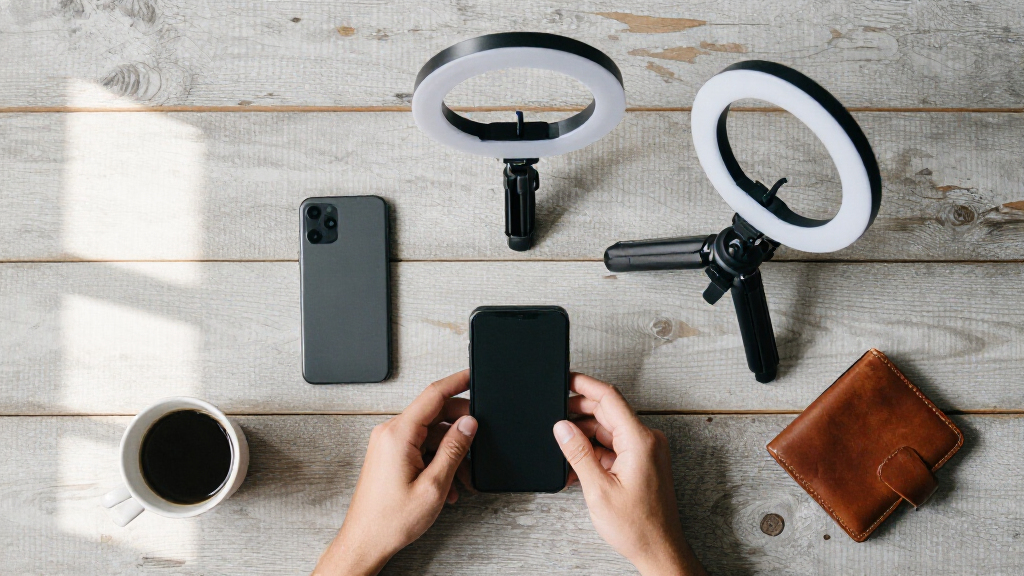
This checklist is for mobile creators who film, record audio, or move footage using a smartphone and portable gear. It covers stabilization, sound, lighting, longer-range shots, file transfer, and storage, with a focus on matching each tool to your setup.

Get the latest gadgets delivered free with Prime
- Fast, free delivery on millions of items
- Prime Video, Amazon Music and more included
- Member-only deals all year
The sections follow a practical workflow: steady the shot, capture clear audio, add light when needed, consider telephoto options, then transfer and store files. Each slot includes buying checks to help you compare features against your phone, accessories, and typical projects.
Use the checklist by confirming compatibility first, then checking how each item fits your recording routine. Prioritize the gear that addresses your biggest limitation, and look for clear connection details before purchasing. The listed product names are picks to investigate, not a substitute for checking current specifications.
Pocket Gimbal Stabilizer
A gimbal can help when handheld movement makes phone footage harder to watch. The listed pick is the Hohem iSteady M7 3-Axis Smartphone Gimbal Stabilizer. Before choosing it, check whether your phone and any case or add-on lens fit the gimbal’s supported setup. A bare phone and a phone loaded with accessories can have different dimensions and balance needs.
A common mistake is focusing on the stabilizer name while overlooking how you will use it. Check the stated payload and phone-size compatibility, how the controls work with your phone, and whether the folded or working size suits your bag. If you plan to switch between portrait and landscape, verify that the gimbal supports your intended orientation and that its controls remain accessible. Confirm compatibility with your complete phone setup, including the case you expect to keep on while filming.
Think through your usual shots, too: walking footage, stationary clips, and quick changes between scenes can place different demands on setup and handling. Review the manufacturer’s instructions for balancing and operation before relying on it during a shoot. A stabilizer is most useful when it suits both the phone and the way you film.
What to look for:
- Supported phone dimensions and weight
- Compatibility with your case and attachments
- Portrait and landscape operation
- Control access and setup steps
- Folded size for your usual carry bag
Hohem iSteady M7 3-Axis Smartphone Gimbal Stabilizer

The iSteady M7 stabilizes smartphone video with three-axis motion control and AI tracking for people, pets, vehicles, and other subjects. It includes a detachable touchscreen remote, a built-in extension pole, and a controllable RGB/CCT fill light.
Pros:
- AI tracking supports people, pets, vehicles, and other subjects
- Detachable touchscreen remote supports target selection and live preview
- Built-in extension pole and fill light support varied shooting setups
Cons:
- Phone clamp is limited to devices 58–90 mm wide
- No battery life information is provided
Best for: Creators who want a dedicated phone stabilizer
Not ideal for: People whose phone setup exceeds the listed compatibility limits
Bottom line: Check phone and accessory compatibility before choosing the Hohem iSteady M7.
Wireless Lavalier Microphone
Good audio is easier to manage when the microphone fits the way you record. The pick is the DJI Mic 3 Wireless Microphone System (2 Transmitters, 1 Receiver, Char; the supplied product name ends at “Char,” so confirm the complete model and package details before buying. The title indicates two transmitters and one receiver, which may suit recording with more than one microphone source, subject to the product’s actual specifications.
A frequent buying mistake is assuming that a receiver will connect directly to every phone or camera. Check the included connectors, supported devices, and whether your phone requires an adapter. Confirm how the system handles monitoring and recording, and whether the transmitters can be attached where you plan to wear them. Match the receiver connection to your recording device rather than relying on the word “wireless.”
Consider the environments where you record: movement, clothing noise, and distance from the receiver can affect practical use. Read the manufacturer’s guidance on range, battery operation, and supported recording modes. If you expect to record two people, verify that your intended workflow captures both sources in the way you need. Check what is included in the exact package, since the truncated name does not establish its full contents.
What to look for:
- Complete product name and package contents
- Receiver connector compatibility with your phone or camera
- Support for the number of speakers you record
- Monitoring and recording options
- Transmitter attachment and operating guidance
DJI Mic 3 Wireless Microphone System (2 Transmitters, 1 Receiver, Charging Case)
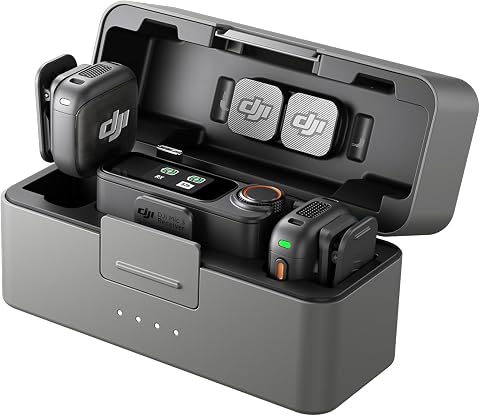
This compact wireless microphone system includes two transmitters, one receiver, and a charging case, with a USB-C mobile phone adapter. It offers adaptive gain control, three voice tones, two noise-cancellation levels, dual-band interference protection, and 32-bit float internal recording.
Pros:
- Compact design for travel and on-the-go recording
- Adaptive gain control and adjustable noise cancellation
- 32-bit float internal recording helps preserve audio detail
- Up to 28 hours of filming time
Cons:
- Only two transmitters are included, although the system supports up to four
- Direct OsmoAudio connection is limited to compatible DJI devices
Best for: Creators who need a wireless microphone system for interviews or dialogue
Not ideal for: Buyers who have not confirmed the complete model and device connection
Bottom line: Verify the full DJI Mic 3 model and included connections before purchasing.
Portable LED Video Light
Portable lighting can give you more control when available light does not suit a scene. The listed pick is the NEEWER HB80C RGBWW LED Video Light with 72Wh Battery and 100W PD Fast; the product name is incomplete, so check the complete model details. Its title names RGBWW lighting, a 72Wh battery, and 100W PD fast charging, but confirm the manufacturer’s specifications and included accessories.
A common mistake is choosing a light based on headline features without checking how it will be mounted or powered in your setup. Confirm dimensions, weight, mounting options, charging requirements, and whether the light can be positioned where you need it. If you plan to use it with a phone rig, make sure the combined setup remains practical to hold or carry. Check mounting and power requirements alongside lighting features.
Think about the kinds of scenes you shoot and whether you need color adjustment or a straightforward light source. Review the operating controls and available modes, as well as the manufacturer’s notes on charging and runtime. Do not assume the product title alone tells you how long it will run in your chosen settings. Check what comes in the box and whether you need a separate stand or mount.
What to look for:
- Complete product name and verified specifications
- Mounting options for your intended rig
- Light controls and available modes
- Charging method and runtime guidance
- Included accessories and carrying requirements
NEEWER HB80C RGBWW LED Video Light with 72Wh Battery and 100W PD Fast Charging

The NEEWER HB80C is an 80W mini RGB COB video light featuring a built‑in 72 Wh battery and 100W USB‑C PD fast charging. It offers seven lighting modes, 18 special effects, Bowens mount compatibility, and can be controlled via the Infinity app or 2.4 GHz wireless for master‑slave grouping.
Pros:
- High output 80W RGBWW light with CRI 95+ and TLCI 97+ for accurate colors
- Multiple lighting modes and 18 built‑in effects for creative shooting
- Fast 100W PD charging and ability to charge while in use
- App control and 2.4 GHz wireless master‑slave grouping
Cons:
- Battery life limited to about 1 hour at full power
- Booster mode requires a separate 100W PD charger
Best for: Creators who want a portable light with color options
Not ideal for: People who need a light with a confirmed mounting setup out of the box
Bottom line: Confirm the full model, mount, and power details before adding this light to your kit.
Smartphone Telephoto Lens
No specific product is listed for this slot, so treat it as a compatibility decision rather than a model recommendation. A telephoto attachment may help frame a distant subject more tightly, but its usefulness depends on the phone and the lens system. Start by checking whether the maker lists your exact phone model and camera configuration. Verify fit for your specific phone, including its case and camera layout.
A common mistake is buying an attachment that physically fits but does not align with the phone’s camera. Check how it mounts, whether a dedicated case or clip is required, and whether you can keep the phone protected while using it. Also review how the lens affects focus, framing, and use of the phone’s camera app. Avoid assuming that an attachment will work across multiple phones or camera positions unless compatibility is stated.
Consider your subjects and shooting distance before deciding whether an add-on lens belongs in your kit. If you regularly change phones, look for a mounting approach that supports the models you expect to use. Review sample footage or images from the exact combination when available, and confirm return and support terms through the seller. Test the complete phone-and-mount combination before relying on it for an important shoot.
What to look for:
- Exact phone and camera compatibility
- Mounting method and case requirements
- Alignment with the intended camera
- Focus and framing behavior
- Support for phone changes or upgrades
USB-C Capture Card
The listed pick is “USB-C SD Card Reader for iPhone, iPad, MacBook, and Android.” That name describes an SD card reader, not a capture card, so clarify what function you need before purchasing. A reader transfers files from a memory card; a capture card is generally chosen to bring a live video signal into a compatible device. Confirm the intended job and product type against your workflow.
A common mistake is treating “USB-C” as proof that a device works with every phone, tablet, or computer. Check the exact device model, operating-system support, card formats, and any app or power requirements stated by the manufacturer. If you want to import footage, verify that your card type is supported and that the receiving device can access the files. If you need live video capture, confirm that the product supports that use explicitly.
Also check the connector layout and whether your case obstructs access to the port. For a mobile workflow, consider whether you need a direct connection or an adapter and how you will manage files after transfer. The listed name includes iPhone, iPad, MacBook, and Android, but confirm support for your specific devices and card before relying on it.
What to look for:
- Whether you need a card reader or live capture card
- Supported SD card types and formats
- Compatibility with your exact device and OS
- App, adapter, or power requirements
- Port access with your phone or tablet case
USB-C SD Card Reader for iPhone, iPad, MacBook, and Android

This compact USB-C card reader supports SD, SDHC, SDXC, and microSD cards, allowing you to transfer photos and videos from cameras to compatible phones, tablets, and computers. It offers plug-and-play use without an app or internet connection and supports transfer speeds up to 60 MB/s according to the description.
Pros:
- Supports several SD and microSD card formats
- Plug-and-play operation without a third-party app
- Compact design for portable use
- Works with compatible phones, tablets, cameras, and computers
Cons:
- Does not work with Lightning-port devices
- Transfer speed claims differ between the description and product information
Best for: Creators who want to import files from an SD card over USB-C
Not ideal for: Anyone looking for live video capture without confirming that feature
Bottom line: The listed product is named as an SD card reader; verify it matches your intended use.
Portable SSD
Portable storage can help keep active footage and project files together while you work away from a desk. The pick is the SanDisk 8TB Extreme Portable SSD. Before buying, confirm the exact model and capacity, then check its connection type and compatibility with your phone, tablet, or computer. Also make sure your devices can format and access the drive as needed.
A common mistake is assuming that any USB connection will deliver the workflow you expect. Check the cable and port requirements, device support, and whether your phone needs an adapter or external power. If you plan to edit directly from the drive, confirm that your editing device and software support that approach. Check capacity, connection, and device support together rather than treating storage size as the only decision.
Think about how you will organize and back up footage. A portable drive can make files easier to carry, but it is still important to have a separate copy of work you cannot replace. Review the manufacturer’s information about the exact model, including its physical dimensions and operating guidance, so it fits your travel setup. Verify the listing carefully to ensure it is the intended product and not a different capacity or variation.
What to look for:
- Exact model and stated capacity
- USB connection and cable requirements
- Compatibility with your phone, tablet, and computer
- Editing workflow and file-system support
- Portable dimensions and backup plan
SanDisk 8TB Extreme Portable SSD

The SanDisk 8TB Extreme Portable SSD offers high-speed NVMe performance with up to 1050MB/s read and 1000MB/s write speeds. It features rugged durability with drop, water, and dust resistance, along with password protection and a 5-year warranty, making it ideal for active lifestyles and professional use.
Pros:
- High-speed data transfer with up to 1050MB/s read and 1000MB/s write speeds
- Rugged design with drop, water, and dust resistance for durability
- Includes password protection with 256-bit AES encryption for security
- Compact and portable, ideal for travel and on-the-go use
Cons:
- Performance may vary depending on host device and conditions
- Limited to USB 3.0 and USB 3.2 Gen 2 connectivity, may require compatible ports
- Price not specified, which could be a consideration for budget-conscious buyers
Best for: Creators who need portable storage for large media libraries
Not ideal for: People whose devices cannot support the drive connection or workflow
Bottom line: Confirm exact model, device support, and a separate backup plan.
Build your kit in the order that solves your current bottleneck: prioritize a microphone if spoken audio is central, a stabilizer if movement is hard to manage, or lighting if your scenes need more control. Then add file transfer and storage based on how much footage you create, and consider a telephoto attachment only after confirming phone fit. Start with the tool that removes the biggest friction in your workflow.
You do not need every category at once. Check the exact model, device compatibility, and included accessories for each pick, then add gear as your projects call for it. A thoughtfully matched setup can stay compact while supporting the way you actually create.
Halloween Picks

MGparty 14.5 ft Halloween Inflatable Walk-In Pumpkin House with LED Lights

Govee Outdoor Halloween Projector Light

Vexalify 11-Inch Halloween Pumpkin Fog Machine with 12-Color Lights
As an affiliate, we earn on qualifying purchases.