To start CNC work as an artist, begin by selecting a suitable material like wood or acrylic that matches your project and guarantees easy machining. Next, prepare your workspace by securing your material and importing your digital sketch into CNC software. Confirm your settings, run a test cut, and make safety precautions like wearing goggles and ensuring good ventilation. Proper preparation and safety help you create precise designs with confidence—continue exploring to master the complete workflow from sketch to cut.
Key Takeaways
- Prepare your digital design by importing sketches into CNC software, ensuring accurate tool paths and settings.
- Select suitable materials compatible with your CNC machine, considering artistic goals and ease of machining.
- Secure the material firmly on the CNC bed to prevent movement during cutting and ensure precision.
- Adjust cutting parameters like speed, depth, and feed rate based on material type and design complexity.
- Perform test cuts and monitor initial runs to identify issues, maintaining safety precautions throughout the process.
Have you ever wondered how artists are pushing the boundaries of creativity with technology? CNC machines open up a world of possibilities, allowing you to transform your sketches into precise, intricate designs. But before diving into the cutting process, you need to consider your material selection carefully. The type of material you choose impacts everything — from the ease of machining to the final appearance. Wood, acrylic, metal, and foam each have unique properties. For example, wood is versatile and beginner-friendly, while metals require more advanced tools and safety measures. When selecting your material, think about your project’s purpose, the detail you want, and your machine’s capabilities. Also, ensure the material is compatible with your CNC machine to avoid damage or mishaps. Understanding material compatibility is crucial to prevent errors and ensure a smooth workflow.
Equally important are safety precautions. Working with CNC machines involves powerful tools and rotating bits that can cause serious injuries if not handled properly. Always wear safety gear like goggles and hearing protection. Keep your workspace clean and free of clutter to prevent accidents, and make sure your machine is in good working order before starting. Familiarize yourself with the machine’s safety features, such as emergency stops and protective covers, and never bypass safety mechanisms. Proper ventilation is essential, especially with materials that produce hazardous fumes or dust, like certain plastics or metals. Using dust collection systems or working in well-ventilated areas helps protect your health. Additionally, always double-check your settings and tool paths before initiating a cut to prevent mistakes that could damage your material or machine.
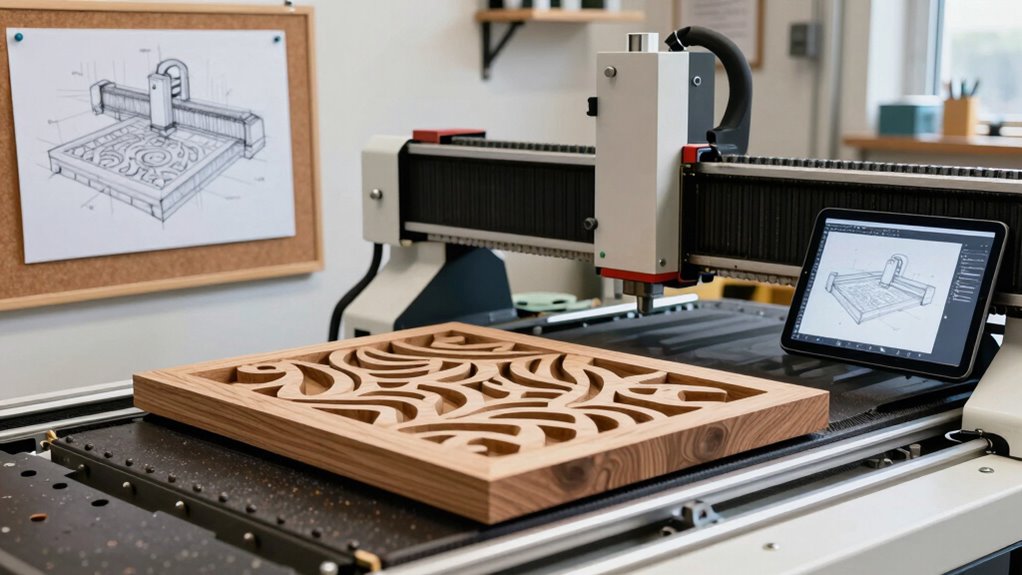
Preparing your workspace is an important step in the workflow. Secure your material firmly to the CNC bed to avoid any movement during cutting, which can ruin your design or cause safety hazards. Once everything is in place, you’ll want to import your digital design into the CNC software, where you can adjust parameters like speed, depth, and feed rate. These settings depend heavily on your selected material, so consult your machine’s guidelines or do test cuts to dial in the best parameters. As you move from sketch to cut, keep a close eye on your process, especially during the initial runs, to catch any issues early. With proper material choices and strict safety precautions, you’ll be able to focus on the creative process, confident that your work environment is safe and your material is suited for your artistic vision.
Frequently Asked Questions
What Types of Materials Can I Use With CNC Machines?
You can use a wide range of materials with CNC machines, thanks to their material versatility. Wood, plastics, foam, and soft metals like aluminum are common choices, each suited for different project types. Your project’s suitability depends on the material’s properties and the CNC machine’s capabilities. Always consider the hardness, thickness, and finish requirements to guarantee the best results and avoid damaging your machine.
How Do I Choose the Right CNC Machine for My Art Projects?
You should choose a CNC machine that matches your project needs and budget considerations. Coincidentally, machine precision plays a vital role in achieving detailed artwork, so look for one with the right resolution and accuracy. Think about the materials you’ll use most often, and guarantee the machine can handle them efficiently. By balancing precision, features, and cost, you’ll find the perfect fit for your artistic goals.
What Safety Precautions Should I Follow When Operating CNC Equipment?
When operating CNC equipment, you should always wear safety gear like goggles, ear protection, and gloves to protect yourself from debris and noise. Follow emergency procedures carefully, such as stopping the machine immediately if something goes wrong. Keep your workspace clean, stay alert, and never bypass safety features. Regularly review safety protocols to make certain you’re up-to-date and always prioritize safety to prevent accidents during your creative process.
How Do I Convert My Artwork Into Cnc-Compatible Files?
To convert your artwork into CNC-compatible files, start with vector conversion using software like Adobe Illustrator or Inkscape. Save your design in common file formats such as SVG, DXF, or AI, which are compatible with CNC machines. Make certain your vectors are clean, closed, and properly scaled. This process helps your CNC software interpret your artwork accurately, making the transfer from design to cut smooth and precise.
What Are Common Troubleshooting Steps for CNC Machining Issues?
When troubleshooting CNC machining issues, start by checking your tool calibration to guarantee accuracy. If you notice inconsistent cuts, inspect the spindle for troubleshooting, like loose connections or worn bearings. Make sure your machine is properly lubricated and that the tool paths are correctly programmed. Reboot the system if needed, and verify the material is securely clamped. These steps often resolve common problems and improve your machining results.
Conclusion
Now that you’ve mastered the basics from sketch to cut, imagine the endless possibilities awaiting your creativity. But this is just the beginning—there’s so much more to explore with CNC technology. Are you ready to push your artistic boundaries further and unleash new dimensions of your work? Stay curious, keep experimenting, and soon, you’ll discover what’s truly possible when you combine artistry with precision. The next level of your journey is just around the corner.