🔍 Read the full analysis: From Speed To Flexibility: 9 Best Wi-Fi 7 Routers For Home Networks on ThorstenMeyerAI.com

Get the latest gadgets delivered free with Prime
- Fast, free delivery on millions of items
- Prime Video, Amazon Music and more included
- Member-only deals all year
TL;DR
A comparison of nine Wi-Fi 7 routers puts the tri-band TP-Link Archer BE550 first for its balance of wireless bands and wired connections. The ASUS ROG Rapture GT-BE98 Pro targets demanding, gaming-focused setups, while several dual-band models offer a simpler fit. Actual benefits depend on compatible devices, home layout, internet service and wired equipment.
A comparison of nine Wi-Fi 7 routers, as detailed in the original analysis, names the TP-Link Archer BE550 its best overall choice, favoring its tri-band design and mix of wired connections over headline speed claims alone. The guide also highlights the ASUS ROG Rapture GT-BE98 Pro for larger, gaming-oriented setups and the dual-band Archer BE230 for simpler networks, while stressing that a router’s fit depends on the home and devices using it.
The guide assesses the routers by wireless band count, port options and features aimed at everyday households, gaming or more involved setups, much like this comparison of routers using AI. Its top pick, the Archer BE550, is presented as a balance for a broad range of homes rather than the model with the most bands or specialist controls. The source does not provide benchmark results or a standardized performance test, so the ranking is a buying recommendation, not a guarantee of measured speeds.
Other models named in the comparison are the NETGEAR BE9300, TP-Link BE600, Archer BE230, Archer BE400, ASUS RT-BE82U, NETGEAR RS90 and NETGEAR RS140, alongside the GT-BE98 Pro and BE550. The source places the BE9300 and BE600 among tri-band alternatives; the BE230, BE400, RT-BE82U, RS90 and RS140 are described as dual-band options. It does not supply complete specifications, prices or individual rankings for every model.
The guide says it weighed the practical cost of network complexity as well as advertised capabilities, considerations also relevant when choosing a mesh Wi-Fi system. Its core advice is to compare each router’s bands and ports with the household’s active devices, internet plan and wired equipment. Wi-Fi 7 routers can connect older clients, but those clients will not gain every feature of the newer wireless standard.
The 9 picks
- 1
 ASUS ROG Rapture GT-BE98 Pro Quad-Band WiFi 7 Gaming RouterView on Amazon →
- 2
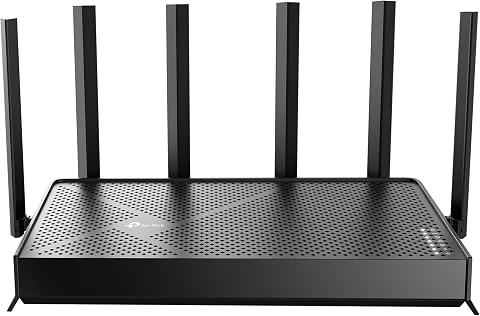 TP-Link Archer BE600 Tri-Band Wi-Fi 7 RouterView on Amazon →
- 3
 NETGEAR Nighthawk BE9300 Tri-Band WiFi 7 RouterView on Amazon →
- 4
 TP-Link Archer BE550 Tri-Band Wi-Fi 7 RouterView on Amazon →
- 5
 NETGEAR Nighthawk RS140 Dual-Band WiFi 7 RouterView on Amazon →
- 6
 ASUS RT-BE82U Dual-Band Wi-Fi 7 RouterView on Amazon →
- 7
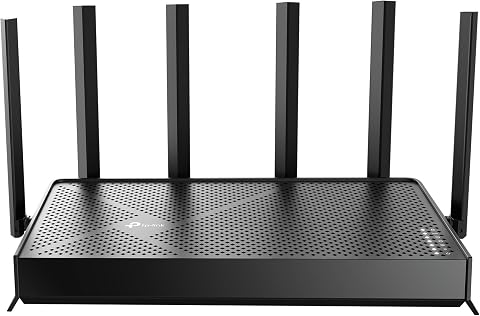 TP-Link Archer BE400 BE6500 Dual-Band Wi-Fi 7 RouterView on Amazon →
- 8
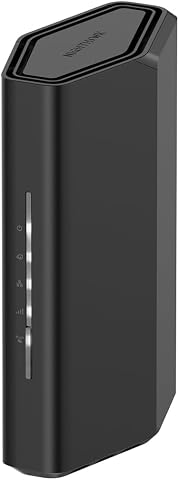 NETGEAR Nighthawk RS90 WiFi 7 Dual-Band RouterView on Amazon →
- 9
 TP-Link Archer BE230 Dual-Band Wi-Fi 7 RouterView on Amazon →
Choose Bands and Ports for Your Home
The comparison matters because Wi-Fi 7 branding alone does not determine whether a router will improve a particular home network. A household with many active wireless clients or several wired devices may value a different configuration from a smaller home with modest traffic. The router’s ports can also become a bottleneck if they do not match the internet service, storage, computer or other equipment attached to it.
For shoppers, the guide’s main distinction is between capacity and simplicity. Tri-band or quad-band designs offer more ways to distribute wireless traffic, but do not automatically make each connection faster. A more elaborate model may add cost and setup complexity without helping a household that lacks compatible clients or a need for that capacity. Coverage, placement and building materials remain relevant even with a high-capacity router.
Products Worth Considering

Apple AirPods Pro 3 Wireless Earbuds with Active Noise Cancellation

LG UltraGear 32GX850A-B 32-inch 4K UHD Glossy OLED Gaming Monitor

LG UltraGear 34GX90SA-W 34-inch WQHD Curved OLED Gaming Monitor
As an affiliate, we earn on qualifying purchases.
How the Nine Models Differ
The guide divides the choices primarily by two, three or four wireless bands. It describes the Archer BE550, NETGEAR BE9300 and TP-Link BE600 as tri-band comparisons, with the ASUS ROG Rapture GT-BE98 Pro standing apart as a quad-band, gaming-focused option. Dual-band models in the list are framed as simpler alternatives for less demanding networks.
Its selection advice is based on matching a router to a home’s devices, floor plan and wired network—not treating specifications as a direct measure of real-world performance. The source cautions that placement, walls, neighboring networks and client hardware can affect results. It does not provide model-by-model lab measurements, prices, availability or a detailed scoring table, limiting how precisely readers can compare performance or value from the supplied information.
“The Archer BE550 earns the overall lead by pairing tri-band Wi-Fi 7 with a practical feature mix, rather than focusing only on extreme throughput or gaming extras.”
— ThorstenMeyerAI.com buying guide
Performance and Value Need Testing
The source gives no test results, prices or dated availability information for the nine models. It is not clear how the routers compare under the same home conditions, how their performance changes across distances, or which offers the best value at current prices. The material also does not list each model’s complete port layout or identify specific compatible devices.
Real-world results remain dependent on the home and network: the source names building construction, router placement, client hardware and internet speed as factors. Its recommendations should be read as a configuration-based comparison, not proof that the top-ranked router will be fastest in every home.
Check Your Network Before Buying
Before choosing, list the devices that will use Wi-Fi most often, check which wireless standards they support, and map the wired connections needed for computers, consoles, storage or access points. Compare that list with each router’s band configuration and port specifications, then check current pricing and availability from retailers or manufacturers. Those details are not included in the source material.
If the main complaint is a weak signal in distant rooms, review router placement and whether a mesh or access-point setup is suitable before paying for higher advertised capacity. Any future performance comparison should state its test conditions and dates, since hardware, prices and firmware can change.
Key Questions
Which Wi-Fi 7 router does the guide recommend overall?
The guide names the TP-Link Archer BE550 its best overall pick, citing its tri-band design and practical mix of wired connections. That is the guide’s recommendation, not a reported result from standardized performance testing.
Who might prefer the ASUS ROG Rapture GT-BE98 Pro?
The guide presents the quad-band GT-BE98 Pro as a specialist option for demanding, gaming-focused setups. It says many homes may not need the model’s scale or added complexity.
Will older devices benefit from a Wi-Fi 7 router?
Older Wi-Fi clients can connect, according to the guide, but they will not gain every Wi-Fi 7 capability. The immediate benefits depend on the wireless standards supported by the devices in use.
Does a tri-band router guarantee faster Wi-Fi?
No. The guide treats extra bands as a way to distribute wireless capacity, not as a direct speed guarantee. Results depend on active client load, device support, placement and home conditions.
What should shoppers check before upgrading?
Check your active devices, internet plan, floor plan and wired equipment. Compare those needs with a router’s bands, ports and expansion options; the supplied comparison does not include prices or full specifications for every model.
Source: ThorstenMeyerAI.com