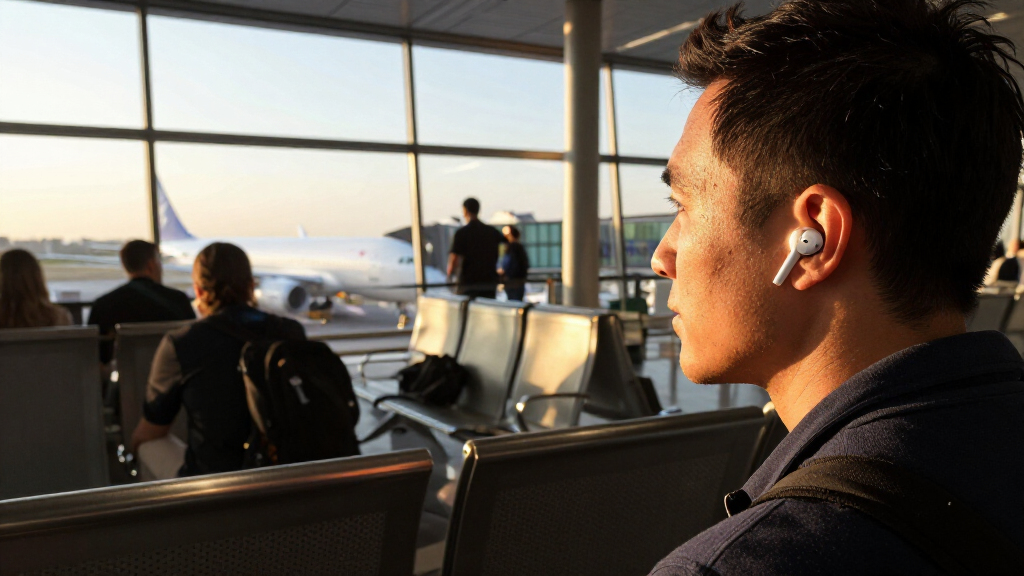

Prepare your wireless earbuds for travel by checking their fit, charging the earbuds and case, setting up noise controls, and pairing them with the devices you plan to use. This guide is for travelers with any level of experience who want dependable audio on a flight, train, bus, or road trip. Allow about 20-30 minutes for setup, plus extra time if the battery needs charging.

Get the latest gadgets delivered free — and shop member deals
- Fast, free delivery on millions of items
- Access to Prime Big Deal Days deals on October 6–7
- Prime Video, Amazon Music and more included

Soundcore by Anker P20i True Wireless Earbuds
- ✔ Driver size: 10 mm
- ✔ Playback per charge: Up to 10 hours
- ✔ Playback with case: Up to 30 hours
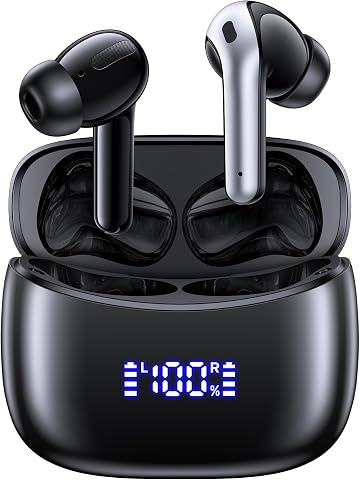
OKEEFE Wireless Bluetooth Earbuds with Real-Time Translation
- ✔ Bluetooth: 5.4
- ✔ Translation: Two-way, real-time; 164 languages listed
- ✔ Playback per charge: Up to 6 hours

Kurdene Wireless Earbuds with Bluetooth 5.3
- ✔ Connectivity: Bluetooth 5.3
- ✔ Driver size: 8 mm
- ✔ Compatibility: iOS and Android
Difficulty: Beginner | Time: 20-30 minutes, plus charging time
What You’ll Need
Tools & Materials:
- Wireless earbuds and their charging case
- Earbud charging cable and a compatible power adapter or charged power bank
- Phone, tablet, laptop, or other playback device
- A downloaded audio file, playlist, or video for offline use
Knowledge:
- Basic ability to open Bluetooth settings on your device
- Awareness of your earbud model’s controls, or access to its quick-start guide
Airline rules for Bluetooth devices and power banks vary. Check your carrier’s current instructions before departure, and follow crew directions during the trip. Do not pack loose earbuds where they can be lost; keep them in their case when not in use.
Soundcore by Anker P20i True Wireless Earbuds
The P20i is our most straightforward recommendation for a traveler who wants dependable planning details without relying on a specialized feature. Its stated up to 10 hours per charge and 30 hours with the case make it easier to estimate how it could cover a journey with breaks between listening sessions. That is a stronger travel case than Kurdene can make from the supplied information, since Kurdene gives no battery figures. A 10-minute charge for up to two hours of playback also offers a practical fallback when a short stop is all the charging time available.Soundcore adds flexibility through 22 EQ presets, customizable controls, and a Find My Earbuds feature. Those controls can help us adapt sound and operation to personal preference, while the compact case’s attached lanyard gives it a convenient carry option. The two microphones and AI processing are described as supporting clearer calls, a useful consideration for check-ins or travel coordination. Compared with OKEEFE, though, P20i does not have a stated translation feature or the larger quoted total case runtime. Its supplied details also do not specify active noise cancellation or water resistance, so we should not assume it will block cabin noise or handle wet conditions. It earns first place by offering the clearest balance of runtime, charging flexibility, and everyday controls.
Pros:
- Up to 10 hours of playback per charge and up to 30 hours with the case
- A 10-minute charge is stated to add up to two hours of playback
- App includes 22 EQ presets, customizable controls, and Find My Earbuds
- Compact case has an attached lanyard
Cons:
- Active noise cancellation is not specified in the supplied description
- Water resistance is not specified
Best for: Travelers who want stated per-charge and case runtime, quick top-ups, and app-based sound and control options.
Not ideal for: Buyers who specifically need confirmed active noise cancellation, water-resistance information, or real-time translation.
Bottom line: We rank the P20i first for travel because its runtime and quick-charge details make planning easier than with Kurdene, while its broader everyday toolkit is less specialized than OKEEFE’s translation feature.
“We rank the P20i first for travel because its runtime and quick-charge details make planning easier than with Kurdene, while its broader everyday toolkit is less specialized than OKEEFE’s translation feature.”
OKEEFE Wireless Bluetooth Earbuds with Real-Time Translation
For travelers who expect language barriers to be part of the trip, OKEEFE offers the lineup’s clearest point of difference: two-way real-time translation across 164 languages. That makes it more specialized than Soundcore, whose strengths are runtime clarity, quick charging, and app customization. The case is listed for up to 70 hours of total playback, the largest combined figure among the three, and its LED battery display gives a visible indication of case charge. USB-C charging and a stated charging time of about one hour round out the practical details.There is a meaningful limit to that impressive case figure: OKEEFE lists only up to six hours per charge, four hours less than Soundcore’s stated earbud runtime. On a long day with few opportunities to return the buds to the case, that difference matters more than the combined total. The supplied description also does not explain translation accuracy, how the feature is activated, or whether it depends on a companion app or connectivity. We should treat the language count as a claimed capability whose real-world usefulness is not established by these details. Kurdene is less complicated as a lightweight, fit-focused option, but it cannot match OKEEFE’s specified case runtime or travel-specific translation role. Choose OKEEFE for the potential language help and case capacity, and skip it if longer uninterrupted listening or confirmed translation performance is essential.
Pros:
- Two-way real-time translation is listed for 164 languages
- Up to 70 hours of total playback with the charging case is stated
- LED case battery display helps show remaining case charge
- Bluetooth 5.4 and USB-C charging
Cons:
- Up to six hours of playback per charge is less than Soundcore’s stated ten hours
- Translation accuracy and feature availability requirements are not detailed
- The supplied description does not specify active noise cancellation
Best for: Travelers interested in two-way translation who also want a clearly stated, high combined case playback figure.
Not ideal for: People who need longer stated listening per charge or detailed evidence about translation accuracy and feature requirements.
Bottom line: We place OKEEFE second because its translation feature is uniquely relevant for some trips, but its shorter per-charge runtime and unclear translation requirements make it a more situational choice than Soundcore.
“We place OKEEFE second because its translation feature is uniquely relevant for some trips, but its shorter per-charge runtime and unclear translation requirements make it a more situational choice than Soundcore.”
Kurdene Wireless Earbuds with Bluetooth 5.3
Kurdene is the fit-focused choice in this comparison. Its lightweight design and three sizes of silicone ear tips give travelers a way to choose a more suitable fit, which may matter during a day of walking or moving through terminals. Bluetooth 5.3 supports automatic pairing with compatible iOS and Android devices, and the 8 mm drivers are described as tuned for boosted bass. AI-assisted microphones are also listed for clearer calls. Those features give it a clear everyday role, but they do not make it as easy to evaluate for travel as Soundcore or OKEEFE.The main obstacle is the missing battery information: the supplied description does not state playback per charge or case capacity. That leaves us unable to judge whether Kurdene can cover a long journey between charging opportunities, while Soundcore gives both figures and a quick-charge estimate. OKEEFE goes further still in total case playback, though its per-charge runtime is shorter than Soundcore’s. Kurdene’s practical details are also limited: a 5V USB, 1A charger is recommended, and fast chargers are not recommended according to the supplied information. The description does not provide an active noise-cancellation claim or water-resistance detail. We would choose it when lightweight comfort and tip selection are the priority, but avoid it for trips where a known battery plan is central.
Pros:
- Lightweight ergonomic design
- Includes three sizes of silicone ear tips
- Bluetooth 5.3 supports automatic pairing with compatible iOS and Android devices
- AI-assisted microphones are described as supporting clearer calls
Cons:
- Playback time and charging case capacity are not specified
- Fast chargers are not recommended in the supplied information
- Active noise cancellation is not specified
Best for: Travelers prioritizing a lightweight fit, three tip-size options, and compatibility with iOS and Android.
Not ideal for: Anyone who needs stated battery life, case capacity, quick-charge guidance, or confirmed noise cancellation before a trip.
Bottom line: We rank Kurdene third for travel because its lightweight fit and tip choices are useful, but missing battery figures make it harder to recommend for a trip than either Soundcore or OKEEFE.
“We rank Kurdene third for travel because its lightweight fit and tip choices are useful, but missing battery figures make it harder to recommend for a trip than either Soundcore or OKEEFE.”
As an Amazon Associate we earn from qualifying purchases.
Before You Start
Check the earbuds and case for damage, debris, or moisture before charging. Use the supplied cable or a compatible one, and avoid charging wet earbuds. If you plan to rely on noise cancellation, remember that it does not replace hearing announcements or following safety instructions. Download entertainment over a trusted connection before leaving, since onboard Wi-Fi may be unavailable or limited.
Step-by-Step Instructions
Step 1: Check the fit and condition
Inspect each earbud, the charging contacts, and the case. Wipe away dust with a clean, dry, soft cloth. If your model has removable ear tips, try the supplied sizes and gently insert each earbud. Turn it slightly until it feels secure without pressure or pain. Play a short audio clip at a low volume and check that sound is balanced between ears.
Tip:Do not push an earbud deep into your ear or use sharp objects to clean its openings. A poor seal can weaken noise cancellation and bass.
Check: Both earbuds stay in place when you move your head, feel comfortable, and play at a similar volume.
Step 2: Charge the earbuds and case
Place the earbuds in the case and confirm that each one sits correctly on its charging contacts. Connect the case to power using a compatible cable, or charge it wirelessly if the case supports that method. Check the case light, app, or device battery display for charging status. Leave the earbuds in the case until they reach a useful charge, and charge the case fully if time allows.
Tip:Charging times and indicator patterns vary by model. Use the manufacturer’s guide if the light does not match what you expect.
Check: The earbuds show a charge, the case reports a useful battery level, and the status light or app indicates charging has finished or is progressing normally.
Step 3: Pair the earbuds with your travel device
Open Bluetooth settings on your phone or other playback device. Put the earbuds into pairing mode using the method for your model, then select their name from the available devices. If they are already paired, connect them and confirm that audio plays through the earbuds. Pair additional devices you expect to use before departure, if your earbuds support multipoint or multiple saved connections.
Tip:Pairing controls differ between models. If the earbuds connect to a different device nearby, disconnect them there before trying again.
Check: Your main device shows the earbuds as connected, and a short test sound plays through both sides.
Step 4: Set controls, noise modes, and volume
Open the earbud companion app or device settings, if available. Review the control for play and pause, volume, noise cancellation, transparency, and voice assistant access. Choose a mode that suits your travel setting, then test the controls before packing. Set playback at a comfortable level so you can hear clearly without turning it up to mask surrounding noise.
Tip:Use transparency or remove an earbud when you need to hear staff, announcements, traffic, or people speaking to you. Do not depend on noise cancellation to block every sound.
Check: You can pause playback, adjust or change the listening mode, and identify the control you need without searching through settings.
Step 5: Prepare offline entertainment
Download the music, podcasts, audiobooks, or videos you plan to use while traveling. Open each item once while connected to the internet to confirm it is saved and playable offline. Check your device’s storage and download quality settings if the files take up more space than expected.
Tip:Streaming services may require an active subscription or periodic online verification. Check access before you leave, especially for long journeys.
Check: At least one selected audio item or video starts playing with the device disconnected from the internet.
Step 6: Pack the charging kit where you can reach it
Return the earbuds to their case, close the lid, and put the case in a secure pocket of your carry-on bag. Pack the charging cable and a compatible power source nearby. Keep the case away from liquids, loose coins, and dirt. If you carry a power bank, follow airline rules for its storage and use.
Tip:A small pouch helps keep the cable and case together. Avoid placing the case in checked luggage if you may need the earbuds during the trip.
Check: You can locate the earbuds, cable, and power source without unpacking your whole bag.
Step 7: Test the travel setup before leaving
With the earbuds charged and in your ears, play a downloaded item for several minutes. Walk around or turn your head to check the fit and connection. Test the noise or transparency mode and pause control. Then return the earbuds to the case and confirm that charging begins. If you will use them with a laptop or tablet, test that connection too.
Tip:Keep device and earbud software updates for a convenient time before travel; do not start a lengthy update just before you need to leave.
Check: Audio plays without repeated dropouts, the controls work, the fit stays secure, and the earbuds recharge in the case.
Step 8: Use and store them safely during the trip
Use the earbuds at a moderate volume and switch to transparency or pause playback when you need to listen to announcements or speak with someone. Remove them when required by crew or staff. When you take them out, place them directly in the case and close it before stowing the case. Check the battery display during long journeys and recharge the case when a suitable power source is available.
Tip:On a road trip, do not wear earbuds while driving or cycling. Passengers can use them when it is safe and does not interfere with communication.
Check: The earbuds remain accounted for, have enough power for planned listening, and do not prevent you from responding to travel instructions.
Common Mistakes to Avoid
- Leaving without checking the case battery. — Check both earbud and case charge before departure; a charged case can top up the earbuds during the journey.
- Assuming streamed content will work offline. — Download your chosen items and test playback with internet access turned off before leaving.
- Using noise cancellation when you need to hear your surroundings. — Learn the transparency control and pause or remove an earbud for announcements, staff instructions, and conversations.
- Packing the case loosely in a bag. — Store it in a zipped pocket or pouch, away from liquids and small objects that could damage the contacts.
Troubleshooting
Problem: The earbuds do not appear in Bluetooth settings.
Solution: Put them back in the case, then start pairing mode using the model’s instructions. Turn Bluetooth off and on on the playback device, and move other previously paired devices out of range or disconnect them. If needed, remove the old earbud entry from Bluetooth settings and pair again.
Problem: One earbud does not charge.
Solution: Check that it is seated correctly in the case. Inspect the contacts for dirt or moisture and wipe them with a dry, soft cloth. Charge the case, then reseat the earbud. Consult the model guide if the charging indicator stays off.
Problem: Audio cuts out or sounds unbalanced.
Solution: Move the playback device closer and keep it out of a closed bag, since walls and the body can interfere with Bluetooth. Check that both earbuds fit securely, raise the device volume slightly if needed, and reconnect the earbuds. Clean the sound openings gently if one side remains quiet.
Problem: Noise cancellation or touch controls behave unexpectedly.
Solution: Check the companion app for the selected mode and control assignments. Clean and dry the touch surface, reseat the earbuds, and consult the model’s instructions for resetting settings. Do not attempt a reset if you still need to preserve an unbacked-up custom setup.
What Success Looks Like
Your earbuds and case have adequate charge, connect reliably to the device you plan to use, fit comfortably, and play downloaded content. You can operate pause and listening-mode controls, reach the charging kit, and hear important instructions when needed. A short offline playback test and a case charging check confirm that the setup is ready.
Next Steps
After travel, wipe the earbuds with a dry, soft cloth and let them dry fully before returning them to the case. Recharge the case and replace any downloads you used. If battery life has dropped or pairing problems continue across devices, consult the manufacturer’s support instructions for your model.
Frequently Asked Questions
Can I use wireless earbuds on a flight?
Rules depend on the airline and flight. Check the carrier’s instructions and follow crew directions about wireless devices. Keep a wired or device-speaker option available if Bluetooth use is restricted.
Will noise cancellation block announcements?
It may reduce background sound, but it cannot reliably block every announcement or voice. Use transparency mode or pause playback when listening matters, and follow staff instructions.
How long should I charge the earbuds before a trip?
Charge them until the app, device, or case indicates a useful level for your planned listening time. Models vary in charging time and battery life, so check the maker’s guide and charge the case too.
What should I do if my earbuds run out of battery?
Place them in the charged case if it has power. If the case is depleted, use its compatible cable and a permitted power source when available. Keep downloaded content ready for another playback option.
Can I use only one earbud while traveling?
Many models support single-earbud use, but the feature varies. Test it before departure and use one earbud only when doing so lets you remain aware of announcements and your surroundings.
Fall Picks
fall essentials
As an affiliate, we earn on qualifying purchases.