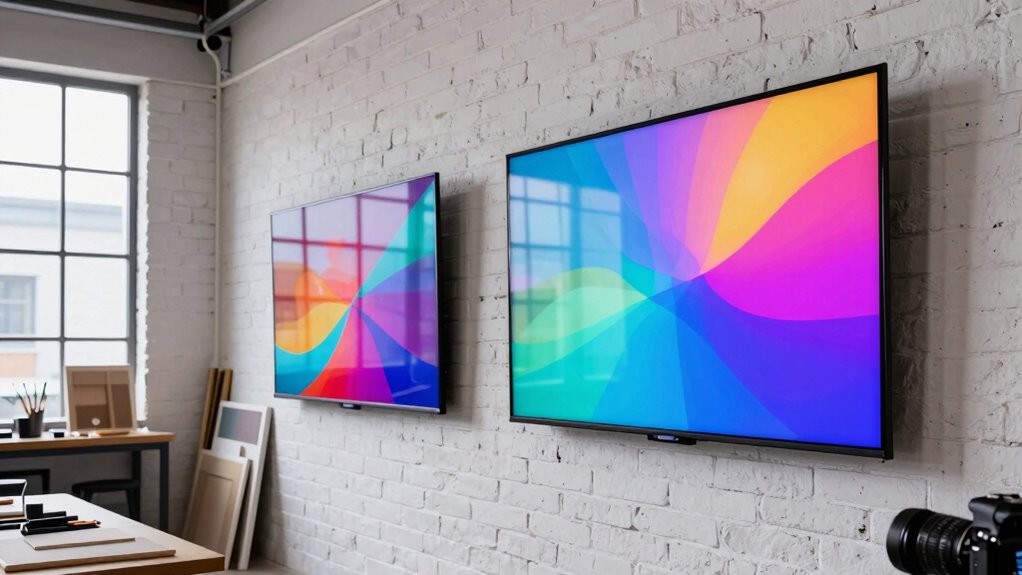

For most art studios, I’d choose the 32-Inch Interactive Digital Signage Kiosk as the best overall balance of screen size, touch interaction, and flexible connections. The MWE 65-Inch 4K Floor-Standing Display suits studios that need a large, polished presentation, while the Canlarriz 18.5-Inch 700-Nit Display is a compact choice when visibility in a bright area matters more than touch. The main tradeoff is between a screen large enough for group viewing and a smaller display that fits a counter or tight wall space. Touch capability, placement, and content playback needs can also change which option makes sense. Read on for how all eight compare and which one best fits your studio.

Get the latest gadgets delivered free with Prime
- Fast, free delivery on millions of items
- Prime Video, Amazon Music and more included
- Member-only deals all year
Complete the kit



Key Takeaways
The 32-inch interactive kiosk ranks first for its middle-ground size and combination of touch, Android, Wi-Fi, USB, and HDMI—more flexible for mixed studio use than a fixed-purpose screen.
The 65-inch MWE 4K floor-standing model is the large-format pick for presenting artwork to groups, while its footprint makes it less suitable for cramped studios.
The Canlarriz 18.5-inch screen stands apart with a stated 700-nit brightness, a useful distinction for brighter spaces where a compact display is enough.
The Sharp PN-L803C 80-inch AQUOS Board is the premium interactive option for collaborative viewing, but its scale is excessive for studios that mainly need menus or rotating announcements.
The two 15.6-inch options favor compact placement; the touchscreen model with a mobile stand adds positioning flexibility, while neither matches the viewing area of the 32-inch and 65-inch displays.
| 32-Inch Interactive Digital Signage Kiosk with Touchscreen, Android, Wi-Fi, USB, and HDMI | 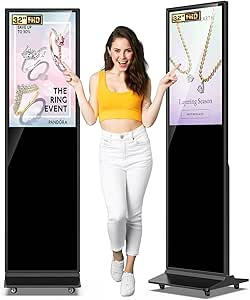 | Best Interactive Studio Directory | Screen size: 32 inches | Display: LCD IPS touchscreen | Resolution: 1920 × 1080 maximum listed; native resolution also listed as 1920 × 1200 | VIEW ON AMAZON | See Our Full Breakdown |
| MWE 65-Inch 4K Floor-Standing Digital Signage Display with Android Media Player |  | Best for Large Gallery Walls | Screen size: 65 inches | Resolution: 4K in title; FHD IPS in description | Display type: LCD | VIEW ON AMAZON | See Our Full Breakdown |
| Canlarriz 18.5-Inch Digital Signage Display, 700-Nit |  | Best Compact Signage with Remote CMS | Screen size: 18.5 inches | Resolution: 1366 × 768 | Brightness: 700 cd/m² | VIEW ON AMAZON | See Our Full Breakdown |
| AYSTekMann 15.6-Inch Interactive Digital Signage Display |  | Best Portable Touchscreen | Screen size: 15.6 inches | Resolution: 1920 × 1080 (FHD) | Touchscreen: 10-point capacitive | VIEW ON AMAZON | See Our Full Breakdown |
| MWE 32-Inch Indoor Digital Signage Display |  | Best for Flexible Studio Layouts | Screen size: 32 inches | Resolution: 1920 × 1080 (FHD) | Viewing angle: 178 degrees | VIEW ON AMAZON | See Our Full Breakdown |
| Sharp PN-L803C 80-Inch AQUOS Board Interactive Display |  | Best for Collaborative Studio Critiques | Screen size: 80 inches | Display type: LCD | Resolution: 1920 × 1080 (Full HD) | VIEW ON AMAZON | See Our Full Breakdown |
| 15.6-Inch Touchscreen Digital Signage Display with Mobile Stand |  | Best for Portable, Small-Studio Signage | Screen size: 15.6 inches | Resolution: 1920 × 1080 | Touchscreen: 10-point capacitive | VIEW ON AMAZON | See Our Full Breakdown |
| 65 inch Indoor Digital Signage 4K Touchscreen IPS Floor Standing Interactive Display with WiFi HDMI/USB Input Auto AD Player Android OS Black |  | Best for Large-Scale 4K Gallery Presentation | Screen size: 65 inches | Resolution: 3840 × 2160 (4K UHD) | Display type: LCD IPS | VIEW ON AMAZON | See Our Full Breakdown |
| digital signage display for art studio | Screen size | Resolution | Viewing angle | Operating system |
|---|---|---|---|---|
| 32-Inch Interactive Digital Si | 32 inches | 1920 × 1080 maximum listed; native resolution also listed as 1920 × 1200 | 178 degrees | Android |
| MWE 65-Inch 4K Floor-Standing | 65 inches | 4K in title; FHD IPS in description | 178 degrees | Android |
| Canlarriz 18.5-Inch Digital Si | 18.5 inches | 1366 × 768 | 178 degrees | Android 12 |
| AYSTekMann 15.6-Inch Interacti | 15.6 inches | 1920 × 1080 (FHD) | 160 degrees | Android; version listed as 11 and 13 |
| MWE 32-Inch Indoor Digital Sig | 32 inches | 1920 × 1080 (FHD) | 178 degrees | — |
| Sharp PN-L803C 80-Inch AQUOS B | 80 inches | 1920 × 1080 (Full HD) | — | — |
| 15.6-Inch Touchscreen Digital | 15.6 inches | 1920 × 1080 | — | Android 13 |
| 65 inch Indoor Digital Signage | 65 inches | 3840 × 2160 (4K UHD) | 178° | Android OS |
More Details on Our Top Picks
32-Inch Interactive Digital Signage Kiosk with Touchscreen, Android, Wi-Fi, USB, and HDMI
For a studio that wants visitors to browse class listings, exhibition details, or artist profiles themselves, this kiosk pairs a 32-inch touchscreen with Android, Wi-Fi, USB, and HDMI. Its 600-nit brightness and 178-degree viewing angle suit shared indoor areas where people may approach from different directions. Split-screen playback also lets a studio combine information rather than devote the entire display to one slide. Compared with the AYSTekMann 15.6-Inch Interactive Digital Signage Display, this offers a larger touch surface and more visible signage, but takes up far more floor space. The listed dimensions are substantial, and the description conflicts about native versus maximum resolution, so I would confirm that detail before choosing it for image-critical artwork. A three-year warranty and lifetime technical support add reassurance for a display expected to stay in public use.
Pros:- Touchscreen supports visitor-led browsing of studio information.
- 600-nit brightness and a 178-degree viewing angle help content remain visible around a busy lobby.
- Android, Wi-Fi, USB, and HDMI give studios several ways to manage and play content.
- Three-year warranty and lifetime technical support are useful for a public-facing installation.
Cons:- Large freestanding dimensions demand significant floor space.
- The description gives conflicting native and maximum resolution details.
- Its kiosk form is less convenient to relocate than the foldable wheeled MWE 32-Inch Indoor Digital Signage Display.
Best for: Art studios with a roomy entrance or lobby that want visitors to tap through class schedules, wayfinding, or exhibition information.
Not ideal for: Small studios or galleries with narrow walkways, and buyers who need confirmed resolution specifications for detailed artwork.
- Screen size:32 inches
- Display:LCD IPS touchscreen
- Resolution:1920 × 1080 maximum listed; native resolution also listed as 1920 × 1200
- Brightness:600 nits
- Viewing angle:178 degrees
- Operating system:Android
- Connectivity:Wi-Fi, USB, HDMI
- Dimensions:17 × 71 × 100 inches (D × W × H)
- Warranty:3 years
Our verdict“Choose this kiosk when interactive visitor browsing matters more than saving floor space or having an unambiguous resolution specification.”
MWE 65-Inch 4K Floor-Standing Digital Signage Display with Android Media Player
This floor-standing display is the lineup’s choice for making a gallery announcement or exhibition schedule readable across a large room. Its 65-inch screen, Android apps, USB playback, HDMI input, and split-screen layouts give studios flexible ways to present event information alongside images. Automatic playback and scheduled power can reduce daily setup for a display that runs on a regular timetable. Compared with the 32-Inch Interactive Digital Signage Kiosk, it gives artwork and announcements more viewing area, but the supplied description does not list a touchscreen, so it is less suited to visitor interaction. There is also a key specification conflict: the title says 4K while the description says FHD IPS. I would verify the actual resolution before using it for detailed artwork; its glossy finish may also reflect lights in bright studios.
Pros:- Large 65-inch screen gives exhibition notices and promotional visuals broad visibility.
- USB, HDMI, Wi-Fi, and Android apps support varied content sources.
- Automatic playback, scheduled power, and split-screen layouts help simplify routine operation.
- 178-degree viewing angle helps people see the display from different parts of a room.
Cons:- Resolution is listed as 4K in the title but FHD IPS in the description.
- Indoor-only design limits placement in outdoor or exposed areas.
- Large floor-standing dimensions are harder to accommodate than the compact Canlarriz 18.5-Inch display.
Best for: Galleries and larger studios that need a prominent, scheduled display for exhibitions, events, and wayfinding.
Not ideal for: Small studios with limited floor area, buyers who need touch interaction, or artists unwilling to confirm the conflicting resolution details.
- Screen size:65 inches
- Resolution:4K in title; FHD IPS in description
- Display type:LCD
- Aspect ratio:16:9
- Screen finish:Glossy
- Viewing angle:178 degrees
- Operating system:Android
- Connectivity:HDMI, USB, Wi-Fi, network
- Dimensions:33.23 × 17.72 × 81.1 inches (D × W × H)
Our verdict“Pick this for a spacious gallery that needs a large scheduled display, but confirm resolution and touch requirements before purchase.”
Canlarriz 18.5-Inch Digital Signage Display, 700-Nit
The Canlarriz suits studios that need a persistent information point without giving up the footprint of a full kiosk. Its 18.5-inch display can sit on a counter or stand in portrait or landscape orientation, while Android 12 and a built-in cloud CMS support remote content updates. The 700-nit brightness is the highest stated here, which can help schedules and notices stand out in a bright indoor space. Compared with the MWE 32-Inch Indoor Digital Signage Display, it takes up less room and adds cloud management, but its 1366 × 768 resolution and smaller screen are less compelling for artwork intended to be viewed at a distance. The glossy finish can catch reflections, and the resolution is modest for fine visual detail. Its 24/7 commercial-use rating and three-year warranty make it a practical information display rather than a large art showcase.
Pros:- Built-in cloud CMS supports remote content management.
- 700-nit brightness is well suited to bright indoor areas.
- Stand supports both landscape and portrait placement.
- USB plug-and-play offers a straightforward local update option.
Cons:- 1366 × 768 resolution is less suited to detailed artwork than the Full HD MWE 32-Inch display.
- 18.5-inch screen is too small for prominent gallery-wide viewing.
- Glossy finish may reflect studio lighting.
Best for: Studios that want a compact, remotely managed screen for a reception counter, doorway, or class schedule.
Not ideal for: Artists seeking a large, high-detail presentation of artwork, or studios with strong direct reflections on the display.
- Screen size:18.5 inches
- Resolution:1366 × 768
- Brightness:700 cd/m²
- Viewing angle:178 degrees
- Operating system:Android 12
- Memory and storage:2 GB RAM; 32 GB storage
- Connectivity:HDMI, LAN, TF card, USB 2.0, USB 3.0, DC
- Dimensions and weight:7.1 × 9.8 × 16.8 inches; 10.8 pounds
- Warranty:3 years
Our verdict“Choose this compact Canlarriz for remote-managed schedules and notices, not as the studio’s main artwork display.”
AYSTekMann 15.6-Inch Interactive Digital Signage Display
For an art studio that needs a screen for occasional workshops, sign-in, or a small interactive portfolio, the AYSTekMann combines a 15.6-inch Full HD touchscreen with an adjustable stand and a built-in battery rated for four to six hours. Ten-point capacitive touch gives several visitors room to interact, while wireless mirroring and scheduled playback suit changing presentations. Its compact format is easier to place than the 32-Inch Interactive Digital Signage Kiosk, though it cannot deliver the same lobby-scale visibility. The battery can help when a power outlet is inconvenient, but its limited runtime is not a substitute for all-day operation. At 250 nits, it is also less suited to bright spaces than the Canlarriz 18.5-Inch, which lists 700 nits. The Android version is inconsistently listed as 11 and 13, and the one-year warranty is shorter than several alternatives.
Pros:- Full HD resolution on a compact 15.6-inch touchscreen.
- Ten-point capacitive touch supports interactive use.
- Built-in battery is rated for four to six hours.
- Wireless screen mirroring and a varied port selection support flexible presentations.
Cons:- Four-to-six-hour battery life may not cover a full day of studio operation.
- 250-nit brightness is lower than the Canlarriz 18.5-Inch display’s stated 700 nits.
- Android version is listed inconsistently as 11 and 13, and the warranty is one year.
Best for: Small studios and workshop leaders who need a compact touch display for sign-in, short sessions, or a portable digital portfolio.
Not ideal for: Studios needing all-day battery operation, a bright-room display, or a longer stated warranty.
- Screen size:15.6 inches
- Resolution:1920 × 1080 (FHD)
- Touchscreen:10-point capacitive
- Brightness:250 nits
- Viewing angle:160 degrees
- Battery:10,000 mAh; rated for 4–6 hours
- Operating system:Android; version listed as 11 and 13
- Ports and connectivity:RJ45, HDMI-in, 2 × USB-A, MicroSD; Wi-Fi, Bluetooth
- Warranty:1 year
Our verdict“Choose the AYSTekMann for compact, short-session touchscreen use when portability matters more than brightness or all-day runtime.”
MWE 32-Inch Indoor Digital Signage Display
The MWE 32-inch display is a sensible pick for studios that move signage between a reception area, workshop, and exhibition space. Its foldable wheeled design makes repositioning easier than with the 32-inch interactive kiosk, while Full HD resolution gives images and notices a clear shared screen. USB and HDMI playback, Wi-Fi, remote content updates, automatic looping, and scheduled power support a hands-off display routine. The tradeoff is that the supplied description does not list touchscreen interaction, so it is better for showing content than letting visitors explore it. It also lacks a stated brightness figure, making it harder to judge how it will perform under strong studio lighting. Compared with the compact Canlarriz 18.5-Inch, this gives artwork more room but needs more physical space and is less suited to a counter.
Pros:- Foldable wheeled design supports relocation around the studio.
- Full HD 32-inch screen provides more room for artwork and announcements than compact displays.
- USB, HDMI, Wi-Fi, and remote updates offer several content-management options.
- Automatic looping and scheduled power support routine playback.
Cons:- Touchscreen interaction is not listed in the supplied product details.
- No brightness figure is provided, so bright-room visibility is harder to evaluate.
- Glossy finish may reflect ambient light, and the display is specified for indoor use.
Best for: Studios that want a Full HD display they can wheel between reception, workshops, and temporary exhibitions.
Not ideal for: Buyers who need touchscreen browsing, a compact counter display, or a stated brightness specification for a bright installation.
- Screen size:32 inches
- Resolution:1920 × 1080 (FHD)
- Viewing angle:178 degrees
- Refresh rate:60 Hz
- Response time:5 ms
- Inputs:1 HDMI port; 2 USB ports
- Connectivity:Wi-Fi
- Dimensions and weight:1.06 × 18.15 × 48.87 inches; 21.55 kg
- Warranty:3 years for quality defects
Our verdict“Pick this MWE when you need a movable, Full HD content screen and do not need visitor touch interaction.”
Sharp PN-L803C 80-Inch AQUOS Board Interactive Display
For studios that need a large surface for group markups, the 80-inch capacitive multi-touch screen gives the Sharp PN-L803C a different job from the portable 15.6-Inch Touchscreen Digital Signage Display with Mobile Stand. Its Full HD resolution and support for up to 1.06 billion colors suit shared presentations, annotated reference images, and artwork reviews where several people need to interact at once. USB connectivity and compatibility with Windows and macOS make it practical to connect common studio computers, though the supplied details do not specify wireless sharing or built-in signage software. The tradeoff is substantial: at 227 pounds, this is a fixed installation, not a display to reposition as the studio changes. Its update-support date is also unknown, so I would favor it for a planned collaborative area rather than a flexible, frequently refreshed signage setup.
Pros:- 80-inch screen gives groups room to view and mark up shared content
- Capacitive multi-touch supports direct interaction with displayed material
- Full HD resolution and 1.06 billion colors suit detailed visual presentations
- Compatible with Windows and macOS computers
Cons:- At 227 pounds, installation and relocation require substantial planning
- USB is the listed connection, with wireless sharing not specified
- Software update support date is unknown
Best for: Art schools and larger studios that want a fixed, oversized interactive display for group critiques and computer-connected presentations.
Not ideal for: Small studios, pop-up exhibitions, or buyers who need a lightweight display, wireless sharing, or confirmed long-term software support.
- Screen size:80 inches
- Display type:LCD
- Resolution:1920 × 1080 (Full HD)
- Touchscreen:Capacitive multi-touch
- Color support:Up to 1.06 billion colors
- Connectivity:USB
- Compatible systems:Windows and macOS
- Weight:227 pounds
Our verdict“Choose the Sharp PN-L803C for a permanent, computer-connected critique space where a large interactive canvas matters more than portability.”
15.6-Inch Touchscreen Digital Signage Display with Mobile Stand
The Mobile Stand model is the most adaptable pick here for a small studio that needs to move announcements, schedules, or portfolio slides between work areas. Its 15.6-inch Full HD touchscreen is much smaller than the Sharp PN-L803C, but the compact size, adjustable stand, VESA mounting, and 10,000 mAh battery make placement easier when there is no convenient outlet. Wireless screen sharing and Android 13 add flexible ways to present content, while Ethernet, HDMI, and USB provide wired alternatives. That flexibility comes with limits: the battery is rated for just 4–6 hours, so it is not an all-day unattended sign, and the listing gives conflicting weight figures. I would choose it for mobile, close-range information—not as the main display for gallery-wide artwork or group viewing.
Pros:- Built-in battery and adjustable stand support placement away from a fixed outlet
- Wireless screen sharing and Android 13 offer flexible content sources
- 10-point capacitive touchscreen supports interactive use
- Ethernet, HDMI, USB, and audio ports provide several wired connections
Cons:- 15.6-inch screen is too small for prominent gallery signage or group viewing
- Battery life is limited to a stated 4–6 hours
- Listing gives conflicting weight figures of 2.3 pounds and 5.95 kg
Best for: Independent artists and small studios that need a portable, close-range display for rotating schedules, workshop details, or portfolio content.
Not ideal for: Galleries seeking a large viewing surface or studios that need a full-day battery-powered display without access to charging.
- Screen size:15.6 inches
- Resolution:1920 × 1080
- Touchscreen:10-point capacitive
- Operating system:Android 13
- Brightness:400 cd/m²
- Memory and storage:4 GB RAM, 64 GB storage
- Battery:10,000 mAh; rated for 4–6 hours
- Ports:RJ45 Ethernet, MicroSD, HDMI output, USB 2.0, USB 3.0, 3.5 mm audio
- Mounting:Adjustable stand and 75 × 75 mm VESA
Our verdict“Pick this compact model when portability and flexible placement matter more than a large, always-on display.”
65 inch Indoor Digital Signage 4K Touchscreen IPS Floor Standing Interactive Display with WiFi HDMI/USB Input Auto AD Player Android OS Black
When artwork needs to read clearly across a room, this floor-standing model offers a stronger visual case than the Sharp PN-L803C: its 65-inch 4K UHD IPS panel provides four times the pixel count of Full HD, alongside a 178° viewing angle for visitors approaching from different directions. Android, built-in Wi-Fi, HDMI, and four USB ports give a studio several ways to supply content, and dual speakers can support video or presentation audio. The advertised touch option is optional, so buyers should confirm the chosen configuration before planning interactive labels or wayfinding. At 60 kg and roughly 71 inches tall, it takes dedicated floor space and may need professional installation. Compared with the portable 15.6-Inch Touchscreen Digital Signage Display with Mobile Stand, it is a room-scale fixture, not a movable counter display.
Pros:- 4K UHD IPS panel supports detailed artwork presentation at large size
- 178° viewing angle helps visitors view content from varied positions
- Wi-Fi, HDMI, and four USB ports allow multiple content connections
- Three-year warranty is specified
Cons:- 60 kg weight can make delivery, installation, and repositioning difficult
- Large floor-standing footprint may crowd smaller studios
- Touch capability is optional rather than confirmed on every version
Best for: Galleries and larger art studios that want a floor-standing 4K display for artwork, exhibition information, or video viewed across a shared space.
Not ideal for: Small studios with tight floor plans, buyers who need frequent repositioning, or anyone who requires touch without confirming the selected configuration.
- Screen size:65 inches
- Resolution:3840 × 2160 (4K UHD)
- Display type:LCD IPS
- Brightness:500 cd/m²
- Viewing angle:178°
- Operating system:Android OS
- Connections:Built-in Wi-Fi, 2 HDMI ports, 4 USB ports
- Speakers:2 × 5 W
- Dimensions and weight:17.72 × 24 × 71.26 inches; 60 kg
Our verdict“Choose this floor-standing 4K model for a spacious gallery that needs room-scale visuals and can accommodate a heavy permanent fixture.”

How We Picked
I compared these displays against the jobs they are likely to do in an art studio: show portfolios and exhibition information, support interactive browsing, present work to a group, and fit into spaces ranging from counters to open viewing areas. I gave weight to screen size and placement, stated resolution or brightness where supplied, touch capability, playback and connection options, and the practical demands of moving or installing each screen. I also separated products by likely role so a compact information display would not be judged as though it had to serve as a gallery presentation wall.
The ranking favors versatility for everyday studio use first, then specialized strengths such as large-format collaboration, brightness, or portable positioning. Models with fewer supplied details are described cautiously rather than credited with unverified capabilities. A higher position does not mean every studio should choose that product: room size, viewing distance, ambient light, and whether visitors need to interact with the content can change the best fit.
| digital signage display for art studio | Operating system | Connectivity |
|---|---|---|
| 32-Inch Interactive Digital Si | Android | Wi-Fi, USB, HDMI |
| MWE 65-Inch 4K Floor-Standing | Android | HDMI, USB, Wi-Fi, network |
| Canlarriz 18.5-Inch Digital Si | Android 12 | HDMI, LAN, TF card, USB 2.0, USB 3.0, DC |
| AYSTekMann 15.6-Inch Interacti | Android; version listed as 11 and 13 | — |
| MWE 32-Inch Indoor Digital Sig | — | Wi-Fi |
| Sharp PN-L803C 80-Inch AQUOS B | — | USB |
| 15.6-Inch Touchscreen Digital | Android 13 | — |
| 65 inch Indoor Digital Signage | Android OS | — |
Factors to Consider When Choosing Digital Signage Display For Art Studios
Choosing a studio display is less about maximizing screen size and more about matching the screen to the work, room, and visitor. I’d settle a few practical questions before comparing features: where the display will sit, who needs to read it, and whether it should invite touch or simply show a rotating presentation.
Match Screen Size to Viewing Distance
A display near a reception desk has a different job from one meant to anchor a group critique. Small screens can handle schedules, prices, or a focused portfolio selection when viewers stand nearby, but dense artwork details and captions become difficult to share at a distance. Large screens make shared viewing easier, yet can dominate a small studio and leave little wall or floor space for actual work. Measure the viewing area and note the farthest typical viewer before choosing a size. A common mistake is buying for the maximum audience rather than the room’s usual use. If the display will serve both close-up browsing and occasional group viewing, a mid-size screen may be a more balanced choice than either extreme.
Treat Brightness and Light as a Pair
Ambient light affects how clearly artwork and text appear, so assess the intended spot at the times it will be used. A window-facing counter or brightly lit entrance may call for a brighter screen than a dim viewing room; the Canlarriz’s stated 700-nit brightness gives it a specific advantage to investigate for such settings. Brightness alone does not guarantee accurate-looking artwork, and screen reflections or direct sunlight can still interfere with viewing. Avoid placing a display where glare lands across the image, even if the specification looks strong. For artwork previews, compare the screen’s appearance with the physical work under the studio’s normal lighting. If color fidelity is central, seek reliable display-color information rather than assuming that a larger or brighter screen will reproduce work more faithfully.
Decide Whether Touch Helps Visitors
Touch can let visitors browse portfolios, exhibition notes, or project categories without asking staff for help. It also adds interaction design work: someone must organize the content, make controls easy to use, and keep the interface current. A touchscreen used only to display a looping slideshow may add capability the studio rarely needs. Consider whether visitors are likely to use the screen independently and whether staff can maintain an interactive layout. In a teaching studio, touch may support group discussion or annotation; in a small shop area, a simple display can communicate information with less upkeep. Choose interaction because it serves a clear task, not just because the feature is available.
Plan Placement, Mobility, and Power
Floor-standing screens can be repositioned and seen from across a room, but they take up floor area and need a stable location that does not obstruct circulation. A compact counter or wall-mounted display keeps pathways clearer, though it may be less visible during events. Mobile stands are useful when a studio changes between classes, openings, and daily work, but moving a screen also means managing cables and finding a safe parking spot. Before buying, measure doorways, display clearance, nearby power access, and the path visitors use. Do not assume that a floor model is easy to move simply because it stands independently. A fixed installation may be the better choice when the screen has one permanent role.
Check Content Playback and Connection Needs
Android, Wi-Fi, USB, and HDMI can support different ways of loading or playing content, but the right combination depends on how the studio works. A screen with multiple inputs can accept a connected computer or media source, while wireless access may help with updates if the network is dependable. Check which file types, content tools, and update methods the display supports before committing; a listed port does not establish that every workflow will be straightforward. If staff need to update artwork frequently, a clear content-management routine matters as much as the screen itself. For a stable loop of images, simple playback may be enough. Avoid paying for a complex interactive setup if nobody has time to maintain it.
Budget for the Whole Installation, Not Just the Screen
The display is only one part of a working signage setup. Mounts or stands, cable routing, a network connection, content preparation, and staff time can all shape the real effort involved. Large interactive models may make sense when they replace several presentation tools or support regular workshops, but they can be excessive for a simple welcome message. A compact screen may reduce space demands while requiring a more deliberate layout so artwork and text remain legible. Ask who will update the content and how often before choosing a feature-rich model. Paying more is easier to justify when the display will be used across several tasks, not when its extra capabilities will sit unused.
Frequently Asked Questions
Is a 32-inch display large enough for an art studio?
It can be a good fit for a reception area, a small portfolio station, or a studio where viewers stand fairly close. It is less suited to showing detailed work to a group spread across a large room, where a 65-inch or 80-inch screen gives people more viewing area. Think about the farthest viewer and whether captions need to be readable from that position. The 32-inch interactive kiosk also brings touch and several connection options, so it can cover more tasks than a basic information screen. If the display’s main job is shared presentation, prioritize viewing scale over extra interaction features.
Should I choose a touchscreen for displaying artwork?
Choose touch when visitors or students will browse content, open project details, or interact with presentations. If the screen will only run a slideshow or exhibit information loop, touch may add setup and upkeep without changing the visitor experience. Interactive displays also need a clear, simple interface that works for people who have not used it before. A larger touch model can support group collaboration, while a compact touchscreen may suit a personal browsing station. Decide what a visitor should be able to do, then match the display to that task.
Which display is better for a bright studio entrance?
Start by checking the lighting and glare at the exact placement, rather than choosing on brightness alone. The Canlarriz 18.5-inch model has a stated 700-nit brightness, which makes it a relevant compact option for a bright area. Its smaller screen, however, may not work for information meant to reach people across a large entrance. A larger screen can improve visibility by size, but reflections can still reduce readability. If possible, position the display away from direct window reflections and test sample images under the room’s usual lighting before settling the installation.
When is an 80-inch interactive display worth the space?
An 80-inch interactive display makes the most sense when the studio regularly hosts group critiques, workshops, or collaborative presentations that benefit from a shared, touch-enabled surface. For a small studio that mainly shows a portfolio or opening hours, that scale can consume valuable room and exceed the task. Compare the screen’s footprint and intended viewing distance with the number of people who will use it at once. Also account for installation and content preparation, not just the display itself. If group interaction is occasional, a smaller screen may cover daily needs with less spatial commitment.
Do I need Wi-Fi if the display can play content from USB or HDMI?
Not always. USB or HDMI may be enough when content changes infrequently and the studio is comfortable updating files directly or connecting a separate source. Wi-Fi can make remote updates more convenient, but it depends on reliable network access and a workable content workflow. Before choosing, find out how the display handles playback after updates and whether staff can use the process without extra technical help. Studios that change artwork or event information often may value connected updates; a stable, unattended loop may not need them. The best choice is the one that fits the studio’s update habits.
Conclusion
For most studios, I’d start with the 32-Inch Interactive Digital Signage Kiosk: its size and connection options make it the best overall fit for mixed presentation and visitor browsing. For a large shared display, the MWE 65-Inch 4K Floor-Standing model is my best value-oriented choice among the large-format options, while the Sharp PN-L803C 80-Inch AQUOS Board is the best premium pick for studios that regularly need a collaborative interactive surface. Beginners who want a compact, straightforward place to show information should look at the MWE 32-Inch Indoor Display and confirm that its playback approach suits their content routine. For a bright counter or tight space, consider the Canlarriz 18.5-Inch 700-Nit Display; for flexible positioning, the 15.6-Inch Touchscreen Display with Mobile Stand has the more specific advantage. Choose by the studio’s room and daily task, not by screen size alone.
Halloween Picks
halloween
As an affiliate, we earn on qualifying purchases.