TL;DR
The source material presents a buying guide comparing 10 3D printers for crafts and everyday projects, with options from open-frame hobbyist models to enclosed printers and systems designed for multiple colors or materials. It highlights differences in build volume, included accessories, weight and filament handling; it does not report a new product launch or independent test results.
A buying guide from Thorsten Meyer AI compares 10 3D printers for colorful crafts and everyday projects, including enclosed models, open-frame hobbyist machines and printers with different approaches to multi-color work, as detailed in the original analysis. The guide recommends the Bambu Lab P2S Combo as its leading all-around option, while stressing that buyers should weigh materials, workspace, setup and filament handling against their project needs.

Get the latest gadgets delivered free with Prime
- Fast, free delivery on millions of items
- Prime Video, Amazon Music and more included
- Member-only deals all year
The guide describes the P2S Combo as a package pairing a printer with an AMS 2 Pro multi-material system. It lists a maximum printing speed of up to 600 mm/s and says the system includes filament drying. The listed body size is 18 by 22 by 18 inches and its weight is 46.3 pounds, which may limit where it can be placed. These figures are presented in the source material; no testing method or independent performance results are supplied.
Other 3D printer picks for different skill levels are aimed at different needs. The Bambu Lab P1S Combo combines an enclosure with an AMS unit, while the standalone P1S is presented as an enclosed option without bundled multicolor hardware. The open-frame Bambu Lab A1 offers automatic calibration; the guide says multicolor printing requires an AMS Lite or a combo bundle. A separate A1 bundle is associated with an LED lamp kit for lighting projects, but buyers are advised to check exactly which accessories are included.
The remaining entries include the Creality K2 Combo, with a listed 260 mm cube build volume; the Anycubic Kobra X, described as supporting four colors natively; the four-toolhead Snapmaker U1; Flashforge’s AD5X, described as supporting four-color printing; and the Adventurer 5M, whose all-metal CoreXY structure is listed with a maximum travel speed of 600 mm/s, alongside other printers for home, workshop, and multicolor projects. The source also says the Kobra X can expand beyond four colors with additional ACE 2 Pro units. It does not provide a consistent test comparison across all 10 printers.
Choose a printer for your projects
This guide compares 10 printers for colorful crafts and everyday use. Its leading all-around pick is the Bambu Lab P2S Combo, but the right fit depends on materials, space, setup and filament handling.
Start with your project
A feature matters when it fits the materials, scale and colors you plan to print.
Consider an enclosure
Buyers planning ABS or ASA prints may favor an enclosed design.
Match the setup to the job
Small, mostly single-color objects may not need a separate multicolor system.
Check room and weight
Printer size, weight and spool space affect where a machine can go.
Different paths to multiple materials
- P2S Combo pairs the printer with an AMS 2 Pro system.
- P1S Combo adds an AMS unit; the standalone P1S is enclosed without bundled multicolor hardware.
- A1 multicolor printing requires an AMS Lite or combo bundle.
- Kobra X supports four colors natively and can expand with additional ACE 2 Pro units.
- AD5X is described as supporting four-color printing and needs space for side-by-side spools.
- Snapmaker U1 uses four toolheads for jobs with materials including flexible and water-soluble filaments.
Check practical tradeoffs
Weight can affect moving and placement before spool space or accessories are considered.
| Model | Listed weight | What to consider |
|---|---|---|
| Creality K2 Combo | 65.9 pounds | Placement and moving |
| Snapmaker U1 | 57.9 pounds | Placement and moving |
| Bambu Lab A1 | 22 pounds | Open-frame setup |
| Flashforge AD5X | 22 pounds | Spool space |
What the comparison leaves open
- No common test results for print quality, reliability or speed.
- No comparison of material waste, operating costs, maintenance or noise.
- Prices and availability are not provided.
- Bundle contents may vary; confirm current specifications and accessories before buying.
Choosing a Printer for Your Projects
The comparisons show why a headline feature such as speed or color count does not, on its own, determine which printer fits a home workshop. Buyers planning ABS or ASA prints may favor an enclosed design, while people making small, mostly single-color objects may have little use for a separate multicolor system. Workspace is another practical constraint: the guide lists the K2 Combo at 65.9 pounds and the Snapmaker U1 at 57.9 pounds, compared with 22 pounds for the A1 and Flashforge AD5X. Those differences affect moving and placement, even before considering spool space or accessories.
The type of multi-material system also changes the tradeoffs. The guide describes the Snapmaker U1’s four toolheads as supporting multi-material jobs, including flexible and water-soluble materials. Other entries rely on systems that feed or switch filaments, or offer expansion through additional equipment. The source does not quantify material waste, printing time for color changes, operating costs or maintenance across those approaches. Those factors could influence the real value of a setup, so the listed features are best treated as a starting point for comparing models rather than a complete cost or performance ranking.
Products Worth Considering
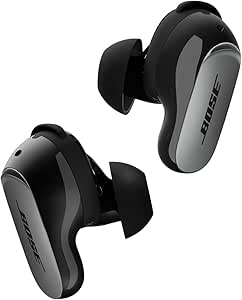
Bose QuietComfort Ultra Earbuds (2nd Gen), Wireless Noise-Cancelling Earbuds, Black

Bose Home Speaker 500 Smart Bluetooth Speaker, Black
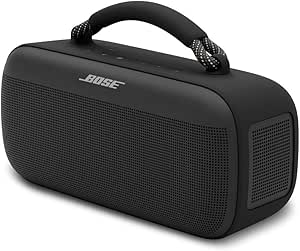
Bose SoundLink Max Portable Bluetooth Speaker, IP67 Waterproof, Black
As an affiliate, we earn on qualifying purchases.
How the Ten Models Differ
The lineup covers several product formats rather than a single class of printer. CoreXY models listed include the P2S Combo, P1S Combo and Adventurer 5M. The guide identifies the P1S and P1S Combo as separate purchase choices: one is a standalone enclosed printer, while the other adds an AMS system. The A1 and A1 Combo are presented as open-frame options for hobbyists whose materials and workspace suit that design.
Build volume, color capacity and bundled hardware vary. The guide lists the K2 Combo at 260 × 260 × 260 mm and describes the Kobra X as providing four-color printing without an add-on system for basic multicolor work. It characterizes the AD5X as a four-color multi-material option and says its side-by-side spools need dedicated space. The Snapmaker U1 takes a different route by using four toolheads. The source lists weights for eight models, but does not give a complete, directly comparable specification table for every entry.
“A faster or more elaborate printer is not automatically the better fit if your projects are small or single-color.”
— Thorsten Meyer AI buying guide
Performance Questions Still Open
The material does not identify a publication date, testing protocol, reviewer sample, prices or a complete basis for ranking the printers. Its speed figures are specifications stated in the guide, not reported results from a common test. It is also unclear how the models compare in print quality, reliability, noise, upkeep, total cost or material waste under the same conditions. Accessory bundles may differ by seller or listing, and the guide itself advises checking whether the AMS Lite is included with the A1 bundle. Readers should confirm current specifications and package contents with the manufacturer or retailer before buying.
Check Bundles and Current Specifications
The next step for a buyer is to narrow the shortlist by project type: material, desired print size, number of colors, available space and willingness to manage extra equipment. Then check the current product listing for included accessories, compatible filaments and any add-on requirements. The source supplies no dates for a sale, product update or future review, so no upcoming milestone is established. Prices and availability are also not provided in the article material.
For a more direct comparison, buyers can consult current manufacturer specifications and look for testing that uses the same materials and print settings across models. That would help clarify whether stated speed, color capacity and build volume translate into useful results for a particular project. Until such evidence is available in the source, its recommendations remain a feature-based guide rather than a verified ranking from comparative testing.
Key Questions
Which printer does the guide recommend as its overall pick?
The guide names the Bambu Lab P2S Combo as its leading all-around option for buyers seeking an enclosed printer with an included AMS 2 Pro system. It lists speeds of up to 600 mm/s, but does not provide comparative test results.
Which models are described as supporting multicolor printing?
The guide discusses AMS systems for the P2S Combo and P1S Combo, an AMS Lite option for the A1, four-color printing on the Anycubic Kobra X and Flashforge AD5X, and four toolheads on the Snapmaker U1. The setup and expansion options differ by model.
Does the guide compare print quality and running costs?
No. The source lists features and some specifications but does not supply a common test of print quality, reliability, material waste or total ownership cost.
What should buyers verify before ordering?
Check the current price, product specifications and exact bundle contents, especially whether a multicolor accessory such as the AMS Lite is included or sold separately. Also confirm the printer’s dimensions, weight and space needs for its filament system.
Source: Thorsten Meyer AI