
Technology now shapes how we create, communicate, travel, work, and manage everyday routines. Yet following technology news can feel like standing beneath a waterfall of announcements: new devices arrive constantly, familiar products gain unfamiliar features, and marketing language often makes small updates sound revolutionary. A useful technology hub should do more than repeat headlines. It should help you understand which developments matter, how different categories fit together, and what to consider before bringing another gadget into your life.

Get the latest gadgets delivered free with Prime
- Fast, free delivery on millions of items
- Prime Video, Amazon Music and more included
- Member-only deals all year
This guide provides an orientation to the modern technology and gadget landscape. Whether you are building a digital art workspace, choosing wearable technology, improving a mobile setup, or simply trying to make more deliberate purchases, the sections below offer practical starting points and links to focused guides for deeper research.
How to Make Sense of Technology News
Technology news generally falls into several categories: product launches, software updates, industry changes, emerging research, security developments, and shifts in how people use technology. Distinguishing between them makes the daily stream easier to evaluate. A new device may be interesting without being important, while a quiet change to privacy settings or software support could affect millions of existing users.
When reading about a product announcement, look beyond the headline and ask what has materially changed. A faster processor may be valuable for demanding creative work but nearly invisible during basic browsing. A redesigned wearable may improve comfort even if its internal technology remains similar. Compatibility, repairability, update policies, and accessory requirements can matter more over time than a single headline feature.
Questions Worth Asking About Any New Gadget
- Does it solve a problem that your current setup cannot solve?
- Will it work with the devices, software, and file formats you already use?
- Does it require subscriptions, proprietary accessories, or a permanent account?
- How long is software support likely to continue?
- Can worn components such as batteries, straps, tips, or cables be replaced?
- What personal information does the device collect, and where is that data stored?
- Is the new feature useful in your routine, or merely impressive in a demonstration?
These questions apply across categories, from smartwatches and tablets to connected home products. They also encourage a healthier relationship with technology news: one based on relevance and context rather than urgency.
Products Worth Considering

EcoFlow Smart Home Panel 2 Whole-Home Backup System Hub
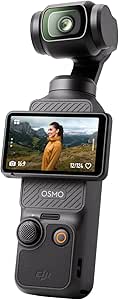
DJI Osmo Pocket 3 Vlogging Camera with 1-Inch CMOS Sensor and 4K Video

Samsung Galaxy Tab S10 FE 128GB Wi-Fi Android Tablet, Blue
As an affiliate, we earn on qualifying purchases.
Creative Technology for Artists and Designers
Creative hardware is one of the clearest examples of technology serving a specific craft. Drawing tablets, styluses, calibrated displays, scanners, printers, and editing software form an interconnected workflow. The best component is not necessarily the most powerful one; it is the component that fits the artist’s medium, working style, preferred software, available space, and output requirements.
Drawing tablets broadly include pen tablets without screens, pen displays that connect to a computer, and standalone tablets capable of running creative applications. Important considerations include active drawing area, pressure and tilt input, display size, ergonomics, shortcut controls, driver compatibility, portability, and the feel of the stylus against the surface. Artists comparing professional options can begin with this guide to the best high-end drawing tablets for artists.
A tablet should be evaluated as part of a complete workstation. A large display may support detailed illustration but require more desk space and a suitable stand. A compact model may travel easily but offer less room for broad drawing movements. Computer specifications also matter when working with large canvases, many layers, animation, or three-dimensional assets.
From Digital Artwork to Physical Prints
Creating an image and reproducing it on paper are different technical challenges. Printing introduces decisions about resolution, color management, ink systems, media types, print dimensions, and ongoing maintenance. Artists who want to produce portfolios, editions, proofs, or display pieces can explore the guide to fine art printers for artists.
A reliable print workflow begins before the print button is pressed. Monitor calibration, appropriate color profiles, consistent lighting, and carefully prepared source files all influence the result. Paper choice can change contrast, texture, and perceived saturation, while print size determines how much source resolution is needed. Prospective buyers should also consider the physical footprint of a printer, supported paper handling, ink availability, and how frequently the machine will be used.
Wearable Technology That Fits Everyday Life
Wearable devices sit at the intersection of technology, personal style, and convenience. They can place notifications, timers, navigation prompts, communication tools, and activity information on the wrist. Their value, however, depends heavily on comfort and habit. A device that looks impressive but feels awkward or demands frequent attention may quickly end up in a drawer.
Start with ecosystem compatibility. Some watches work best when paired with a particular mobile platform, while others offer broader support with differences in available features. Next, consider the functions you would genuinely use. Someone seeking discreet notifications has different needs from a person interested in outdoor navigation, contactless controls, or detailed exercise information.
Appearance also matters because watches are unusually visible personal devices. Case proportions, strap materials, display design, and interface styling all affect whether a wearable feels appropriate throughout the day. The guide to fashion smartwatches that combine style and technology is a useful next step for readers who want connected features without ignoring design.
Smart Devices Versus Traditional Watches
Not every wrist needs a screen. Traditional watches remain attractive to people who value simplicity, visual restraint, or freedom from another charging routine. Thin cases can be especially useful beneath a cuff or for anyone who prefers a less prominent accessory. Readers comparing understated designs can browse the guide to slim watches for men.
The choice between a smartwatch and a conventional watch is less about which category is universally better and more about the role you want the object to play. If you want wrist-based interactions and integration with digital services, a smartwatch may make sense. If you primarily want dependable timekeeping and a particular aesthetic, a traditional model may be the more satisfying tool.
Portable Technology and Smarter Travel
Modern travel often involves a phone, laptop or tablet, headphones, chargers, adapters, battery packs, and storage devices. The challenge is not merely carrying everything; it is keeping equipment protected, accessible, and within practical weight limits. A good mobile setup begins by eliminating duplication. One compatible charger and a carefully chosen cable set may replace several separate power supplies, depending on the devices involved.
The bag itself is part of the technology system. Device compartments need suitable dimensions and padding, while organization should make frequently used items easy to reach without exposing valuables unnecessarily. Comfort becomes more important as the load increases. Travelers balancing device storage, personal items, and appearance can consult the guide to women’s travel backpacks for style and comfort.
Building a Practical Mobile Kit
- Choose cables based on the ports and charging standards your devices actually support.
- Keep backups of essential files before traveling.
- Use device encryption and strong authentication in case equipment is lost.
- Label adapters and small accessories so they are easier to identify.
- Store liquids separately from electronics.
- Review airline and regional rules for batteries and power accessories before departure.
- Download essential documents, maps, and media for offline access.
Portable technology works best when each item has a clear purpose. Reducing the number of accessories makes packing simpler and also makes it easier to notice when something is missing.
Accessories, Materials, and Gadget Care
Owning technology is only part of the equation. Screens collect oils, watch bands wear, charging ports gather debris, stylus tips change with use, and printers require routine attention. Sensible care can preserve usability and appearance, but cleaning methods should always match the material and manufacturer guidance.
Avoid assuming that one cleaner is safe for every surface. Coated displays, camera lenses, polished metal, leather, plated jewelry, and porous materials have different requirements. Apply liquids cautiously, keep moisture away from openings, and disconnect powered equipment before maintenance where appropriate. Abrasive materials can create permanent damage even when they appear soft.
This principle extends beyond electronics to the accessories worn alongside them. Watches, bracelets, rings, and other personal objects frequently share the same storage spaces and daily conditions as wearable devices. Readers looking after jewelry can use the guide to jewelry polishing cloths as a category-specific resource rather than treating every surface with a general-purpose cleaning product.
Analog Interests in a Digital World
A technology-focused lifestyle does not require every activity to become connected. In fact, physical tools and screen-free hobbies can offer a welcome counterbalance to constant notifications. Printed art, notebooks, mechanical watches, cards, and other tactile objects continue to appeal precisely because their interaction is direct and bounded.
Tarot is one example of a traditionally physical practice that now exists alongside digital communities, reference apps, online learning, and remote readings. The deck remains the central object, while technology can support discovery and study. Those exploring the physical side can review the guide to tarot card decks.
The same balance applies to other specialist accessories. Some objects benefit from modern manufacturing or improved materials without needing connectivity. For readers researching a very different kind of compact accessory, the guide to butane pipe lighters focuses on options within that category. As with any flame-producing item, follow applicable safety guidance, storage requirements, age restrictions, and local rules.
Privacy, Security, and Connected Devices
Every connected gadget introduces a relationship between hardware, software, accounts, and data. Before setup, review the permissions requested by its companion app. A feature may reasonably need Bluetooth or location access while in use, but that does not automatically justify continuous background access. Disable permissions that are unnecessary and revisit settings after major updates.
Basic Security Habits
- Install operating system, application, and firmware updates from official sources.
- Use unique passwords and multi-factor authentication for important accounts.
- Change default credentials on connected devices when possible.
- Remove old devices from accounts before selling, recycling, or giving them away.
- Check whether cloud synchronization is optional and what information it stores.
- Back up valuable work using more than one storage location.
- Research support status before buying older or heavily discounted connected hardware.
Security is not a one-time setup task. Devices age, vendors change policies, and software support eventually ends. A periodic review of installed apps, account access, connected services, and unused hardware can reduce unnecessary exposure.
How to Build a Technology Setup That Lasts
A durable setup begins with needs rather than categories. Define the job first: creating illustrations, producing prints, staying reachable while traveling, or checking essential information without opening a phone. Then identify the minimum hardware and software required to do that job well.
Prioritize compatibility and comfort before marginal specifications. Leave room in the budget for necessary accessories, replacement components, software, storage, and maintenance. Where possible, choose products that can continue serving a useful role even when a newer generation appears.
Finally, treat technology news as context rather than a shopping schedule. Follow developments that affect the tools you already use, investigate new categories when they address a genuine need, and rely on focused guides when comparison becomes complicated. The goal is not to own the most gadgets. It is to assemble a thoughtful collection of tools that supports creativity, mobility, communication, and everyday life with as little friction as possible.