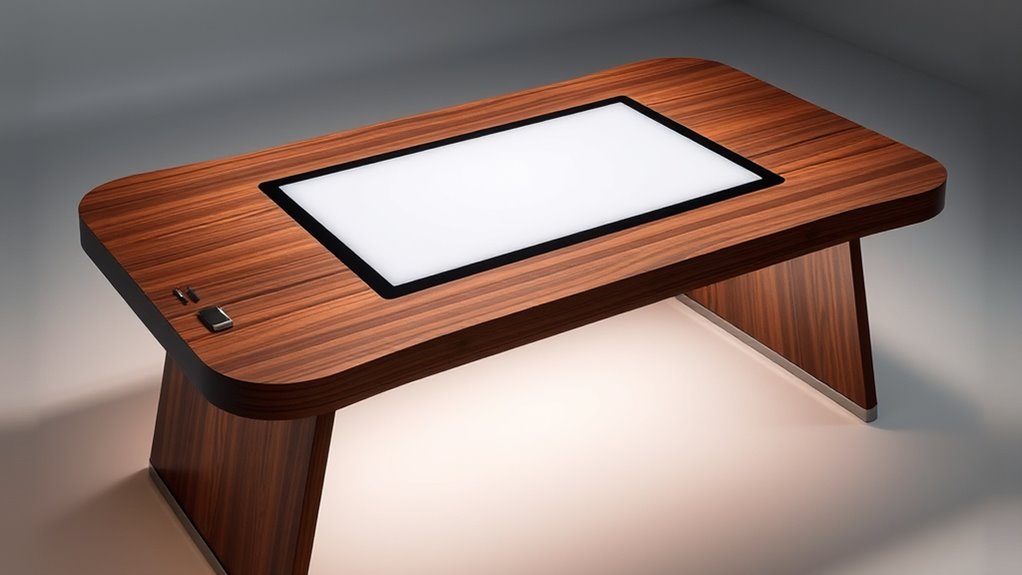

For a luxury drawing desk with a built-in display, I’d start with the Studio Designs Fusion if you want a broad mix of adjustable height, integrated lighting, and small-supply storage. The Studio Designs Zenith is my pick for a wider illuminated area and straightforward height presets. Both pair tempered glass with a dimmable Artograph LED pad, but neither is a heavy-duty drafting table: each lists a 25-pound tabletop capacity. The choice comes down to whether you value Fusion’s more varied storage and continuously adjustable height, or Zenith’s larger light pad and set height positions.

Get the latest gadgets delivered free — and shop member deals
- Fast, free delivery on millions of items
- Access to Prime Big Deal Days deals on October 6–7
- Prime Video, Amazon Music and more included
Complete the kit



Key Takeaways
- The Fusion combines its 31.75 × 20-inch illuminated area with two drawers, a side shelf, a bottom shelf, and continuously adjustable height from 27.5 to 35.5 inches.
- The Zenith has the larger light pad at 34 × 19.5 inches and reaches 3,500 lux, making it the stronger fit when illuminated tracing space takes priority.
- Both tables offer a 0° to 40° work angle, tempered glass, and a 25-pound tabletop limit, so neither is suited to heavy equipment.
- Choose Fusion for more organized supply storage; choose Zenith for three defined height settings and a broad illuminated work area.
- Neither desk has a built-in electronic display: each integrates an LED light pad beneath its glass surface for tracing and drawing.
| Studio Designs Fusion Adjustable Drafting Table with Integrated LED Light Pad |  | Best Overall | Overall dimensions: 47.75 W × 23.75 D × 35.5 H inches | Work surface: 35.5 W × 23.5 D inches | Tabletop material: 5 mm tempered glass | VIEW ON AMAZON | See Our Full Breakdown |
| Studio Designs Zenith Drafting Light Table with Built-In Artograph LED Light Pad |  | Best for a Larger, Brighter Light Pad | Overall dimensions: 42 W × 30 D × 32.5–38.5 H inches | Tabletop material: 5 mm tempered safety glass | Illuminated area: 34 W × 19.5 D inches | VIEW ON AMAZON | See Our Full Breakdown |
| luxury drawing desk with built in display | Overall dimensions | Tabletop material | Illuminated area | Light output |
|---|---|---|---|---|
| Studio Designs Fusion Adjustab | 47.75 W × 23.75 D × 35.5 H inches | 5 mm tempered glass | 31.75 × 20 inches | 0–2,600 lux; 6,000K–7,000K |
| Studio Designs Zenith Drafting | 42 W × 30 D × 32.5–38.5 H inches | 5 mm tempered safety glass | 34 W × 19.5 D inches | 0–3,500 lux; 6,000K–7,000K |
More Details on Our Top Picks
Studio Designs Fusion Adjustable Drafting Table with Integrated LED Light Pad
The Fusion is the more adaptable all-around choice for someone setting up a dedicated drawing station. Its tabletop tilts from 0° to 40°, while the table height can be adjusted anywhere from 27.5 to 35.5 inches. That continuous range gives you more room to fine-tune the working position than the Zenith’s three fixed heights, especially if the desk needs to serve both seated and standing work at different times.
The integrated Artograph pad illuminates a 31.75 × 20-inch area and offers adjustable brightness up to 2,600 lux. That is a generous tracing surface, though the Zenith’s 34 × 19.5-inch pad is wider and lists a higher maximum of 3,500 lux. Buyers who regularly trace broad compositions or want more peak brightness may prefer the Zenith. The Fusion still provides a substantial lit area, and its storage layout is the more complete of the pair: two mesh drawers, a slide-out side shelf, a bottom shelf, and a pencil ledge help divide tools and materials instead of placing everything on the floor or desktop.
The glass top and steel frame give the table a polished studio feel, but the stated 25-pound tabletop capacity narrows what “luxury” means here. It is built around drawing supplies and lightweight tools rather than a dense setup of equipment. The 60-pound table also requires assembly, and its 47.75-inch width may claim a substantial footprint. I’d choose it over the Zenith for flexible positioning and supply organization, but not for the brightest or widest light pad.
Pros:- Height adjusts continuously from 27.5 to 35.5 inches, alongside a 0°–40° tilt range.
- Integrated light pad covers a generous 31.75 × 20-inch area with adjustable brightness.
- Two drawers, a side shelf, a bottom shelf, and a pencil ledge provide varied supply storage.
- Steel frame and floor levelers support a stable setup on uneven floors.
Cons:- The tabletop is rated for only 25 pounds, limiting heavier equipment.
- Its light pad is less wide and has a lower listed maximum brightness than the Zenith’s.
- Assembly is required, and the nearly 48-inch-wide frame needs room.
Best for: Artists who want a flexible-height drafting station with integrated tracing light and several places to organize everyday supplies.
Not ideal for: Buyers who need to place heavy equipment on the tabletop, need the highest listed brightness, or have limited floor space.
- Overall dimensions:47.75 W × 23.75 D × 35.5 H inches
- Work surface:35.5 W × 23.5 D inches
- Tabletop material:5 mm tempered glass
- Tabletop angle:0° to 40°
- Height adjustment:27.5 to 35.5 inches
- Illuminated area:31.75 × 20 inches
- Light output:0–2,600 lux; 6,000K–7,000K
- Storage:Two wire mesh drawers, slide-out side shelf, bottom shelf, pencil ledge
- Capacity and weight:Tabletop: 25 lbs; table weight: 60 lbs
Our verdict“I’d choose the Fusion for its broader height adjustment and richer storage layout, provided a 25-pound work surface suits your setup.”
Studio Designs Zenith Drafting Light Table with Built-In Artograph LED Light Pad
If illuminated drawing area is the deciding factor, the Zenith has the clearest advantage. Its built-in Artograph pad measures 34 × 19.5 inches and reaches a listed 3,500 lux, compared with the Fusion’s 31.75 × 20 inches and 2,600 lux. The shape is slightly wider and shallower, so it may better suit broad horizontal tracing layouts. Both pads use a 6,000K–7,000K color temperature and list a 50,000-hour LED lifespan.
Positioning is flexible but more prescribed than on the Fusion. Zenith offers five tabletop angles from 0° to 40° and three heights—32.5, 35.5, or 38.5 inches. Those defined settings are easy to understand, though you cannot fine-tune the table height between them. Its 42-inch width is narrower than the Fusion’s overall width, while the 30-inch depth makes it deeper front to back. Check both measurements against your room and chair before choosing based on width alone.
The Zenith keeps its storage simple: a 24-inch slide-up pencil ledge and a lower shelf rated for 15 pounds. That is less sorting space than the Fusion’s drawers and side shelf, but it leaves the setup visually restrained. The glossy black finish and tempered safety glass deliver a clean, studio-oriented look. As with the Fusion, a 25-pound tabletop capacity makes this a light-duty art station rather than a platform for heavy monitors or equipment. I’d select the Zenith over the Fusion for its larger, brighter pad and narrower overall width; I’d pass if I needed extensive storage or precise height tuning.
Pros:- The 34 × 19.5-inch light pad is wider than the Fusion’s illuminated area.
- Adjustable brightness reaches a listed maximum of 3,500 lux.
- Five tabletop angles and three height settings support multiple drawing positions.
- A slide-up pencil ledge and lower shelf keep basic supplies close.
Cons:- Height adjusts at three fixed settings rather than continuously.
- Storage is less varied than the Fusion’s drawers and multiple shelves.
- The tabletop and lower shelf have modest capacities of 25 and 15 pounds.
Best for: Artists who prioritize a wide, bright integrated light pad and prefer a compact supply setup with three defined table heights.
Not ideal for: Buyers who need drawers and side storage, continuous height adjustment, or a tabletop rated for heavy equipment.
- Overall dimensions:42 W × 30 D × 32.5–38.5 H inches
- Tabletop material:5 mm tempered safety glass
- Illuminated area:34 W × 19.5 D inches
- Light output:0–3,500 lux; 6,000K–7,000K
- LED lifespan:50,000 hours
- Height settings:32.5, 35.5, and 38.5 inches
- Tabletop angles:0°, 10°, 20°, 30°, and 40°
- Storage:24-inch slide-up pencil ledge; 30 W × 9.5 D-inch lower shelf
- Capacity and weight:Tabletop: 25 lbs; lower shelf: 15 lbs; table weight: 57 lbs
Our verdict“I’d pick the Zenith when pad size and brightness lead the decision, as long as its fixed height settings and simpler storage fit your routine.”

How We Picked
I compared these two desks against the specific promise of a drawing desk with a built-in display. Here, “display” means the integrated LED light pad rather than a monitor or digital screen. I focused on how much usable area the pad provides, how brightness and tabletop position can be adjusted, and whether the table’s storage and dimensions support a practical drawing setup.
That comparison gives each model a distinct place in this roundup. I rank the Fusion as Best Overall because its height adjusts continuously across a range and its drawers and shelves offer more ways to keep supplies close. The Zenith is Best for a Larger Light Pad: its illuminated area is wider and its stated peak brightness is higher, though it has fewer storage features and height adjustment is limited to three settings. Both have tempered glass tops, five angle positions or an equivalent 0°–40° range, and a listed capacity of 25 pounds. Those limits matter as much as the premium-looking glass and integrated lighting when deciding what equipment to place on either surface.
I used only the supplied product details for this comparison. Specifications describe listed capabilities; they do not establish how either desk feels in a particular room or how it performs under every drawing technique. I give more weight to features that change the work experience than to finish alone, and I call out compromises that could rule a desk out for a buyer.
| luxury drawing desk with built in display | Capacity and weight |
|---|---|
| Studio Designs Fusion Adjustab | Tabletop: 25 lbs; table weight: 60 lbs |
| Studio Designs Zenith Drafting | Tabletop: 25 lbs; lower shelf: 15 lbs; table weight: 57 lbs |
Factors to Consider When Choosing Luxury Drawing Desk With Built In Display
Both desks combine a tilted glass work surface with an integrated LED light pad, so the decision rests on how you draw, what needs to fit nearby, and which measurements suit your room. I’d compare their practical limits before treating either as a complete studio workstation.
Match the light pad to your work
The Zenith provides a 34 × 19.5-inch illuminated area and lists brightness up to 3,500 lux; the Fusion provides 31.75 × 20 inches and up to 2,600 lux. Their footprints are close, but Zenith is wider while Fusion is slightly deeper. If your work uses broad horizontal references or you value the higher listed peak output, the Zenith has the edge. If your tracing fits within a slightly narrower area, Fusion still supplies ample lit space and couples it with more storage. Both specify 6,000K–7,000K light, so pad dimensions and brightness are the clearer differences here.
Choose the adjustment style you will use
Each tabletop tilts across a 0° to 40° range, allowing a flat setup or a steeper drawing angle. Height control differs: Fusion adjusts continuously from 27.5 to 35.5 inches, while Zenith offers 32.5-, 35.5-, and 38.5-inch positions. Continuous adjustment gives Fusion more flexibility for matching a chair or changing posture; fixed settings make the Zenith’s choices easy to identify but may not land at your preferred height. Compare those ranges with your seating and standing habits rather than assuming either desk will fit every user.
Check what your equipment weighs
Both tabletops are rated for 25 pounds. That ceiling is a meaningful constraint if you plan to add a heavy monitor, large equipment, or multiple tools at once. Zenith’s lower shelf is rated for 15 pounds, and Fusion lists 15 pounds for its side and bottom shelves, plus 5 pounds for each drawer. Keep heavier items off those storage surfaces and consider the complete load, not just the drawing itself. Their tempered glass tops are central to the built-in light-pad design, but the listed capacities should guide what you place there.
Treat storage and room dimensions as part of the choice
Fusion offers more places to sort supplies, with two mesh drawers, a slide-out side shelf, a bottom shelf, and a pencil ledge. Zenith has a simpler arrangement: a pencil ledge and one lower shelf. That makes Fusion the more organized choice for frequently used small items, while Zenith may appeal if a less complex storage layout is enough. Measure your available floor area carefully: Fusion is 47.75 inches wide and 23.75 inches deep; Zenith is 42 inches wide and 30 inches deep. Zenith is narrower side to side but extends farther front to back, so the right fit depends on the shape of the room.
Understand what “built-in display” means here
These models include an LED light pad beneath a tempered glass drawing surface. It illuminates artwork or reference material for tracing and detailed projects. Neither supplied description identifies a computer monitor or digital display for viewing images. If you are searching for a desk with a screen, these products do not meet that interpretation of the phrase. For an integrated tracing surface, however, both offer adjustable illumination and a large work area; compare the pad’s dimensions, brightness, and the rest of the table to select between them.
Frequently Asked Questions
Do these desks have a built-in screen or monitor?
No. Both products include an integrated Artograph LED light pad beneath a glass tabletop. That pad lights drawings and reference sheets for tracing; the supplied details do not describe a digital screen or computer monitor.
Which desk has the larger built-in light pad?
The Zenith has the wider illuminated area at 34 × 19.5 inches. The Fusion’s area is 31.75 × 20 inches, which is slightly deeper. Zenith also lists a higher maximum brightness of 3,500 lux, compared with Fusion’s 2,600 lux.
Which model offers more flexible height adjustment?
The Fusion adjusts continuously from 27.5 to 35.5 inches, so it offers more fine tuning within that range. The Zenith has three fixed positions at 32.5, 35.5, and 38.5 inches, including a higher maximum setting. Which works better depends on the height you need and whether you value incremental adjustment or a taller preset.
Can I use either desk for heavy equipment?
Both tabletops are rated for 25 pounds, so they are intended for a relatively light work setup. Zenith’s lower shelf is rated for 15 pounds. Fusion lists 15-pound capacities for its side and bottom shelves and 5 pounds for each drawer. Check equipment weight and distribute supplies within the stated limits before setting up.
Which drawing desk has more storage?
The Fusion has the more extensive storage arrangement: two wire mesh drawers, a slide-out side shelf, a bottom shelf, and a pencil ledge. The Zenith includes a 24-inch slide-up pencil ledge and a lower shelf. I’d favor Fusion for sorting small supplies close at hand, while Zenith suits a simpler setup with fewer storage compartments.
Conclusion
For a versatile drawing station with continuous height adjustment and more supply storage, I recommend the Studio Designs Fusion. For an artist who puts a wider, brighter light pad first and can work with three fixed height settings, the Studio Designs Zenith is the stronger match. Both provide a tilted tempered-glass surface and integrated tracing light, but their 25-pound tabletop limits make them best for lightweight drawing setups. Measure your space, check your equipment load, and choose the desk whose light area and adjustment style fit the work you actually do.
Halloween Picks
halloween
As an affiliate, we earn on qualifying purchases.